NETGEAR is aware of a growing number of phone and online scams. To learn how to stay safe click here.
Forum Discussion

Inkytog
Dec 30, 2021Aspirant
Orbi setup with router that can’t be modem only
Please explain in plain (non-tech) language! Following a lot of research I've come to have the following questions. This is hopefully answerable generally rather than knowing about the...

CrimpOn
Dec 30, 2021Guru - Experienced User
As to whether this is a good idea or not, only you can be the judge. My position is that thousands of customers hook up their new WiFi system to the ISP box and 'never look back'. Everything they want to do 'just works'.
When you research 'Double NAT', there are specific things that Double NAT interferes with. If you want to do those things, then you have to eliminate the Double NAT. If you don't, then you have a choice.
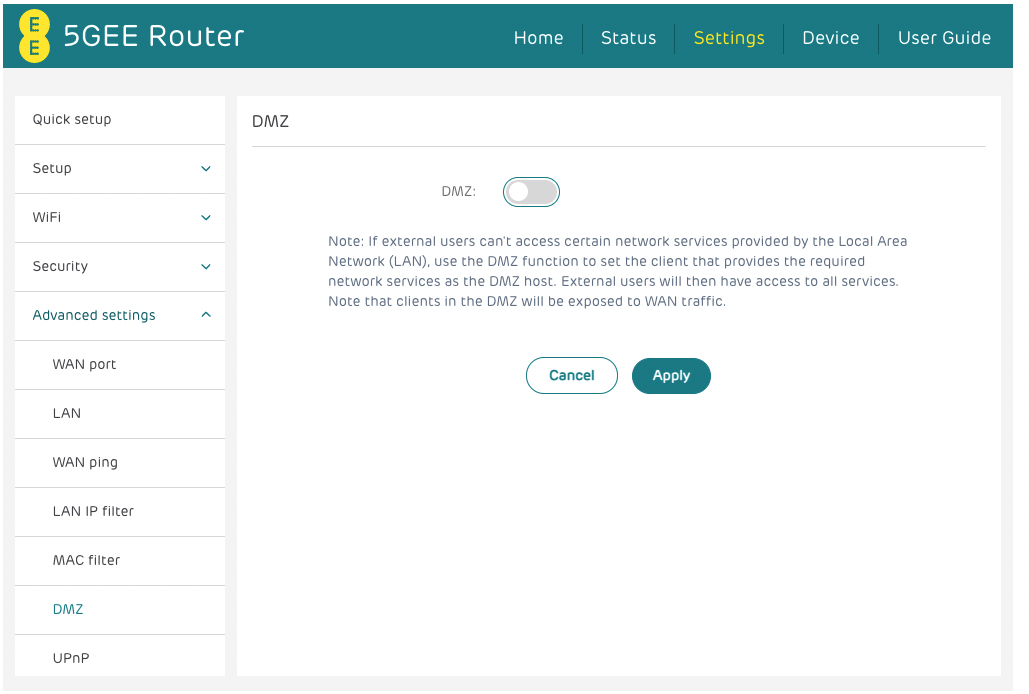
To use the DMZ method, the ee box must have DHCP on and give an IP address to the Orbi. This will appear in a device table on the ee box (somewhere in the menu). It would be a good idea to assign the IP address so that every time it boots up it will get exactly the same one.
When you activate the DMZ option, it will ask for that IP address. (no point in asking until the option is selected).
Good Luck
Inkytog
Dec 30, 2021Aspirant
Thank you -
So.. essentially AP mode is pain free. Other method could give issues?
If I did the DMZ method would there be a chance the IP address could change and therefore need updating at points?
Other than the orbi router features - is that what I'd be missing out on by just using the AP mode? I can probably live with that - I know I can disable my current Wifi and use Orbi - but would I have a guest wifi too if it's only AP mode? I assume it doesn't affect the Mesh coverage part of this?
To avoid double NAT - would disabling NAT stop this?
I can't see where to assign an IP address though. I see IP filtering etc but nowhere to assign it. I think EE have crippled this box!
- CrimpOnDec 30, 2021Guru - Experienced User
AP mode removes all 'router functions', which are a bunch:
https://kb.netgear.com/000061277/Disabled-Features-on-the-Orbi-when-set-to-AP-Mode
If the ee box does not seem to have a method of assigning or reserving IP's for specific devices, you could use the option on the Orbi internet page to "Use a Static IP Address" and put in the value that the ee already gave the Orbi.
Orbi will continue to offer both the primary and Guest WiFi networks, but they will not be 'separated' from each other in AP mode.
(Some users want to quarantine their guests. Others just want to give their guests an easy password to enter to get WiFi.)
- InkytogDec 30, 2021Aspirant
Thanks so much - I think I get it.
Ideally I'd want to be using the Orbi for as much as possible but it's sounding like a bit of a work around to get it to do so.
If i go down the DMZ route .. Will any of these settings help or hinder this? I'm looking at the Double NAT situation!- CrimpOnDec 30, 2021Guru - Experienced User
When the Orbi is in the DMZ and in router mode, it will be the only device connected to the ee router. All other devices will connect to the Orbi and get their IP addresses from the Orbi DHCP.
Just personally, I would reset the ee DHCP parameters to be:
Gateway 192.168.0.1
DHCP Range 192.168.0.2 to 192.168.0.253
If the Orbi gets an IP address of 192.168.1.x on its WAN port, it will switch its own DHCP server to hand out IP's in the 10.0.0.1 subnet.
There is nothing 'wrong' with this, but it will tend to confuse people when you report the 10 addresses (if you ever have occasion to).
Please report what happens.
