NETGEAR is aware of a growing number of phone and online scams. To learn how to stay safe click here.
Forum Discussion

WaldS
Feb 20, 2021Initiate
Orbi WiFi SSID now always on?
Hello and thank you for reading this.
I have recently updated my Orbi RBR20 router to the latest firmware version (2.6.2.104). I noted that now the main WiFi network SSID can no longer be hidden. Such option does not exist! I used to have it checked off. Only my Guest WiFi was adertised. Netgear did not include such change in their release notes... so? A bug?
Any replies will be appreciated.
WaldS
28 Replies
- NikitaAspirant
Hello! Same here. Orbi RBR20 router, latest firmware version (2.6.2.104). Problems have apeared after upgrading to the provided latest firmware version.
Moreover I'm unable to fully disable Guest Wi-Fi. Somehow it is always enabled and hidden for about 5 to 10 minutes after rebooting. When I reboot the router, Guest Wi-Fi appears to be on, even if I disable it before rebooting. However Guest Wi-Fi disappears after 5 or more minutes. Screenshots attached.
Any support?
- NikitaAspirant
- WaldSInitiate
Thanks to those that replied. Much appreciated. To clarify: hiding the main WiFi in my case was merely a cosmetic issue... I accept the security clarifications but they do not apply here. I just wanted to have one WiFi advertised to my visitors. Other devices at home did not need to see the main network SSID because they were always connected. So my question is more of a disappointment with Netgear that removed that option arbitrarily,
without informing users why. I hope they read this forum and can restore this functionality in the next revision.
 Blanca_ONETGEAR Employee Retired
- CrimpOnGuru - Experienced User
WaldS wrote:I have recently updated my Orbi RBR20 router to the latest firmware version (2.6.2.104). I noted that now the main WiFi network SSID can no longer be hidden. Such option does not exist! I used to have it checked off. Only my Guest WiFi was adertised. Netgear did not include such change in their release notes... so? A bug?
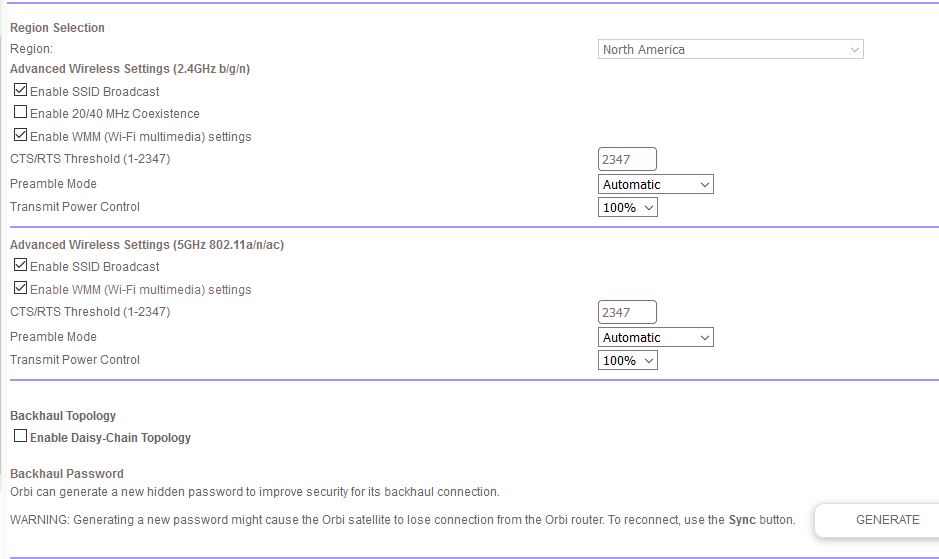
Amazing. My RBR50 is running the latest firmware, 2.7.2.104, and it still shows the check box for broadcast SSID on both 2.4G and 5G.
(see attached image). Who would have thought that Netgear would change an option such as this on some Orbi models and not on others?
- NikitaAspirant
And I also miss extended Wi-Fi settings, since this is all that's accessible right now, see screenshot. This is advanced tab, not basic. Soundn't there be anything more?
- FURRYe38Guru - Experienced User
Has a factory reset and setup from scratch been performed since last update?
If you unchecked Enable Guest Network and unchecked Enable SSID broadcast from the guest network menu, then no signal of the guest network will be broadcast or hidden.
Nikita wrote:And I also miss extended Wi-Fi settings, since this is all that's accessible right now, see screenshot. This is advanced tab, not basic. Soundn't there be anything more?