NETGEAR is aware of a growing number of phone and online scams. To learn how to stay safe click here.
Forum Discussion

bingoblake
Aug 10, 2018Aspirant
OrbiRBR50 adding a Orbi outside
I have a Orbi RBR50 and am adding an Orbi outdoor unit to the mix. Once I added it to the mix one of my slaves disappeared and I cant get the system to recognize anymore. I am trying to extend to my shop with is about 200 feet from house. I placed one slave in shop and one is in the house. The outdoor unit went inbetween house and shop to boost signal, but now the one in the shop is no longer recognized, but the the outside orbi is. Anyone know why the shop orbi slave is no longer recognized? I would now have 5 on the system total.
6 Replies
 StephenBGuru - Experienced User
The new unit is an RBS50Y? (I'm wondering because you put in EX2700 as the model number).
Does the shop satellite still show up in the Orbi's web ui (perhaps classified as "disconnected")? Or is it completely missing? If you turn off the RBS50Y are you still able to connect to the WiFi Network?
BTW, you do need to enable the daisy chain mode on the router if you want to relay the shop satellite's backhaul through the RBS50Y.
- bingoblakeAspirant
Thank you for replying! Please ignore the model number it was challenging to find the correct model number with the drop down menu.
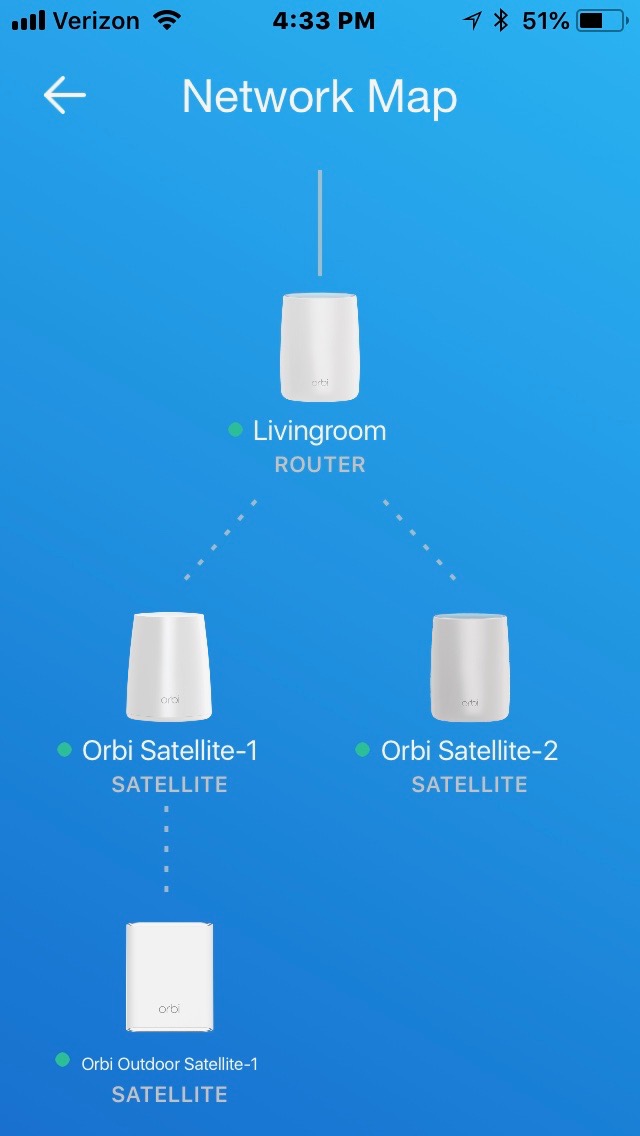
It is a RBR50 purchased with two RBS50 satellites and one RBS40 satellite added and an Orbi Outdoor satellite just added. When I look at the network map in the app I only see Router, Sat 1 (RBS40) connecting the Outdoor unit and a single Sat 2 (RBS50) the SAT 3(RBS50) which is in the shop is missing from the map?
How do I enable daisy chain mode?
- StephenBGuru - Experienced User
bingoblake wrote:
How do I enable daisy chain mode?
Use the browser interface. Choose the "Advanced" tab, then "Advanced Setup" and "Wireless Settings" There's a check box there for "Enable Daisy-Chain Topology"
bingoblake wrote:
When I look at the network map in the app I only see Router, Sat 1 (RBS40) connecting the Outdoor unit and a single Sat 2 (RBS50)
I believe that's an bug in the app (not always handling more than 2 satellites correctly). Try using the browser interface, and report back if you don't see the satellite there.
- bingoblakeAspirant