NETGEAR is aware of a growing number of phone and online scams. To learn how to stay safe click here.
Forum Discussion

zafkir
May 23, 2018Aspirant
Dropped packets on RBR40
I have tried taking all satelites offline, changing the settings to Disable MIMO, Daisy Chain and Fast Roaming and IPv6. I've also tried firmware versions 2.0.0.56 and 2.1.4.10
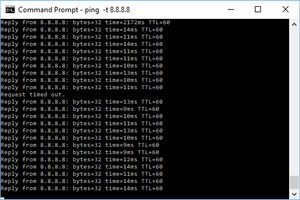
Packets are regular...
zafkir
May 23, 2018Aspirant
fair... here is one where i'm pinging my orbi router which should be the fastest (ping results are almost identical when i ping the verizon router). Several packets are in the 2900 range, which if i'm playing a game like overwatch is unacceptable. With my stock verizon router i wasn't getting any times over ~100ms which was working fine and i never had response times hitting that number. If this is to be expected with this system, then that's unacceptable for me, and i'll return it (not trying to be snarky, just honest)
zafkir
May 23, 2018Aspirant
Another post on this forum describes how to create different 2.4ghz and 5ghz SSIDs. When i do this, I get no packet loss or latency over 100ms when connected to either ssid. I'd rather not do this, as it eliminates some of the features and isn't officially supported. Does this help troubleshoot or illustrate my issues?
- budyMay 24, 2018Luminary
Aside from not being able to see the picture you posted in your previous comment, the behaviour you're describing could actually be caused by the bandsteering protocol of the Orbi. However, this would mean, that your client would have to switch its WiFi connection while pinging - have you checked that?
When I'm pinging Google's 8.8.8.8, I am getting a pretty good result:
64 bytes from 8.8.8.8: icmp_seq=77 ttl=59 time=11.413 ms
64 bytes from 8.8.8.8: icmp_seq=78 ttl=59 time=12.679 ms
64 bytes from 8.8.8.8: icmp_seq=79 ttl=59 time=11.883 ms
64 bytes from 8.8.8.8: icmp_seq=80 ttl=59 time=10.256 ms
^C
--- 8.8.8.8 ping statistics ---
81 packets transmitted, 81 packets received, 0.0% packet loss
round-trip min/avg/max/stddev = 9.784/11.959/15.560/1.050 ms
And this is over the WiFi of my RBR40. Ping times over LAN will be some ms less…
- zafkirMay 24, 2018Aspirant
I reverted to a single ssid, and I ran netsh wlan show interfaces for a few minutes, around the ping spikes and this is what i got everytime (with the signal strength changing slightly)
C:\Users\Dave>netsh wlan show interfaces

There is 1 interface on the system:

    Name                   : Wi-Fi
    Description            : Realtek RTL8811AU Wireless LAN 802.11ac USB 2.0 Network Adapter
    GUID                   : 96ac869a-c0be-47ba-91ac-3aa51bcc4ac6
    Physical address       : e8:4e:06:51:e4:32
    State                  : connected
    SSID                   : GoHokies
    BSSID                  : 8c:3b:ad:fb:26:b7
    Network type           : Infrastructure
    Radio type             : 802.11ac
    Authentication         : WPA2-Personal
    Cipher                 : CCMP
    Connection mode        : Profile
    Channel                : 48
    Receive rate (Mbps)    : 54
    Transmit rate (Mbps)   : 390
    Signal                 : 88%
    Profile                : GoHokies

    Hosted network status  : Not available
It appears that since teh channel is 54 every time... it's always on 5ghz. So it doesn't appear to be switching.
- st_shawMay 24, 2018Master
zafkir wrote:
I reverted to a single ssid, and I ran netsh wlan show interfaces for a few minutes, around the ping spikes and this is what i got everytime (with the signal strength changing slightly)
C:\Users\Dave>netsh wlan show interfaces

There is 1 interface on the system:

    Name                   : Wi-Fi
    Description            : Realtek RTL8811AU Wireless LAN 802.11ac USB 2.0 Network Adapter
    GUID                   : 96ac869a-c0be-47ba-91ac-3aa51bcc4ac6
    Physical address       : e8:4e:06:51:e4:32
    State                  : connected
    SSID                   : GoHokies
    BSSID                  : 8c:3b:ad:fb:26:b7
    Network type           : Infrastructure
    Radio type             : 802.11ac
    Authentication         : WPA2-Personal
    Cipher                 : CCMP
    Connection mode        : Profile
    Channel                : 48
    Receive rate (Mbps)    : 54
    Transmit rate (Mbps)   : 390
    Signal                 : 88%
    Profile                : GoHokies

    Hosted network status  : Not available
It appears that since teh channel is 54 every time... it's always on 5ghz. So it doesn't appear to be switching.
The channel shown above is 48, so I think that's what you meant. All satellites use the same channel, so you cannot tell if your computer was switching between satellites just by looking at the channel.
I think your printout shows your problem though. Your recevie rate is only 54 MBps. That's horrible for an 802.11ac adapter. You need maximum link rate for top performance. You must have a very poor signal where you are using your computer. That would explain the long ping times and dropped packets.
Move your computer to a location where you get a receive rate of 866 (or 450 or 300 or whatever the max you computer supports.) Then repeat the tests.
Looks like you have a USB WiFi adapter. You might need to get a better adapter, move your satellites, move your computer, or all three.