NETGEAR is aware of a growing number of phone and online scams. To learn how to stay safe click here.
Forum Discussion

SeaMonkey80
Jul 13, 2018Apprentice
My Ethernet Backhaul Setup
Sorry in advance for the long post.
I have been following this forum as an observer for quite a while now, and have noticed that many people are having issues with their Orbi setup, either when...
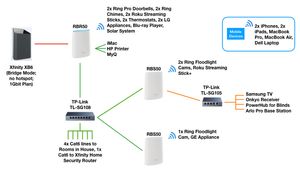

SeaMonkey80
Aug 15, 2018Apprentice
ed-m, when you power cycle the Orbi system, are you keeping the satellites plugged in via the ethernet cables to the RBR50? If so, then this is probably why it is not connecting properly to your wireless clients. Whenever you do the reset dance, you should unplug the ethernet cables linking the orbis together, and have it connect to the wireless backhaul first. Then, once the satellite is connected and synced with the RBR50, plug in the ethernet cable and it should switch over to wired backhaul.

ed-m
Aug 16, 2018Aspirant
SeaMonkey80 , thanks for the reply. I hadn't tried that, and that is possible for one of the satelites to establish a wifi backhaul first, but for the second one, the signal is just not strong enough for the wifi backhaul to connect. But I think your idea is good, and in fact yesterday I finally got the second satelite to work by deleting it, bringing it next to the RBR, and syncing the units over wifi, then I moved the satelite back and connected it with ethernet and all seems good for now .....
... but....
I shouldn't have to jump through hoops everytime there is a hiccup..... the firmware needs to improve..... and I'm not sure what happens for the rest of the family if i'm not around the next time there's a problem.
Thank you for jumping in and responding to my post yesterday ..... I appreciate the help :)
- FURRYe38Aug 16, 2018Guru - Experienced User
You guys might hope over to the new beta test thread and see about getting some new beta to try. Migtht be worth testing it out and see if this helps this...
ed-m wrote:
SeaMonkey80 , thanks for the reply. I hadn't tried that, and that is possible for one of the satelites to establish a wifi backhaul first, but for the second one, the signal is just not strong enough for the wifi backhaul to connect. But I think your idea is good, and in fact yesterday I finally got the second satelite to work by deleting it, bringing it next to the RBR, and syncing the units over wifi, then I moved the satelite back and connected it with ethernet and all seems good for now .....
... but....
I shouldn't have to jump through hoops everytime there is a hiccup..... the firmware needs to improve..... and I'm not sure what happens for the rest of the family if i'm not around the next time there's a problem.
Thank you for jumping in and responding to my post yesterday ..... I appreciate the help :)
- SeaMonkey80Aug 16, 2018Apprentice
ed-m wrote:
SeaMonkey80 , thanks for the reply. I hadn't tried that, and that is possible for one of the satelites to establish a wifi backhaul first, but for the second one, the signal is just not strong enough for the wifi backhaul to connect. But I think your idea is good, and in fact yesterday I finally got the second satelite to work by deleting it, bringing it next to the RBR, and syncing the units over wifi, then I moved the satelite back and connected it with ethernet and all seems good for now .....
... but....
I shouldn't have to jump through hoops everytime there is a hiccup..... the firmware needs to improve..... and I'm not sure what happens for the rest of the family if i'm not around the next time there's a problem.
Thank you for jumping in and responding to my post yesterday ..... I appreciate the help :)
Agreed. Netgear should try to solve this issue, if they have not already. There is a beta firmware that I have signed up to test that may have fixed this problem, but I haven't yet installed it on my system - waiting for the weekend.
Logically, given the procedure we have to go through in order to connect the wired backhaul, it would seem that a simple fix would be to somehow delay the activation of the ethernet ports on the satellites until the wifi backhaul has synced and configured after the system boots. This way, if the power goes out, then the system could come back online, connect to the wifi backhaul, then automatically connect to the wired backhaul after the set delay. No need to do the silly run around the house unplugging and plugging in cables. Just my thought for a possible fix...
- FURRYe38Sep 27, 2018Guru - Experienced User
Let us know if this might be fixed in the beta...
SeaMonkey80 wrote:
ed-m wrote:
SeaMonkey80 , thanks for the reply. I hadn't tried that, and that is possible for one of the satelites to establish a wifi backhaul first, but for the second one, the signal is just not strong enough for the wifi backhaul to connect. But I think your idea is good, and in fact yesterday I finally got the second satelite to work by deleting it, bringing it next to the RBR, and syncing the units over wifi, then I moved the satelite back and connected it with ethernet and all seems good for now .....
... but....
I shouldn't have to jump through hoops everytime there is a hiccup..... the firmware needs to improve..... and I'm not sure what happens for the rest of the family if i'm not around the next time there's a problem.
Thank you for jumping in and responding to my post yesterday ..... I appreciate the help :)
Agreed. Netgear should try to solve this issue, if they have not already. There is a beta firmware that I have signed up to test that may have fixed this problem, but I haven't yet installed it on my system - waiting for the weekend.
Logically, given the procedure we have to go through in order to connect the wired backhaul, it would seem that a simple fix would be to somehow delay the activation of the ethernet ports on the satellites until the wifi backhaul has synced and configured after the system boots. This way, if the power goes out, then the system could come back online, connect to the wifi backhaul, then automatically connect to the wired backhaul after the set delay. No need to do the silly run around the house unplugging and plugging in cables. Just my thought for a possible fix...
- SeaMonkey80Sep 27, 2018Apprentice
For my setup, this new Beta 2.2.1.204 has fixed the backhaul issue. It now recovers after power outage, and the network is stable. Speeds are much better across the board, and I haven't had any random reboots or disconnects. So far, so good.
- RocketSquirrelOct 02, 2018Luminary
SeaMonkey80 wrote:
Logically, given the procedure we have to go through in order to connect the wired backhaul, it would seem that a simple fix would be to somehow delay the activation of the ethernet ports on the satellites until the wifi backhaul has synced and configured after the system boots. This way, if the power goes out, then the system could come back online, connect to the wifi backhaul, then automatically connect to the wired backhaul after the set delay. No need to do the silly run around the house unplugging and plugging in cables. Just my thought for a possible fix...
I agree about the running around the house. But I think your suggestion is backwards. At boot time, the Orbi's should look for wired backhaul first. Failing that, they should revert to wireless.
The reason is that some of us are using wired stations which are too distant to sync and connect wirelessly. That will always fail.
Better yet, add GUI controls to allow the user to specify wired or wireless for each satellite. I haven't seen the current 2.2 beta, but I hope some such improvement is in there.
- SeaMonkey80Oct 02, 2018Apprentice
The newest beta, v. 2.2.1.204, is running really well on my setup. There is no issue with the ethernet backhaul with my sats or main orbi. If there is a power loss, then everything reconnects perfectly - no system hangs or disconnects at all. For now, this is looking like a really good update. RocketSquirrel, you should give it a try.

