NETGEAR is aware of a growing number of phone and online scams. To learn how to stay safe click here.
Forum Discussion

SeaMonkey80
Jul 13, 2018Apprentice
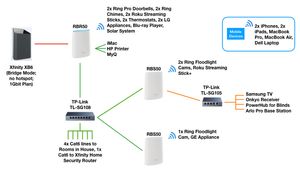
My Ethernet Backhaul Setup
Sorry in advance for the long post.
I have been following this forum as an observer for quite a while now, and have noticed that many people are having issues with their Orbi setup, either when...

LEDMAN888
Dec 05, 2018Aspirant
SeaMonkey80 - that was super helpful.
I really appreciate your input.
I disabled the daisy-chain, MIMO, and 2.4Ghz settings.
And I did login directly to the satellites to see what which devices were connected to the satelite..
Everything seems to be working fine now.
Thanks for your help.
One other question. I have 3 Denon Wireless Amps sitting in a closet on the second floor.
I have my Obi router sitting on the first floor, one satellite on the second floor, and one satellite on the third floor. Is it normal for the Amps to be connecting randomly between the router on the first floor and the satellite on the second floor?
Truly thankful...

SeaMonkey80
Dec 05, 2018Apprentice
Thanks for your help.
One other question. I have 3 Denon Wireless Amps sitting in a closet on the second floor.
I have my Obi router sitting on the first floor, one satellite on the second floor, and one satellite on the third floor. Is it normal for the Amps to be connecting randomly between the router on the first floor and the satellite on the second floor?
Truly thankful...
Glad everything is working!
For your 3 Denon Wireless Amps, my guess would be that they are just close enough to form a stable connection to either the satellite or the router. Do you have Fast Roaming enabled? Try disabling it as this could be making them "jump" between the units. You could also try moving your second floor satellite (or first floor router) further away, or relocating the Amps closer to one of the units. Are you seeing any issues with them jumping between the units? Meaning, are there any issues with speed or connectivity to the network?
- LEDMAN888Dec 06, 2018Aspirant
To be fair, i haven't experienced any problems with the music amps switching between router and satellite.
I guess I shouldn't complain since everything is working fine.
By logging directly into the satellites, i can tell which devices are connected to each satellite.
So i guess, by default, all the other devices are connected to the router.
It would be nice if they could somehow make that distinction when you log into the router.
Oh well.
By the way, do you work for Netgear?
You were 1,000X more helpful than the customer support person i got.
Thanks a million!