NETGEAR is aware of a growing number of phone and online scams. To learn how to stay safe click here.
Forum Discussion

SW_
Apr 18, 2019Prodigy
New Orbi RBR50/RBS50 Firmware Version 2.3.1.48
Netgear just pushes out another firmware version, 2.3.1.48.
Please share your experience!


SW_
Apr 19, 2019Prodigy

ReallyAnnoyedAF
Apr 19, 2019Star
The filesize is 30% larger than the previous release but just about the same size as the release before that. Their build system is **bleep**ed up.
- jweiseApr 19, 2019Apprentice
I updated to 48 a few minutes ago. It went smoothly and do not see any obvious changes.
Have my system running in AP mode due to problems with 44. Time will tell!
- rammer91Apr 19, 2019Tutor
My router upgraded to .48, but I need to manually update my satellite to .48, however I can't find the .48 for download. Only .44. Very frustrating. Why wouldn't they make it available immediately to download? Now I have my router and satellite running on two different firmwares.
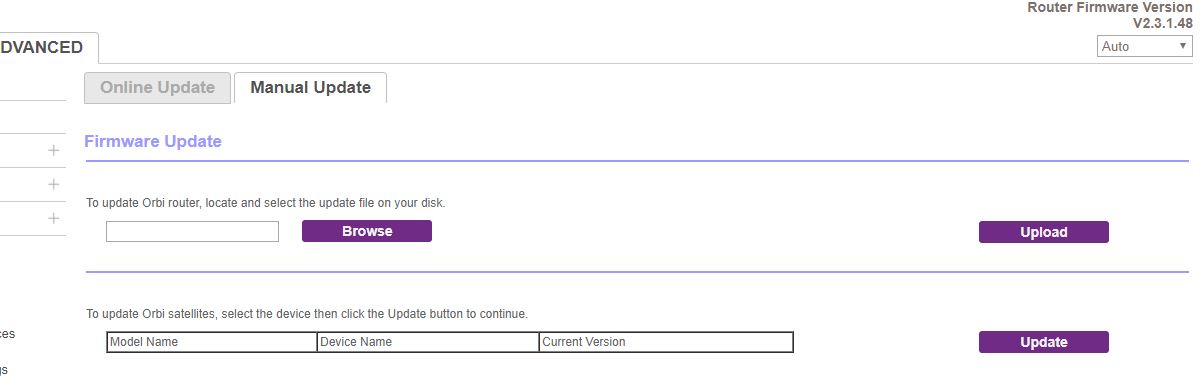
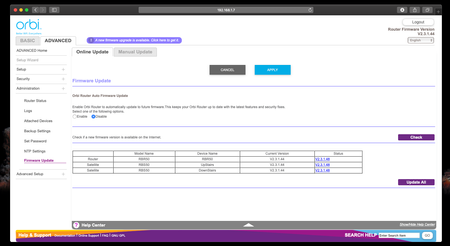
 LoboTommyApr 20, 2019LuminaryLog in to your router via desktop, advanced settings, administer, firmware. There you can push the update manually to your as satelite
- DabbitApr 20, 2019Aspirant
Thank you. Although my 2 satellites are listed in the ADVANCED / ONLINE UPDATE tab, The two satellites show as 'waiting for connection'. On the manual tab, therefore, they are not available to select to update manually. I have my router set in AP mode, if that matters.
- LoboTommyApr 20, 2019Luminary
sound a lot like the issues that goes around with the orbi RBR20 and RBS20 series. The RBS20 disconnects all the time. Did a factory reset on all satelites and routers, set up the netwoek from scratch, then had to cableconnect the pc to the router - logged in, and hit the "update" button the instance the satelite connected. Was a nightmare.
I rolled back to the v2.3.1.44 firmware on all routers. But it is still unstable. The satelites disconnects, reconnects, disconnects etc over and over and over.
- rammer91Apr 20, 2019TutorTo update the satellite manually to .48 I need the file. Where can I get the .48 file so I can manually update the satellite?
- LoboTommyApr 20, 2019Luminary
at the moment, noone has produced the file. It only shows up in the menu for firmaware update. you push the automatic update manually (mark the router you want to upgrade, an klick "update now")
- Dfran1Apr 20, 2019Apprentice
updated to .48 and now any device on the satelite is 1/4 the rated speed, I just tried a total reset of the satelite and a telnet
1. config default
2. config commit
3. reboot
same sloow speed so I will try a total factory default as soon as I can, unless someone peosts something else to try.
any device thats connects wifi to the main works great, but the satelite wifi 5G at least sucks big time
thanks
- rammer91Apr 20, 2019Tutor
That's my beef. They've pushed an upgrade, but haven't released a file. I was able to upgrade my router to .48, but for any number of unknown reasons my satellite doesn't show that it's available to push, it says "waiting to connect" yet I know it's connected. So that's why I have to update it manually, which I can't do without the file. At this point I'm spending more time on the chat boards and power cycling my network setup and tweaking setting to try to get it to work than I am enjoying it. Probably going to go in the scrap heap. Terrible that it's so difficult to configure, and based on the comments here I'm not the only one. I'm not a pro, but I'm fairly adept at network engineering and I just can't figure it out.
- psmedleyApr 20, 2019Tutor
I'm seeing the prompt when I login to update, however, only the router is listing the new firmware, the satellite is saying 'Update Failed'.
The 'Update All' button is greyed out (presumably as the satellite isn't picking up the new version.
Any ideas? Other than waiting for the manual file?
 tagteamApr 20, 2019Virtuoso
I guess wait for the manual file. I just noticed that it is NOT available for download, which is pretty poor form for Netgear.
Releasing a firmware update that is only available via the GUI? Not good!
- psmedleyApr 20, 2019Tutor
Looks like updating the router using the app has worked, wonder if that will update the satellite too?
Edit:nope, router is now on the .48 firmware, satellite still on .44
- csm2000Apr 20, 2019Tutor
Where can you go to get v2.3.1.48 and to the update manually? Nothing happens when I click on the purple Firmware update link. This is really rediculous. WTH is wrong with Netgear?
- rammer91Apr 20, 2019Tutor
Nowhere. You can't (yet). I had previous posts about it and everybody keeps telling me how to do it through the web interface, which I can't for various reasons. Tired of Netgear wasting my time.
- csm2000Apr 20, 2019Tutor
Great job NetGear! Thanks for not making the Firmware file available. Pure BS!!
- LoboTommyApr 20, 2019LuminaryLike i said, under firmware menu, manual update you can choose the satelite and push the file through, even if it's not downloaded. Pick the satelites one by one. Of you don't succeed, u can always borrow my sledgehammer...
- jweiseApr 20, 2019ApprenticeUsed update all and it worked fine.
- Damit1Apr 20, 2019ApprenticeLOL.
Upgraded to latest ver, WIFI speeds dropped by 100Mbps.
Downgraded to .44 ver, WIFI speeds back to nornal. - lw187Apr 22, 2019GuideHow do you roll back?
- FM2019Apr 22, 2019Aspirant
Did you found a fix for the RBR20 disconnection after updating firmware to .48?
I have the same anoying problem. I had no issues with firmware .44. Now this Orbi is useless. Will a new firmware be rolled out to fix this?
- LoboTommyApr 22, 2019LuminaryHere's the fix...