NETGEAR is aware of a growing number of phone and online scams. To learn how to stay safe click here.
Forum Discussion

wziemer
Oct 29, 2016Star
V1.3.0.12 - Outstanding Issues
Model: Netgear Orbi RBK50 (Orbi Base + Satallite)
Firmware: V1.3.0.12
OS: Not relevelnt, but Wndows 10 Pro x64 anyway
Browsers: Any, Primary Browser is Chrome though.
I have seen several people mention issues with the Netgear Orbi router on the netgear forums lately. I also have seen several people mention some fixes/workarounds. I just thought it would make sense to try to document the ones i'm able to confirm and am experiancing in a single post.
- Issue: Wifi randomly dropping Nest Wifi cameras. Specifically NestCam (5ghz) and Dropcam HD (2.4ghz). Both cameras drop at similar times and it happens multiple times per day.
- Workaround: Go to the "Advanced" tab -> Advanced Setup -> Wireless Settings and uncheck "Enable Implicit BEAMFORMING - Boosts WiFi speed, reliability, & range for all mobile devices"
- With this setting left enabled, the cameras will work just fine but several times per day they will drop for 10-15 minutes, typically 5-6 times per day.
- Workaround: Go to the "Advanced" tab -> Advanced Setup -> Wireless Settings and uncheck "Enable Implicit BEAMFORMING - Boosts WiFi speed, reliability, & range for all mobile devices"
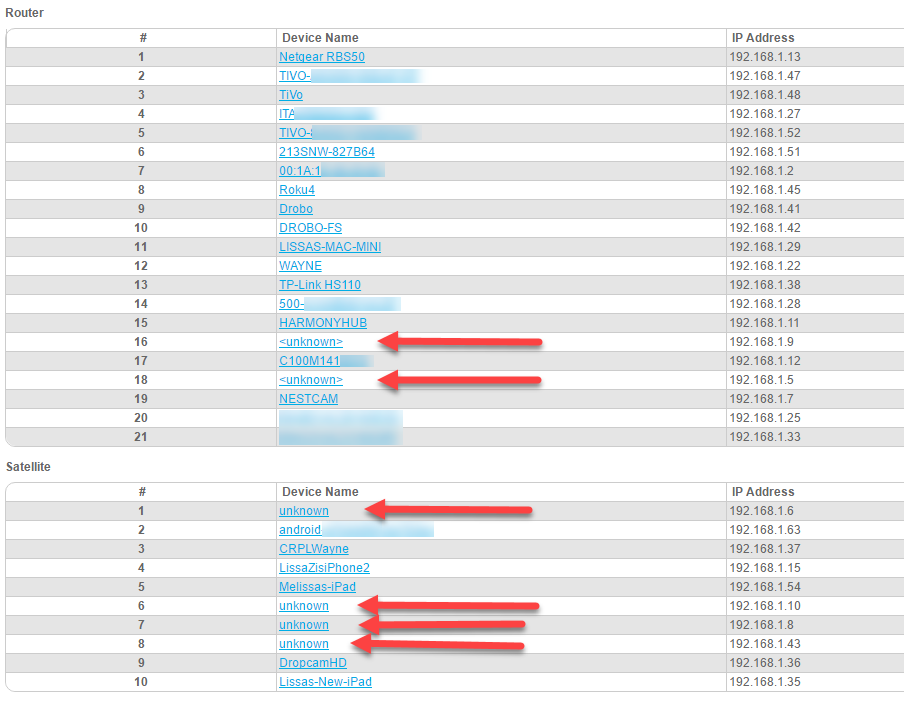
- Issue: Attached Devices has a bunch of unknown devices even though this was listed as an issue that was resolved in the latest firmware release.
- Example:
- Note: Above screenshot was taken after enabling adavnced device details view from debug section, but same thing is noticed when you view the default setting
- Example:
- Wifi connects but seems to not provide an internet connection at random. We noticed this mainly at night when we are winding down before bed and typically using iOS devices (ipad pro, iPhone 6S/7 Plus).
- I'm still troubleshooting this one but so far, i think its got something to do with the satallite. My next step is probably going to be trying to just unplug the satallite for a day or two and see if we still continue to see the same issue.
- We typically always notice this on facebook, the feed simply does not update and as soon as we toggle wifi off and refresh, like magic everything updates. Flip wifi back on and it may work, but eventually it stop working again and you either have to wait a bit and then it starts working or toggle wifi off for a bit and then reconnect again. Like i said, more troubleshooting needed here as i'm not entirely sure what causes this.
29 Replies
yup i concur with the unknown connection issue
however i dont have any devices that have issues but the nest issue is a known one
have no issues with connectivity but i also only run the orbi in ap mode at the current time and let me router ( asus rt-ac88u ) do all the heavy lifting
pete
 Fivef555AspirantMy wife is having the same issue with the IPhone losing the connection and apps not refreshing. We haven't found a work around. If Netgear ever enables the ability to choose whether a device connects to the router or satellite I suspect that I may solve this issue.
- rhester72Virtuoso
Not sure what to say, honestly - our family has four iPhone roaming around the house without issue.
What model iPhone is having trouble?
Rodney
- Fivef555AspirantMy IPhone 6 is working fine. My wife's iPhone 7 hasn't consistently been refreshing apps such as facebook since moving from the Nighthawk X8 to the Orbi system. I also noticed her phone seems to stay connected to the satellite when mine is connected to the router even though we are sitting in the same room next to each other.
My wife's iPhone is a 7 Plus and mine is a 6S Plus and we both see the issue. Typically its when we are upstairs (the satallite is upstairs and the base unit is downstaris) that we notice it, thought sometimes we notice it in my living room but thats a pretty equal distance between both the base and the satallite so what i need to pay more attention to is which device its connected to when this issue occurs to see if i can find a pattern.
I may just unplug the satallite tonight and see how the rest of this week goes.
- rhester72Virtuoso
I haven't seen any issues at all with the 3 iPhone 6 Pluses we have. There is also an iPhone 7 here, but it's my mother-in-laws and honestly if it were having any issues with wifi I sincerely doubt she'd notice. I'll do a bit of testing with her device to see if I observe any problems.
Rodney
- Fivef555AspirantMine is in router mode. My wife was telling me she also has the issue when using safari sometimes. She gets a message stating she isn't connected to the internet.
- Fivef555AspirantI no longer have my own router to give it a try. To be honest although the phone worked fine on the X8, I am not convinced that this isn't an IOS 10 issue as well. I work for a large electronics retailer and a log of people are having issues with connectivity after the update and it seems that it's random as far the phones it effects.
- rhester72Virtuoso
Fivef555 wrote:
I no longer have my own router to give it a try. To be honest although the phone worked fine on the X8, I am not convinced that this isn't an IOS 10 issue as well. I work for a large electronics retailer and a log of people are having issues with connectivity after the update and it seems that it's random as far the phones it effects.Useful data point! None of our iPhones have been upgraded to 10 (deliberately).
Rodney
- bijugmAspirant
See the same issue with the kids 2 iphone 6 and sometimes with mine. Is the resolved in V1.3.0.26? I am at this version now.
- Fivef555AspirantMy household is still having the same issues. I've also noticed devices having to be reconnected to the network lately. Mainly the fire Tv's are having intermittent connection issues when streaming through PlayStation Vue but forgetting my network and reconnecting seems to fix the issue. The same just happened with a MacBook tonight. Both devices show full wifi signal but act as if there is no internet connection until I reconnect. At this point my suspicions around iOS 10 being the culprit seemed to be unfounded based on the issues with other devices. Conversely the one device I watch PlayStation Vue on that's hard wired Snr having any of the issues.
- Fivef555Aspirant*isnt
general question regarding this passphrase thing
are ppl using an ssid that they have used before on other routers or are you using a new and unused ssid for the orbi system ?
- Hydro130Luminary
peteytesting wrote:general question regarding this passphrase thing
are ppl using an ssid that they have used before on other routers or are you using a new and unused ssid for the orbi system ?
I came from an Asus 5300, and I kept that primary SSID/password when I switched to Orbi. I have a couple of iPhones (SE and 6S) and an older Macbook Air, plus a variety of HA tools (Honeywell RedLink, SmartThings hub, Hue hub, Harmony hub, Google Home x5) - all have worked very smoothly on Orbi and the "old" SSID.
The only consistent glitch I have with the Orbi is whenever I need to reboot it (firmware update, etc)... It always takes a few reboot cycles to finally "catch" and fully connect to the interwebs. I've had this issue with both v12 and v26 of the firmware. But if that's the worst thing I have to live with for this router, I'll very happily do it!! :)
Cheers, Chris
- Fivef555AspirantI created a new one when I replaced my X8.

