NETGEAR is aware of a growing number of phone and online scams. To learn how to stay safe click here.
Forum Discussion

lwells
Dec 30, 2017Aspirant
LB2120 not booting / unknown LED pattern
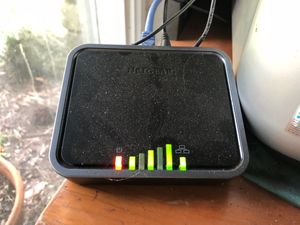
Hi I have an issue with an LB2120 LTE modem (LB2120-100AUS - H/W 1.0(0701)). Once switched on, the power LED comes on for a moment or two, and then the modem displays the following LED sequen...
JasonN
Apr 18, 2018NETGEAR Employee Retired
Hi Stephen12345 & Bowlo,
Will your LB2120 boot up or is it just the LED light that are in a weird pattern? Is your device up-to-date with the most current firmware? Have you done a factory reset?
Have you tried another power supply because the power LED is amber?
Please let me know. :]
- Jason N
Bowlo
Apr 20, 2018Aspirant
LB2120-100AUS
H/W: 1.0(0701)
The device recently automatically updated but I didn't note the update or previously installed versions.
The amber power LED comes on at startup and stays on.
The green LEDs 1, 3 & 5 come on about 15 seconds after startup and stay on.
The network LED flashes briefly about 20secs after startup but then extinguishes.
The network LED flashes with activity when a computer is connected to the WAN but the computer doesn't see the LB2120 and doesn't connect.
There's no way to do an online factory reset as the computer won't connect in either port.
Pressing the factory reset button has no effect. I've tried momentary holding, holding for various periods and holding while starting up all having no effect.
I've tried another power supply with no difference in behaviour.
I've also removed and re-inserted the SIM card with no change.
The device was quite impressive in operation before it failed.
Thanks Jason.
I hope this is helpful for you.