NETGEAR is aware of a growing number of phone and online scams. To learn how to stay safe click here.
Forum Discussion

Moto69xer
Nov 24, 2022Aspirant
M6 Pro (MR6500) Dual band Issue
I recently purchased a 5G WiFi 6E Mobile Router (MR6500) with a Firstnet plan from AT&T and have a problem I haven't been able to solve. The 2.4, 5 and 6GHz modes work fine by themselves. The problem...
Moto69xer
Nov 26, 2022Aspirant
Not sure I'm following your statement that:
"In the dual band modes, only one SSID can be configured and on the air for the "Dual-Band (2.4 GHz & 5 GHz) Wifi 6" resp. "Dual-Band (2.4 GHz & 6 GHz) Wifi 6E. Only one network name is shown for the dual-band modes. This is not specific to this MR6500 btw."
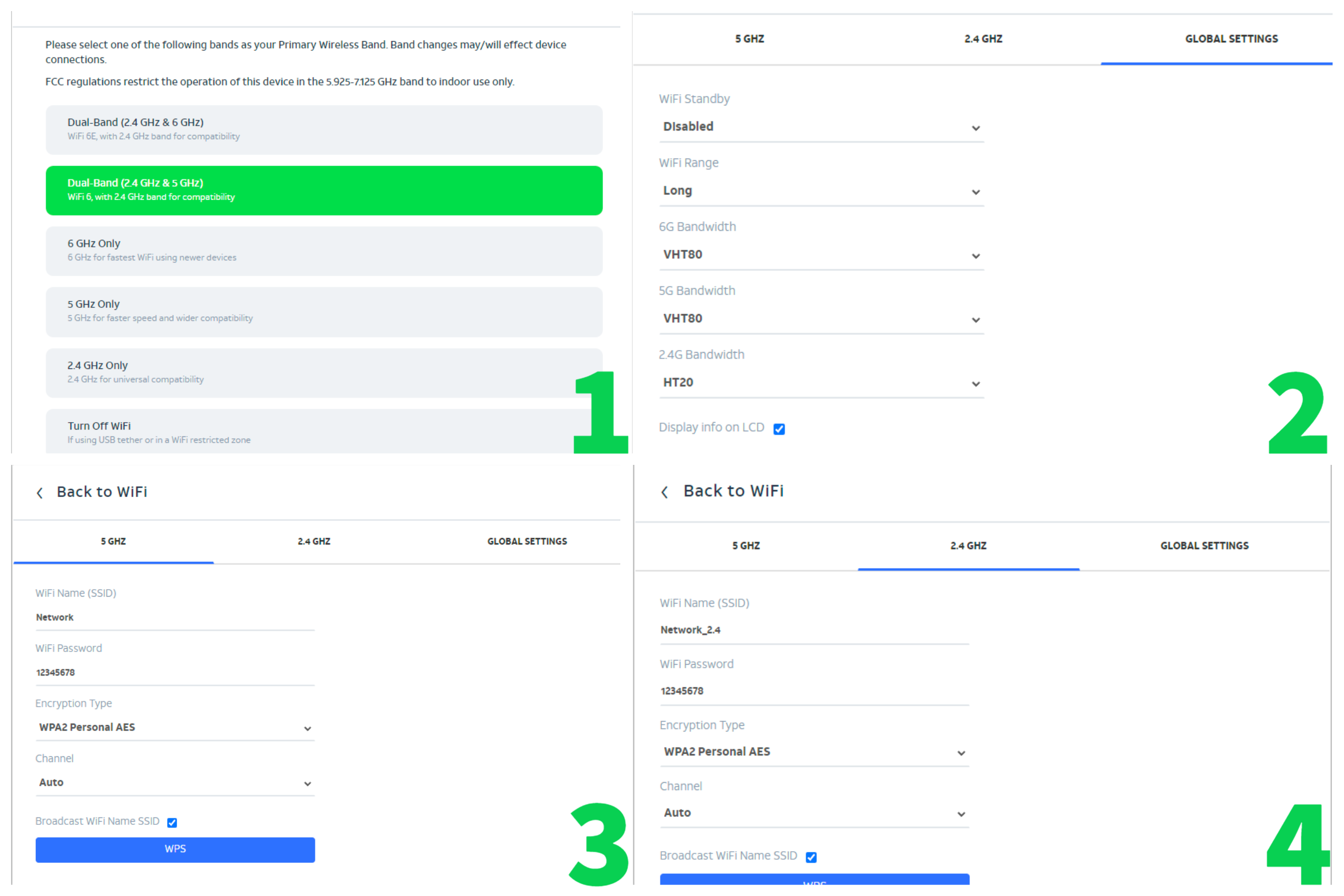
I've attached a picture containing the menus I am seeing while setting up dual band mode (Using example SSIDs). Hopefully it will be helpful. I am definitely able to create two different SSIDs associated to each band while in dual band Wifi 6 mode and have each one set to broadcast its SSID in the menus (as seen in part 3 and 4 of my picture). My problem is that the 5GHz band which should show up as the SSID "Network" on my device, does not. Not even in the wifi analyzer app. I am only able to see the SSID "Network_2.4" in the wifi analyzers' 2.4GHz network tab which is correct. The 5GHz tab shows no network bands or SSIDs being detected at all like the router is not broadcasting as it says it is. Which is weird because 5GHz mode by itself works and broadcasts as it should. I believe the unit may have a hardware problem at this point as I have used other routers that have had no problem broadcasting 2 different SSIDs for the two bands selected. As for setting both SSIDs to be the same. I am aware that I can set them both to be on the same SSID but I need them to be two seperate ones for my application. Hope this clarifies things a little more. I appreciate your help so far.
JohnPeng
Nov 26, 2022NETGEAR Expert
Moto69xer wrote:
Not sure I'm following your statement that:
"In the dual band modes, only one SSID can be configured and on the air for the "Dual-Band (2.4 GHz & 5 GHz) Wifi 6" resp. "Dual-Band (2.4 GHz & 6 GHz) Wifi 6E. Only one network name is shown for the dual-band modes. This is not specific to this MR6500 btw."
I've attached a picture containing the menus I am seeing while setting up dual band mode (Using example SSIDs). Hopefully it will be helpful. I am definitely able to create two different SSIDs associated to each band while in dual band Wifi 6 mode and have each one set to broadcast its SSID in the menus (as seen in part 3 and 4 of my picture). My problem is that the 5GHz band which should show up as the SSID "Network" on my device, does not. Not even in the wifi analyzer app. I am only able to see the SSID "Network_2.4" in the wifi analyzers' 2.4GHz network tab which is correct. The 5GHz tab shows no network bands or SSIDs being detected at all like the router is not broadcasting as it says it is. Which is weird because 5GHz mode by itself works and broadcasts as it should. I believe the unit may have a hardware problem at this point as I have used other routers that have had no problem broadcasting 2 different SSIDs for the two bands selected. As for setting both SSIDs to be the same. I am aware that I can set them both to be on the same SSID but I need them to be two seperate ones for my application. Hope this clarifies things a little more. I appreciate your help so far.
As FCC required, WiFi 6E can't be enabled in mobile router. In order to use WiFi 6E, you have to set the device in fixed wireless setup by using the device without the battery inserted.
Thanks