NETGEAR is aware of a growing number of phone and online scams. To learn how to stay safe click here.
Forum Discussion

rleamon
Jun 25, 2018Initiate
Nighthawk MR1100 extreme data use, connection problems
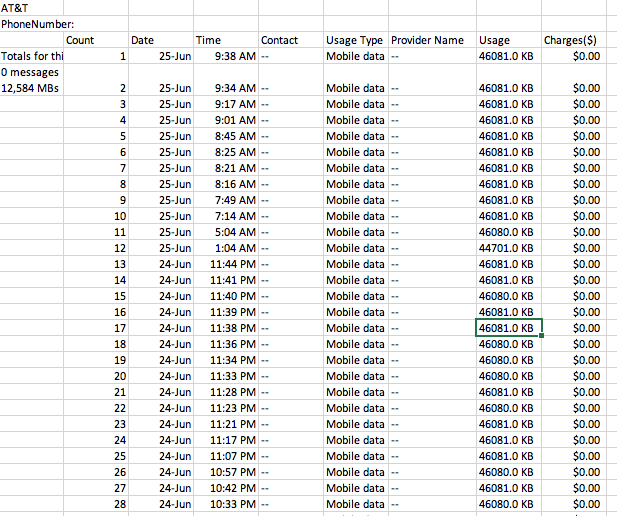
Howdy -- I'm using an MR1100 in a vacation home and have a weird problem. As shown on the attached data log screenshot, every few minutes almost exactly 46081.0 KB of data is logged on the account. I...
- Jun 27, 2018
That got it! Guess I just wasn't holding my mouth right or something. :0) Actually, as dumb as it sounds, I think my mistake may have been in not restarting the MR1100 with the Eero attached. I was restarting the Eero but not the modem. Thanks so much for your help - you have a great day. Hope you get your issue solved soon. Take care.
rleamon
Jun 27, 2018Initiate
I don't recall it being a big issue -- used the eero app and followed instructions. As I recall, you turn off the hotspot (hold the button until you see the battery symbol), plug an Ethernet cable from the eero into the hotstpot, turn on the hotspot (hold button again), then plug in the eero. There is a "do not let Ethernet go to sleep" command somewhere, perhaps only in the web admin page (vs the app), so be sure that's off. Let the "gateway" eero, which is the one connected by Ethernet to the hotspot, get up and running, then add others. As I recall, you have to have an active Internet connection for the eero setup to work. Good luck!
conceptumator
Jun 27, 2018Aspirant
That got it! Guess I just wasn't holding my mouth right or something. :0) Actually, as dumb as it sounds, I think my mistake may have been in not restarting the MR1100 with the Eero attached. I was restarting the Eero but not the modem. Thanks so much for your help - you have a great day. Hope you get your issue solved soon. Take care.