NETGEAR is aware of a growing number of phone and online scams. To learn how to stay safe click here.
Forum Discussion

_Y_
Mar 22, 2018Aspirant
UPNP FOR NIGHT HAWK M1 MR1100
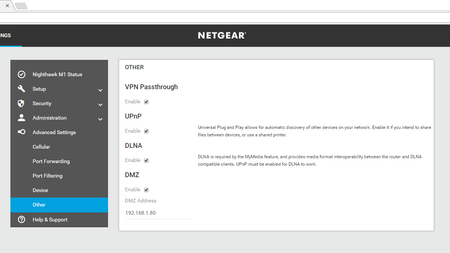
HELLO i have problem with upnp its not open to host a game the game arma3 i open the unpn in the router and port forward i noticed upnp only open in very old router or dsl viber router not th...
- Mar 29, 2018
Hi _Y_,
Thank you for the reply.
Can you try reseating the sim card and doing a factory reset on your M1. Next, let it boot all the way up and then search for update.
Please let me know if this works for you. :]
- Jason N
JasonN
Mar 28, 2018NETGEAR Employee Retired
Hi _Y_,
Please refer to the link below for your options. You are experiencing double NAT.
Use Port Forwarding
You have to set up port forwarding on both routers. On the M1, forward the port to the Nighthawk's WAN IP address. On the Nighthawk, forward the same port to the IP address of the device you want to access remotely.
Convert the Nighthawk to an Access Point
On the Nighthawk, go to ADVANCED > Advanced Setup > Wireless AP and enable AP Mode. This will disable the router, firewall and NAT functions on the Nighthawk. Your M1 will become the main router. This is the better option unless there is a specific security feature exclusive to the Nighthawk that you want to use.
Please let me know if this helps. :]
- Jason N
- _Y_Mar 29, 2018Aspirant
hello
thanks Jason
i use only m1 for connection
i buy it from ebay unlocked testra
can't update it i don't know why all i see searching
i dont see that
ADVANCED > Advanced Setup > Wireless AP
still search for upnp problem i have also 790s same problem with upnp can't host a game
if you know some one have mobile router and he host a game arma 3 let me know plz
- JasonNMar 29, 2018NETGEAR Employee Retired
Hi _Y_,
Thank you for the reply.
Can you try reseating the sim card and doing a factory reset on your M1. Next, let it boot all the way up and then search for update.
Please let me know if this works for you. :]
- Jason N
- _Y_Mar 30, 2018Aspirant
hello
sorry Jason
i give up it wont work now always reboot
i already did factory reset ones before and did it agine yesterday now reboot if i but the sim card and work normal without sim card it happened before i must wait 1 or 2 day to start m1 normal
i go back now to 790s
i will search for another mobile router alcatel or tp link
i thought it will be ez but it not
thanks for your time.