NETGEAR is aware of a growing number of phone and online scams. To learn how to stay safe click here.
Forum Discussion

maindriver
Jun 14, 2019Apprentice
M4300 stack vs non stack, VMware and iSCSI setup
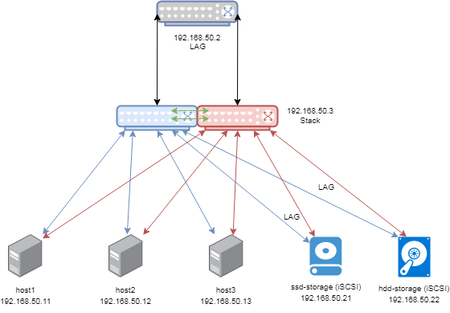
Hi, We have 3x HP servers, each with a 2x 10GB NIC. (VMware hosts) 2x Synology servers, one is SSD, one is HDD, each with 2x 10GB NIC. I'm not sure of the best way of setting this up. The ...
msi
Jun 17, 2019Luminary
Hi
You "sort of" can upgrade the firmware independently within a M4300 stack as LaurentMa discussed in this thread here: Reboot all stack members, then the standby master, and finally the old master. However I have come to realize that during such an update you will have a temporary firmware code mismatch until you have rebooted the stack master AND all the ports of the rebooted stack member remain down until you reboot the stack master. When the old master reboots, a new stack master quickly gets elected and the ports of the new stack master and the other (rebooted) stack members ever so quickly change to UP status. (During a code mismatch I could not initiate a failover of the stack master to a backup standby switch.)
I have to say that I was also surprised to learn that many other stackable switches from other vendors don't support staged updates of stack members but only certain product lines that are usually in an even higher price segment or focus on datacenter switching.
TL;DR: Since you use iSCSI where I/O timeouts can lead to host or VM crashes I'd rather consider the second option. For the iSCSI part, consider making 2 VLANs and 2 Subnets where 1 subnet/VLAN is only on first switch and the other on the second switch. Then you can configure multipathing on the VMware side. With Linux and Windows you can often configure round-robin mode where both connections are used in active-active mode. However I suggest you read up on how to properly do this by reading both Synology and VMware manuals on that topic and figure out a way how to get this configured properly. I'd discourage combining LACP and Multipathing together.
Related Content
NETGEAR Academy

Boost your skills with the Netgear Academy - Get trained, certified and stay ahead with the latest Netgear technology!
Join Us!
