NETGEAR is aware of a growing number of phone and online scams. To learn how to stay safe click here.
Forum Discussion

KevinB15
Mar 29, 2017Aspirant
Fiber Connection
Have a GS752TXS w/ 4 10G fiber connections and a GS728TX-100NES w/ 2 10G fiber connections, both using AXM761 modules. On the GS752, port 49 is connected to a NAS, port 50 is connected to a server...
 Apr 04, 2017
Hi KevinB15,
It very helpfull about the provided information.
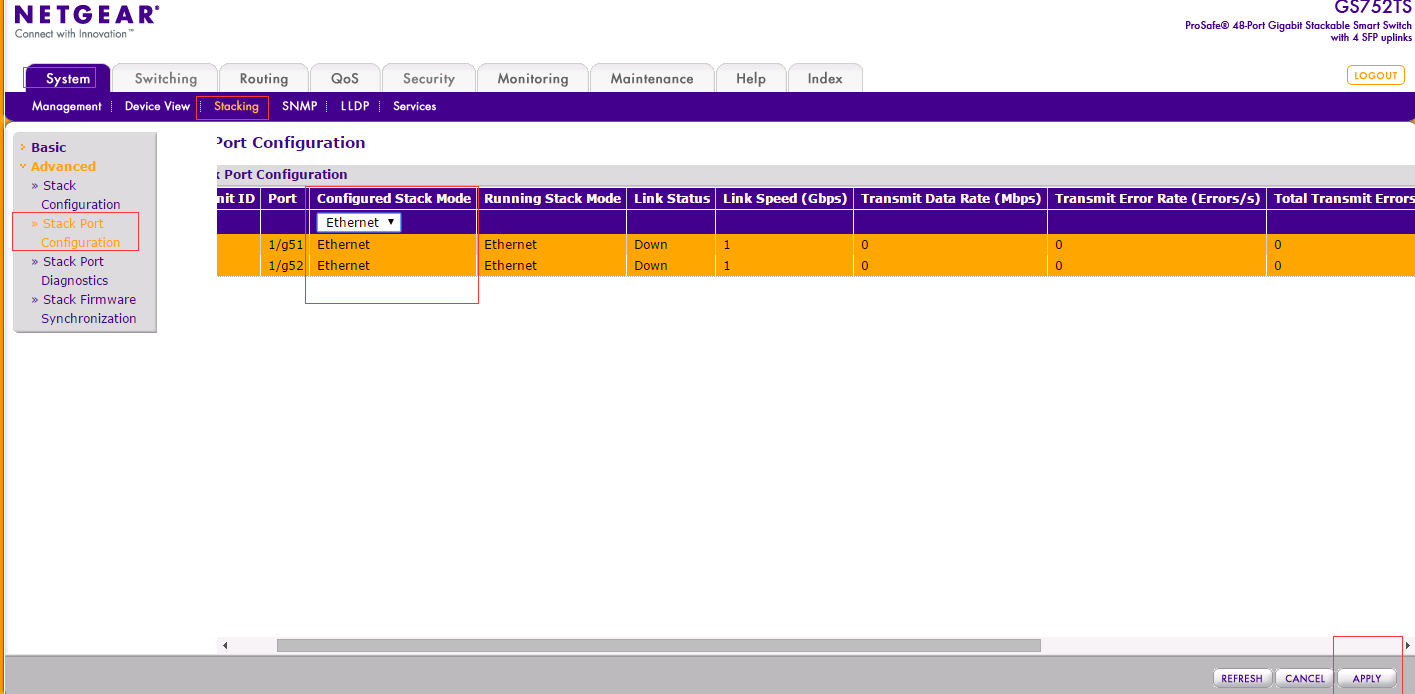
On GS752TXS Port 51,52 are stack ports. So they can't be used for ethernet connection.
We need to change port 51,52 from stack mode to ethernet mode with following steps.
1.Go to "System /Stacking/Stack Port Configuration"
2.Select port 51/52.
3.Change configured stack mode to Ethernet.
4.Click Apply on the right bottom。
5.Restart the switch.
Hope it helps
Best Regards
Carl
Carl_z
Mar 31, 2017NETGEAR Expert
Hi KevinB15,
Welcome to the community!
Can you help to share the following information
Ports status about GS752TXS (port 49,50,51) via "Switching /Ports"
Ports PVID status about GS752TXS and GS728TX via "Switching/Vlan/Advanced/Port pvid configuration "
Regards
Carl
Netgear Employee

KevinB15
Apr 03, 2017Aspirant
Ports status about GS752TXS (port 49,50,51) via "Switching /Ports"
Physical Status Link Status
49: 10G full Link Up
50: 10G full Link Up
51: blank Detach
52: blank Detach
Ports PVID status about GS752TXS
current PVID
49: 1
50: 1
51: 0
52: 0
and GS728TX
PVID
27: 1
28: 1
- Carl_zApr 04, 2017NETGEAR Expert
Hi KevinB15,
It very helpfull about the provided information.
On GS752TXS Port 51,52 are stack ports. So they can't be used for ethernet connection.
We need to change port 51,52 from stack mode to ethernet mode with following steps.
1.Go to "System /Stacking/Stack Port Configuration"
2.Select port 51/52.
3.Change configured stack mode to Ethernet.
4.Click Apply on the right bottom。
5.Restart the switch.
Hope it helps
Best Regards
Carl
- KevinB15Apr 05, 2017Aspirant
Ok, I had already changed it, I didn't do the restart.
Thanks for the help.
Related Content
NETGEAR Academy

Boost your skills with the Netgear Academy - Get trained, certified and stay ahead with the latest Netgear technology!
Join Us!
