NETGEAR is aware of a growing number of phone and online scams. To learn how to stay safe click here.
Forum Discussion

ubiq1er
Mar 12, 2021Tutor
Let's talk about switches and ping
Hi,
Recently bought an additional GS108PEv3 switch to power up some Access Points.
I accessed to its management interface to configure it (Static Ip, VLAN settings,...)
After that, I put it where it belongs in my network.
But then, as I couldn’t access this new GS108PEv3 switches web management interface from PC B, i made some tests.
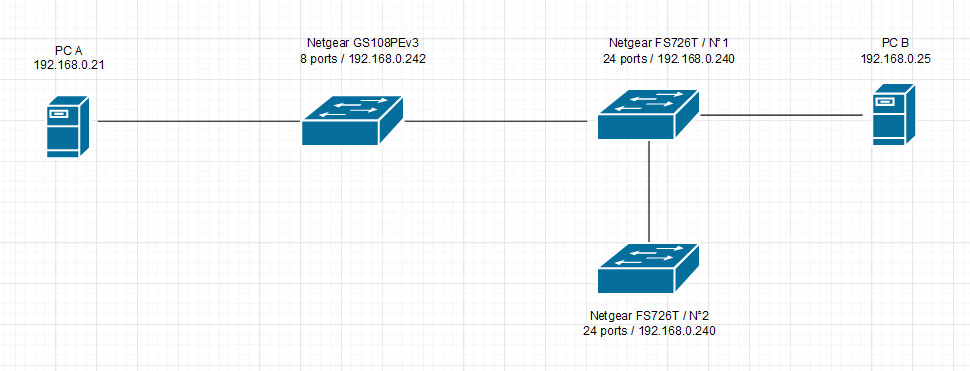
So, I have the following network situation (see image attached).
For the purpose of the test, all devices were set with static IPs.
Switches are set up with 4 different VLANs, and linked through 802.1q trunk ports.
The entering port used for PC A and PC B are in the same VLAN.
PC A :
- Can ping all the switches, but not PC B.
PC B :
- PC B can ping the 24 ports switches, but gets no response from the 8 port switch.
- PC B can ping PC A (but the other way around doesn’t work).
Why is that ? Is this layer 2, layer 3 related ?
4 Replies
- schumakuGuru - Experienced User
L2.
Show us the VLAN and PVID config of all switch ports and the PC ports involved.
- ubiq1erTutor
Thank you for your answer.
Attached, you'll find 3 pictures to show you all the config.
I probably found the reason why PC B didn't answer to ping => ICMP was off in its Firewall settings; so, this point is not an issue anymore..
I still have no idea why I can't ping my 8 port switch, nor access to its management interface from afar (I must be directly plugged in one of its physical ports to do so).I tried to access the management interface in VLAN ID 10, like illustrated on my attached picture; but I tried on VLAN ID 1 too, with other physical ports, thinking that VLAN ID 1 (default) was maybe the management VLAN (but after some reserach in this forum, there seems not to be such a VLAN on this model; management interface should be accessible through all VLANs).
I'm probably missing something trivial, but I just don't see it...
- ubiq1erTutor
So, is the configuration of my VLANs ok ?
Still no access to my GS108PEv3 Management Interface switch, when I'm not directly plugged on it.
Where should I look next ?

Related Content
NETGEAR Academy

Boost your skills with the Netgear Academy - Get trained, certified and stay ahead with the latest Netgear technology!
Join Us!