Forum Discussion

gixxerdaveneo
Jul 05, 2023Initiate
Need help with vlan setup netgear xs728T prosafe
Need help setting up vlans on 2 netgear switches. Here is my setup. Fortigate firewall port 24 is connected to port 27 on netgear xs728t The interface "lan" on firewall has sub-interfaces with v...
- Jul 06, 2023
Solution:
- Starting with firewall, have interface "lan" setup with sub-interfaces with vlans (no change here)
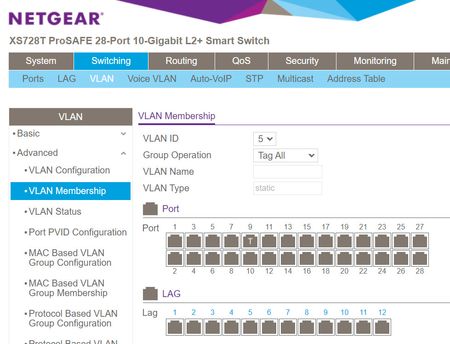
- Netgear xs728t switch, created vlans and tagged ports 9 for both vlan1&5 and then tagged port 27 for vlan5
- port 27 is uplink to firewall
- port 9 is link to gs110emx switch(port 10)
- Netgear gs110emx switch, created vlans and tagged port 10 for both vlan1&5
BTW: computer on port 1 on gs110emx is getting DHCP from firewall!!!
Below are supporting pic
Firewall "lan" interface
XS728T Switch
GS110EMX Switch

schumaku
Jul 05, 2023Guru - Experienced User
If you need to transport multiple VLAN on a link (or a LAG): Create a TRUNK, make all VLANs TAGGED. This applies to the link where you connect the Fortigate, where you connect other switches.
Neither the XS728T nor the GS110EMX does DHCP. I assume you want to create access ports for the VLAN 1 resp. the VLAN5. So make these ports UNTAGGED and set the same PVID where you connect e.g. a workstation.
Related Content
NETGEAR Academy

Boost your skills with the Netgear Academy - Get trained, certified and stay ahead with the latest Netgear technology!
Join Us!
