NETGEAR is aware of a growing number of phone and online scams. To learn how to stay safe click here.
Forum Discussion

FlipFluitketel
Jun 15, 2021Aspirant
Netgear GS724Tv4 vlan routing
Hi, I'm rather new to vlan's so I might have missed something simple but I don't get it working like I hoped it would. I've got a Genexis Platinum 7840 modem which hasn't got options for vlan...

DaneA
Jun 24, 2021NETGEAR Employee Retired
Welcome to the community! 
The KB article How to configure routing VLANs on a NETGEAR managed switch with shared internet access? is suitable for NETGEAR Fully Managed Switches as indicated on the part that says "This article applies to" as shown below:
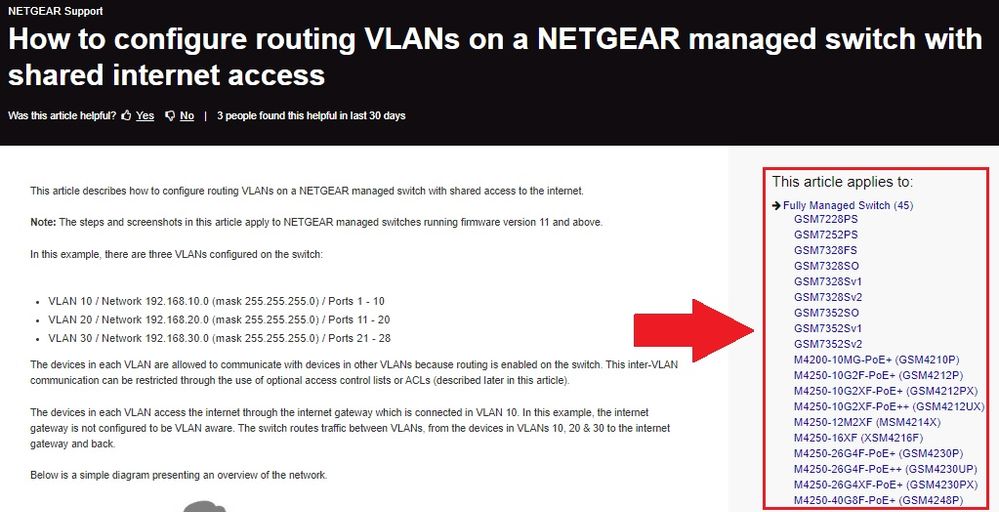
Be informed that the GS724Tv4 belongs to the Smart Managed Pro Switch Models and all Smart Managed Pro Switches does NOT have the capability to create a DHCP server. Kindly review the specifications of the GS724Tv4 on its data sheet here.
Is the Genexis Platinum 7840 modem a modem-only device or modem-router combo? Here are the options below:
a) If ever it is a modem-only device, you will need a VLAN aware-router connected in between the Genexis Platinum 7840 modem and the GS724Tv4.
b) If ever the Genexis Platinum 7840 modem is a modem-router combo, you will need to set it to full-bridge mode. Then you will need a VLAN-aware router connected between the Genexis Platinum 7840 modem and the GS724Tv4.
The appropriate KB article for you is this one below and you can use this as a guide:
How do I set up one or more VLANs between a NETGEAR ProSAFE firewall and a smart switch?
Another scenario, let say the Genexis Platinum 7840 modem is a modem-only device (or already set to full-bridge mode) and there is a Non-VLAN-aware router already connected between the Genexis Platinum 7840 modem and the GS724Tv4, let me share the article below and use it as your guide:
VLAN Routing on Smart Switches
Regards,
DaneA
NETGEAR Community Team
- FlipFluitketelJun 28, 2021Aspirant
Hmm.. That's too bad the GS724Tv4 can't do the DHCP-server.
The Genexis Platinum 7840 is a modem/router and it isn't possible to put it in bridge-mode since the ISP has done some changes in the firmware and it also isn't possible to put another modem instead of the Genexis.
Then I would think the best option is to use another router behind the modem/router but the router then has to have some setting that users can't get to the other network. For example if I set the router to use the 192.168.10.x range the users shouldn't be able to get in the 192.168.2.x range from the Genexis (and the other way around). Any ideas about that "solution"?
- DaneAJul 01, 2021NETGEAR Employee Retired
Then I would think the best option is to use another router behind the modem/router but the router then has to have some setting that users can't get to the other network. For example if I set the router to use the 192.168.10.x range the users shouldn't be able to get in the 192.168.2.x range from the Genexis (and the other way around). Any ideas about that "solution"?
Having another router behind the modem/router is not a good idea because you will have a Double NAT scenario that may cause problems.
Kindly access and read the articles below to learn more:
How to fix issues with Double NAT
Regards,
DaneA
NETGEAR Community Team- FlipFluitketelJul 02, 2021Aspirant
I know about double NAT but as I mentioned before, it is not possible to set the modem/router in bridge mode or and it doesn't support VLAN's and replacing it with another modem/router also isn't possible because of the ISP using settings for tv/telephone they won't share.
So basically you're saying it isn't possible in this situation to keep 2 networks separated from each other (unless using an extra router which mayba can cause problems because of the double NAT).
Related Content
NETGEAR Academy

Boost your skills with the Netgear Academy - Get trained, certified and stay ahead with the latest Netgear technology!
Join Us!
