NETGEAR is aware of a growing number of phone and online scams. To learn how to stay safe click here.
Forum Discussion

CKopp
Jul 09, 2026Luminary
Network switch selection for VLAN design
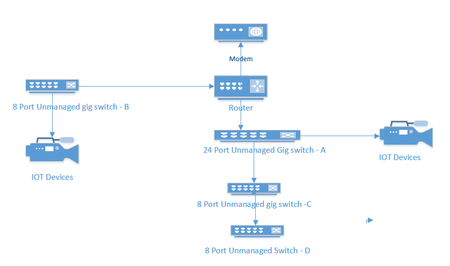
I currently have an unmanaged network consisting of a 24 port switch, 3 - 8 port switches, a Netgear RS series router and a cable company supplied modem. Several IOT devices reside on this network, ...
CKopp
Jul 10, 2026Luminary
Actually I think I may have figured out part of my questions. It seems that any switch which wither has to support multiple VLANS or forward VLAN traffic need to be managed. So in my config Switches A B and C would need to me be managed. It also looks like I will need to change the configuration so Switch A chains off Switch B, and that hooks up to the router instead of both A and B.
Stephen, I am curious about your comments on wireless traffic. Right now no IOT device communicates on Wireless. Any wireless TV or phone only uses my guest network. I only use main wireless for a couple of laptops. Are you saying that if I implement vlans appropriately at the switch level, the router will still see these as part of the whole network including the non-guest wireless, thus violating the isolation between them?
 StephenBJul 10, 2026Guru - Experienced User
CKopp wrote:
Stephen, I am curious about your comments on wireless traffic.
Starting from the basics -
Your devices are communicating using layered protocols.
Layer 2 is ethernet and wifi packets. Each device has a unique MAC (Media Access Control) address that is used in the destination field of the packets to send packets to that device. There a also a broadcast MAC address (ff:ff:ff:ff:ff:ff:ff) that tells your routers and switches to broadcast the packet to all devices on the network. All of this works without IP addresses and routing. Your switches don't care about IP addresses, they instead learn the MAC addresses of all the devices on your network (keeping track of what port they are connected to). They forward each packet to the correct detination port if they know it (and if they don't, they broadcast the packet to all their ports)
Now, the devices that the broadcast packet reaches is called the "broadcast domain". A VLAN is defined to be a broadcast domain. In other words, a broadcast packet sent by a device on a VLAN will only reach other devices on that VLAN. Technically this is done by adding a "tag" to the ethernet/wifi packet that tells routers and switches (that support VLANs) what VLAN the packet is associated with. This effectively isolates each VLAN from other VLANs on your network.
"Above" this layer 2 communications is layer 3. This layer uses IP addresses for routing packets (not the MAC addresses).
If you send a packet to an IP address on another VLAN, that packet will eventually reach your router, and the router will route it to that VLAN. Since your router doesn't support VLANs, the only way to prevent that from happening is to make sure the VLAN is isolated from your router. With your topology, that would also prevent the devices on that VLAN from reaching the internet.
CKopp wrote:
I am curious, does my wireless router use a VLAN behind the scenes to isolated the guest wireless network from the rest of my network
That is one way to do it (and is the way my Orbi mesh does it). The VLAN tag makes it easy for the main router to know if a packet is coming from (or going to) a guest-network device connected to a satellite.
But since there is no mesh in your case, the packets don't have to be tagged with the VLAN since everything going through one device (the router).
I do need to correct something I said earlier. Some Netgear routers allow devices on the guest network to communicate with the local ethernet-connected devices, others do not. I don't have an RS-series, so I am not certain if it allows that or not. (The trend is for newer routers to isolate guest from ethernet).
If the RS does isolate guest from ethernet, then that will not change when you add VLANs. Similarly, if the RS does not isolate guest from ethernet, then adding VLANs won't change that either.
- StephenBJul 10, 2026Guru - Experienced User
CKopp wrote:
Actually I think I may have figured out part of my questions. It seems that any switch which wither has to support multiple VLANS or forward VLAN traffic need to be managed. So in my config Switches A B and C would need to me be managed. It also looks like I will need to change the configuration so Switch A chains off Switch B, and that hooks up to the router instead of both A and B.
Not quite. If all devices connected to a switch are on the same VLAN, then that switch does not need to support VLANs (and can be unmanaged).
In your current configuration, the router needs to support VLANs, as well as switch B. Switch A might not.
If you put a smaller smart switch between the router and switch B that supports VLANs, then you can move all the IoT devices to that new switch. In that case, you can continue to use switch B as your main switch, as it wouldn't need to support VLANs.
The way this works is that the port on the new switch that is connected to switch B is configured in the new switch as being on the main network. VLAN tags aren't needed for that port. The port connecting the new switch to the router is set up as a trunk - carrying traffic from all devices to the router. So that port is configured to be in all VLANs (including the main network), and the packets would carry VLAN tags. The associated router ethernet port also needs to be VLAN aware, and be able to handle the VLAN tags.
Similarly, the router port going to switch A is either dedicated to the IoT VLAN (if only IoT devices are connected to it), or it is also a trunk connection like the one to the new switch (if there is a mix of IoT and main network devices).
But there is another piece of the puzzle. Even if you have an IoT VLAN, your main ethernet-connected devices won't be isolated from the VLAN unless you set up the routing to preserve the isolation at layer 3 (not just layer 2). The RS series router simply doesn't have the features you need to do that.
Double-routing (as I suggested in my first response) is one work-around, or you can get a wired enterprise-class router/firewall, and use the RS series as an AP. There is significant learning curve if you go with the enterprise-class router.
- StephenBJul 11, 2026Guru - Experienced User
StephenB wrote:
Double-routing (as I suggested in my first response) is one work-around,
Here's what double-routing would look like. You'd add a consumer router and an unmanaged switch. The graphic is messy (I started with your diagram), but this should give you the idea.
Only the IoT clients are connected to the top (edge) router. All your other clients are connected to the bottom (inner) router.
The IoT devices cannot reach your other clients, because the NAT in the inner router blocks that. But the regular clients can reach the IoT devices. (Media streamers might need to be connected to the inner network). The two routers would use different IP subnets - for instance, 192.168.1.x for the edge router, and 10.0.0.x for the inner router.
It should be less expensive than your VLAN implementation, as that requires replacing the router with an enterprise class one and maybe adding smart or managed switches. Also, easier to set up, since there is no learning curve.
- schumakuJul 12, 2026Guru - Experienced User
StephenB wrote:
Here's what double-routing would look like. You'd add a consumer router and an unmanaged switch. The graphic is messy (I started with your diagram), but this should give you the idea.
Double NATing would not allow any IGMP Multicast based live TV then. The IGMP Proxy exists in the primary NAT router only, it won't span over to the next NAT router.
The IGMP Proxy allows magically NATing a dedicated ISP IPTV VLAN to the primary router LAN and subnet, on a RFC1918 private network.
The OP won't be able to operate such IGMP based TV boxes behind yet another BAT router for various reasons. The most obvious one? The second BAT router doesn't see the IPTV VLAN provided by the ISP.
If the community members are seeking for assistance, a bare minimum of information is required. A little bit more than "TV Boxes". What ISP, what IPTV service, what TV boxes are the care minimum.
Don't understand why people don't want to listen.

Related Content
NETGEAR Academy

Boost your skills with the Netgear Academy - Get trained, certified and stay ahead with the latest Netgear technology!
Join Us!
