NETGEAR is aware of a growing number of phone and online scams. To learn how to stay safe click here.
Forum Discussion

CKopp
Jul 09, 2026Luminary
Network switch selection for VLAN design
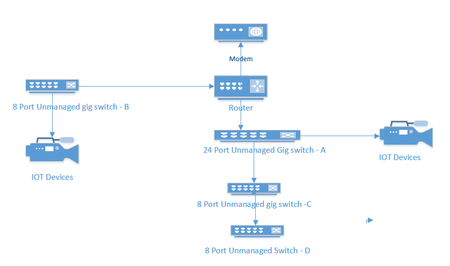
I currently have an unmanaged network consisting of a 24 port switch, 3 - 8 port switches, a Netgear RS series router and a cable company supplied modem. Several IOT devices reside on this network, ...
CKopp
Jul 13, 2026Luminary
I have been reading the RS600 manual and am a bit confused. There is a VLAN/Bridge mode that can be enabled. It looks like if I enable it I can specify VLAN tag groups by either Ethernet port or wireless network. The documentation suggests that the use of VLAN tagging supersedes Nat translation. So, (at least for switch B), couldn't I replace it with a managed switch, create a vlan on the switch for the IOT devices, define the port that connects the switch and router as a trunk port, and then create a VLANon the RS 600 for the port the managed switch is connected to?
CKopp
Jul 13, 2026Luminary
Actually, never mind. I see that the VLAN settings appear to only operate in bridge mode.
- schumakuJul 13, 2026Guru - Experienced User
Not correct. Its about the WAN facing bridge only, and it's VLAN config options are applicable to the WAN (Internet) port only. The VLAN config there is for Internet connections requiring ISP specific VLAN configurations only.
 StephenBJul 13, 2026Guru - Experienced User
schumaku wrote:
Its about the WAN facing bridge only, and it's VLAN config options are applicable to the WAN (Internet) port only. The VLAN config there is for Internet connections requiring ISP specific VLAN configurations only.
Right. So not helpful for CKopp , since his ISP isn't using such a configuration.
- CKoppJul 13, 2026Luminary
Yes, I should have been more clear, I had realized its settings only operate in bridge mode for the WAN side.

Related Content
NETGEAR Academy

Boost your skills with the Netgear Academy - Get trained, certified and stay ahead with the latest Netgear technology!
Join Us!
