NETGEAR is aware of a growing number of phone and online scams. To learn how to stay safe click here.
Forum Discussion

CKopp
Jul 09, 2026Luminary
Network switch selection for VLAN design
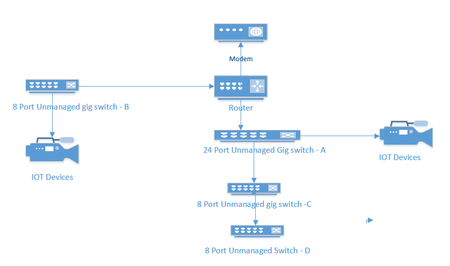
I currently have an unmanaged network consisting of a 24 port switch, 3 - 8 port switches, a Netgear RS series router and a cable company supplied modem. Several IOT devices reside on this network, ...

impostor
Jul 30, 2026Tutor
If your main goal is just to isolate your IoT devices from the rest of your network, you probably don't need to replace every switch right away.
I'd prioritize replacing the switches that actually need to carry multiple VLANs (trunk links). Any switch that's only serving devices from a single VLAN can stay unmanaged, as long as everything connected to it belongs to that same network segment. The important part is that the links between your router and the managed switches can carry the VLAN tags correctly.
The GS3xx Easy Smart switches should be fine for a straightforward home setup with a few VLANs. They're not as feature-rich as fully managed models, but for creating separate IoT, LAN, and maybe a guest/streaming VLAN, they generally do the job without being overly complicated to configure.
One thing I'd also think about is whether your Netgear RS router supports the VLAN setup you want (inter-VLAN routing, DHCP per VLAN, firewall rules, etc.). In my experience, the router's VLAN capabilities tend to be the limiting factor more often than the switches themselves.
Do you know which exact RS model you have? That would make it easier to say whether your current plan will work as expected.

StephenB
Jul 30, 2026Guru - Experienced User
impostor wrote:One thing I'd also think about is whether your Netgear RS router supports the VLAN setup you want (inter-VLAN routing, DHCP per VLAN, firewall rules, etc.). In my experience, the router's VLAN capabilities tend to be the limiting factor more often than the switches themselves.
That is clearly the case here.
- impostorJul 31, 2026Tutor
Exactly. In that case, I'd check the router's VLAN capabilities first before changing the switches. That should save you from replacing hardware unnecessarily.
Related Content
NETGEAR Academy

Boost your skills with the Netgear Academy - Get trained, certified and stay ahead with the latest Netgear technology!
Join Us!
