NETGEAR is aware of a growing number of phone and online scams. To learn how to stay safe click here.
Forum Discussion

Steven_Belfast
Apr 10, 2018Apprentice
Uptime on GS108Ev3
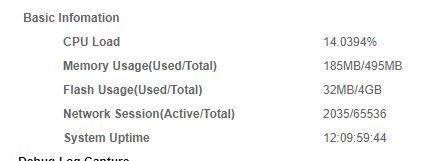
Hi Folks Was just wondering if anyone knows how to get system details from the GS108Ev3 ? Things like CPU load, Memory usage and System uptime. On other Netgear devices able to use a deb...
 Retired_MemberApr 10, 2018
Hi Steven_Belfast,
GS108Ev3 is Plus switch, which have no CPU/Memory/Uptime showing on local GUI. For the slow login issue, can you help upgrade to our latest FW, and try again after clear browser cache?
http://www.downloads.netgear.com/files/GDC/GS108EV3/GS108Ev3_V2.06.03EN.zip

schumaku
Apr 11, 2018Guru - Experienced User
Steven_Belfast wrote:Also on a side note the switch GUI seems slow to load 7 seconds to load the login page and then 3 seconds from logging in to the main page, This has been with the default shipped firmware and the latest release
Its not slow enough that i mind, just seems strange given the other netgear devices i have used/tested over the years.
Steven,
Do you access the GS108Ev3 from a different VLAN/subnet connected to or passing that very same GS108Ev3 switch -> router -> GS108Ev3 management IP?

Steven_Belfast
Apr 12, 2018Apprentice
Retired_Member
Thanks for the information & I have reflashed the firmware and did a factory reset and seem quicker to login to the GUI.
schumaku
I do not have the need for Vlans, This is something i have thought about as i work from home and could set the work system on the a different Vlan but there is really no need.
The wired computers that i would use to log in to the switch are connected direct to the via, DHCP is disabled as this is dealt with by a ISP router.
But as stated above GUI access is better following re-flash and factory reset.
Thank you both for the help.
Related Content
- Apr 12, 2023Retired_Member
NETGEAR Academy

Boost your skills with the Netgear Academy - Get trained, certified and stay ahead with the latest Netgear technology!
Join Us!
