NETGEAR is aware of a growing number of phone and online scams. To learn how to stay safe click here.
Forum Discussion

GavinYap
Aug 07, 2019Aspirant
Vlan trunking using vlan tagging
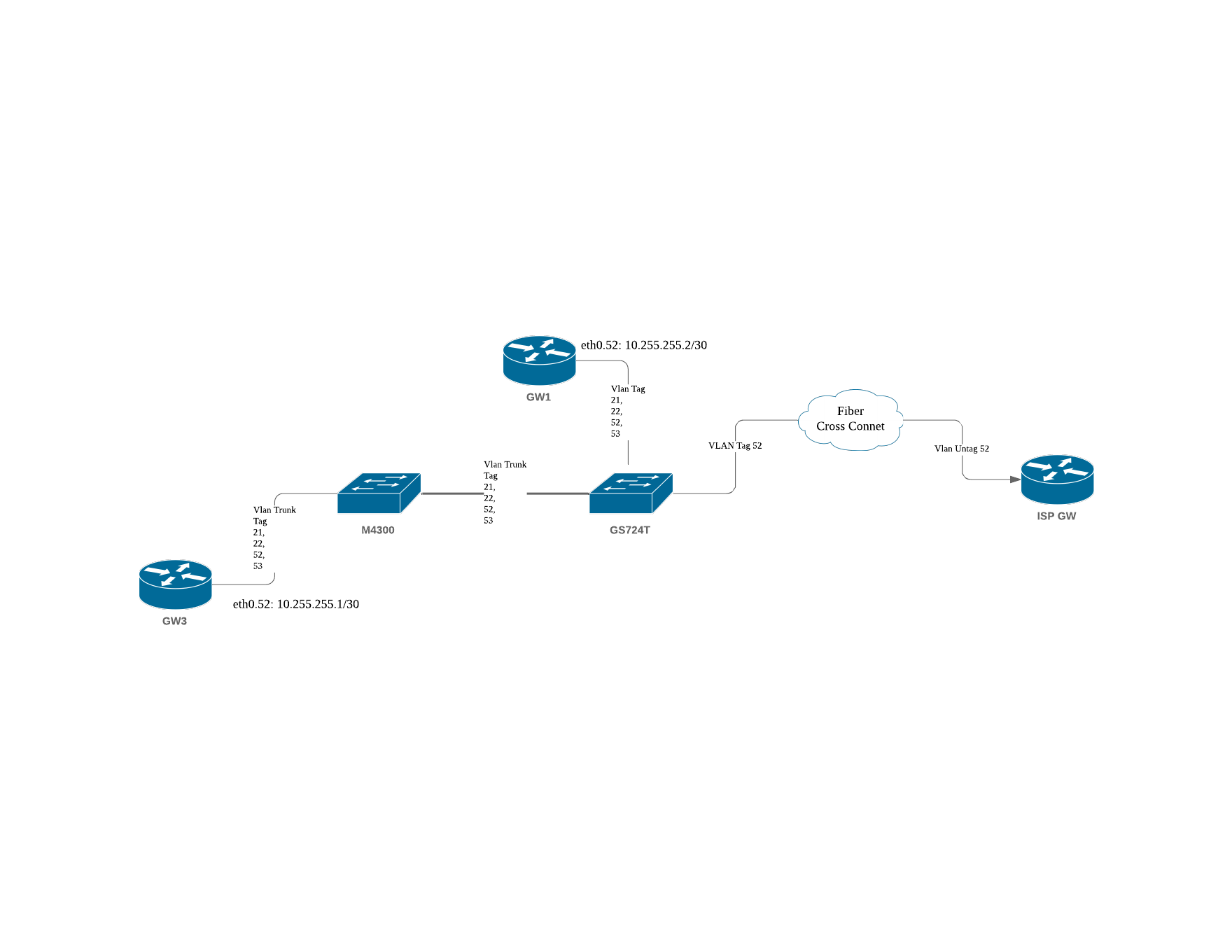
Hi , Refering to the attached image, I have a setup of 2 switches whereby they are join together by vlan tagging of 21,22,52&53. I have 2 GWs, GW1 and GW3 respectively which is also connected to...
GavinYap
Aug 10, 2019Aspirant
Hi DaneA,
There is default route configure for GW3 but not GW1.
Default route does not play a role here since both gateways are having 10.255.255.0/30
there .1 is on GW3 and .2 is ont GW3,
As it is on the same network no routing is require. Thus the purpose of vlan trunking is to make both switches to be the same L2 network for vlan 52.
native_vlan
Aug 14, 2019Aspirant
this seems to be related to my problem. Im not seeing how to get traffic out of a switch on a vlan to out the trunk to the rest of the network.
- schumakuAug 14, 2019Guru - Experienced User
native_vlan wrote:Im not seeing how to get traffic out of a switch on a vlan to out the trunk to the rest of the network.
For trunk connections (direct single port, or LAG) you run an 802.1q VLAN mode, and tag all VLANs on this trunk connection. Same settings are required on both switches (for LAG and VLANs)
- P_GalaJul 12, 2022Aspirant
You must create a "dummy" vlan numbered from the one that you want to interconnect using the IP and Subnet of the switch you want to connect at the settings.
Then you can tag with the vlans at the port you want to use and trunk.
This is how I got it work.

Related Content
NETGEAR Academy

Boost your skills with the Netgear Academy - Get trained, certified and stay ahead with the latest Netgear technology!
Join Us!