NETGEAR is aware of a growing number of phone and online scams. To learn how to stay safe click here.
Forum Discussion

don_daniel
May 14, 2017Tutor
date and time is reset to a date in nov 2016 on srx5308 causing internet outages!
Hi all
I have since longer time a SRX5308 installed as my Firewall/router. Until a few days ago, I had a wireless router R6300 installed which blew up..
now, I have installed a nighthawk R8000 as wireless router... in AP mode.
Since then I had outages of the internet (not the wireless and also within the same network at home, no outage.. it is the port going out to the internet):
I had in mind that such a problem occured to me once upon a time.. and the reason was that the router has wrong time settings... so I went to the router SRX5308 (the R8000 has no settings to change as in AP mode) and indeed, there was a date in November 2016 set!
date/time settings are correct set
the select ntp mode was set to 'sync to NTP server on internet'
the 'use default NTP servers' is set..
BUT saving did not change the date settings!
I did then set the date and time manually... a feature of the router... and this did do the trick.. I thought..!
now, there was no problem anymore until today! again the outages all hours or so.. and again! the date was set back to a date in november 2016!!!
what do I have to do that the settings of the date and time is automatically taken from the internet?? and why do I get this odd date in November 2016??
hope you can help me further..
regards
dondaniel
4 Replies
- DaneANETGEAR Employee Retired
Hi don_daniel,
As far as I have check, there is no issue on the SRX5308 as per you have describe here. Kindly post screenshots of the setting you have configured for the date & time on the SRX5308 as well as the NTP servers. Also, what is the current firmware version on your SRX5308?
Regards,
DaneA
NETGEAR Community Team

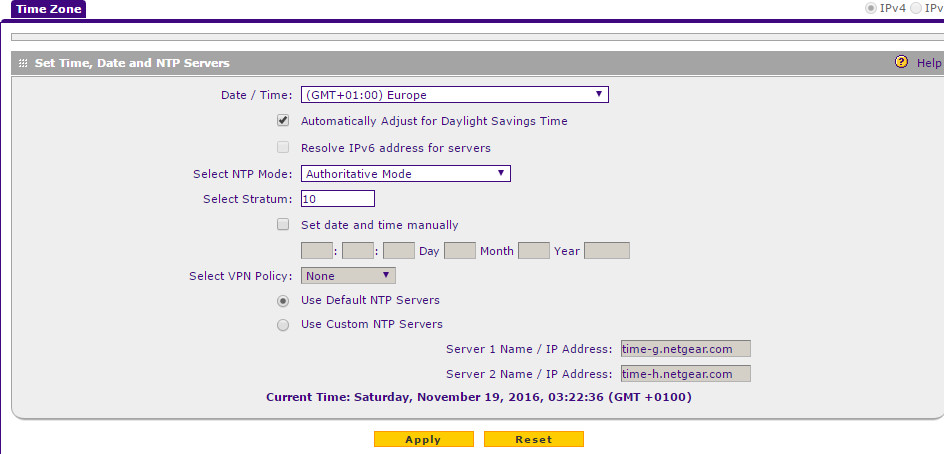 sure.
sure.Related Content
NETGEAR Academy

Boost your skills with the Netgear Academy - Get trained, certified and stay ahead with the latest Netgear technology!
Join Us!
