NETGEAR is aware of a growing number of phone and online scams. To learn how to stay safe click here.
Forum Discussion

bzness
Jan 15, 2018Aspirant
FVS336gv2 not connectiong with xfinity
Ok, so I have an Xfinity account and a small home network behind an FVS316G firewall. Everything seems to be OK at the moment. However, Xfinity just upgraded me to a much faster connection (over 100 ...

DaneA
Jan 25, 2018NETGEAR Employee Retired
I just want to follow-up on this. Were you able to perform my suggested steps? If yes, what is the result?
Were you able to open a chat or online case with NETGEAR Support?
Regards,
DaneA
NETGEAR Community Team

bzness
Jan 28, 2018Aspirant
OK, just got around to trying what you said. It did not help. There are only a couple of firewall rules, enabling or disbling them did not help. And turning off the attack checks did not help either. The firewall still tops out at around 30 Mbps.
Incidentally, I have another network where I am using an SRX5308 firewall, and I have the same problem (only there it tops out at 60 Mbps).
Are the netgear firewalls capable of higher speeds, or is that just a marketing gimmick (add the 2 WAN ports on the FVS336Gv2 at 30 Mbps each and claim 60)?
Has anybody here achieved 60 Gbps on an FVs336Gv2 using only one WAN port? Or more than 60 on an SRX5308 with only one WAN port used?Let me know if you have, and how you achieved that.
Thanks.
- bznessJan 28, 2018Aspirant
Ok, I think I found the answer for my FVS336Gv2:
"Pretty normal to me, the maximum it can reach is about 30Mbps. Just like what I have mentioned in my previous post the throughput for the router is 60Mbps total, 30 up-30 down. Bandwidth reduces as well when you have firewall rules.
Thanks,
JohnRo
NETGEAR® Community Team"So, that's what I have to live with then on this firewall.The SRX5308, however, should be a lot faster than 60, shouldn't it? - DaneAFeb 21, 2018NETGEAR Employee Retired
I apologize for the late response on this. :(
Let us try this. Let us lower the the MTU size on the SRX5308 (or FVS336Gv2). Here are the steps below:
1. On the web-GUI of the SRX5308, go to Network Configuration > WAN Settings > WAN Setup.
2. Click Edit on the respective WAN interface you are using. The WAN IPv4 ISP Settings screen displays.
3. Click the Advanced option arrow in the upper right of the screen. The WAN Advanced Options screen displays for the WAN interface that you selected.
4. On the MTU size section, select Custom in order to change the MTU size. Refer to the MTU size table below for the appropriate MTU size:
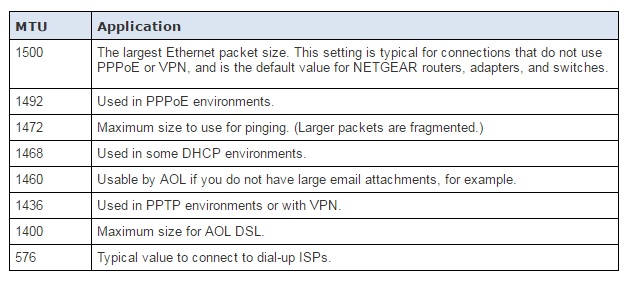
5. Click Apply to save the changes then observe the internet connection through the SRX5308.
Note: You might need to reboot the SRX5308 as well then observed again the internet connection through it.
As reference, kindly read pages 71-76 of the SRX5308 reference manual here on how to change the MTU size.
Note: you may want to try the steps aboe on the FVS336Gv2 as well and see if it helps.
Regards,
DaneA
NETGEAR Community Team
Related Content
NETGEAR Academy

Boost your skills with the Netgear Academy - Get trained, certified and stay ahead with the latest Netgear technology!
Join Us!
