NETGEAR is aware of a growing number of phone and online scams. To learn how to stay safe click here.
Forum Discussion

train_wreck
Aug 30, 2016Luminary
L2TP/IPsec - Android to FVS336Gv3 - "the length of the isakmp header is too big"
I am using the guide I made to configure L2TP/IPsec on the FVS336Gv3:
https://community.netgear.com/t5/VPN-Firewalls/FVS336Gv3-L2TP-IPsec-on-Windows-10/m-p/1063257#M4362
Windows clients are able to connect and throughput is around 10mbps.
I am now in the process of configuring the built-in VPN client on Android (the 2 phones I'm testing with are Samsung Galaxy S4 and S5, both on 5), which has had no problems connecting to other vendor's VPN router devices - Cisco, Mikrotik, Ubiquiti, all no problems. While it connects to the FVS336G with the same settings used on Windows, throughput is VERY slow to the point of being unusable - under 100kbps. Also, I experience periods of 10-20 seconds where the FVS336G stops passing VPN traffic to the phone entirely; long-term pings from the phone to a client behind the FVS LAN show bursts of packet loss. The phone right now is connected a WiFi acces point on the WAN side of the FVS336G, and is experiencing no other throughput or traffic problems whatsoever without the VPN connected.
When the Android phone is connected to the FVS VPN, I periodically see the following log entry repeatedly in the "VPN Logs" on the FVS:
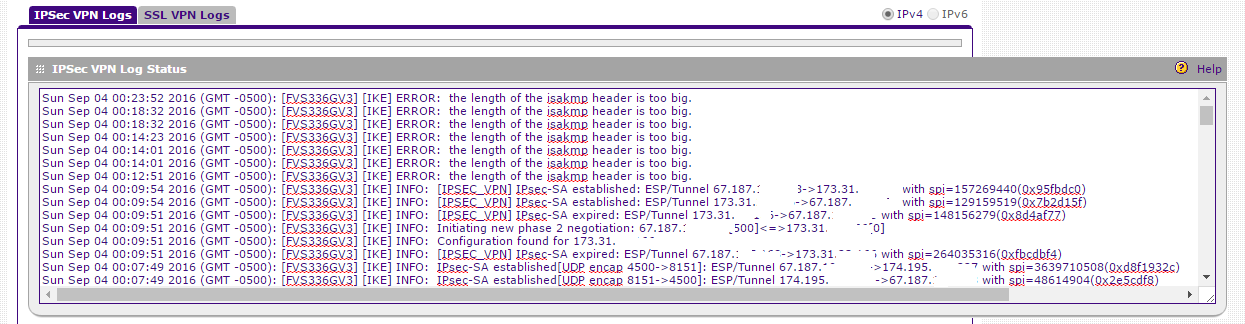
[FVS336G][IKE] ERROR: the length of the isakmp header is too big.
What does this error message mean? If you put it in quotes on Google, you literally get 10 results on the entire Internet, most of which are from the source code from a software program called "KAME Racoon". ?????????
Any help here? Before the mods post the boilerplate suggestions, yes I have the latest firmware, yes I have tried a factory restore. Of course those actions did nothing to change the situation.
12 Replies
- DaneANETGEAR Employee Retired
Hi train_wreck,
Kindly post images or screenshots that shows that the throughput is slow when your Android phones are connected via L2TP VPN to the FVS336Gv3 as well as the VPN Logs you have mentioned.
Regards,
DaneA
NETGEAR Community Team
 train_wreckLuminary
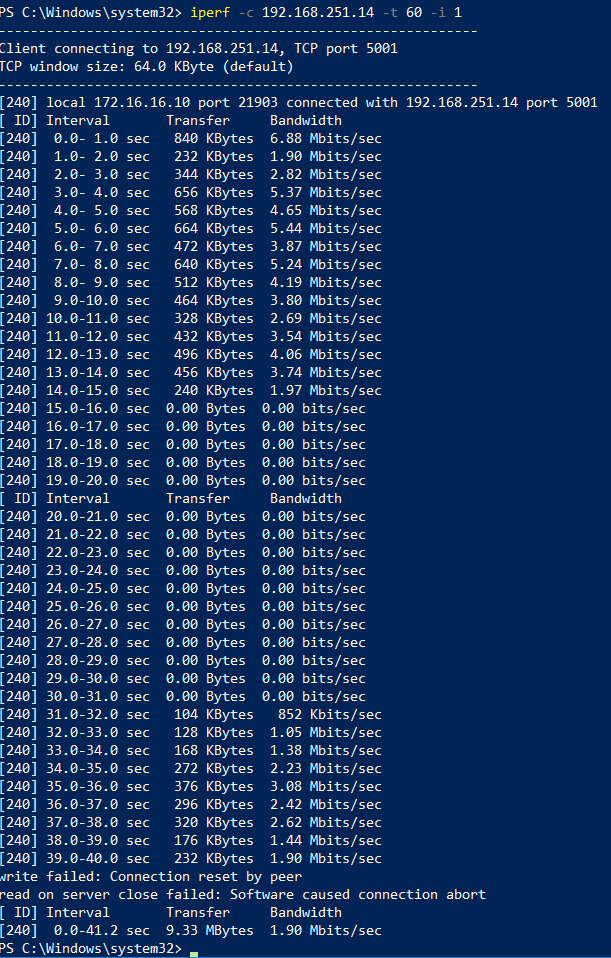
Here is an iperf from my Win10 PC (172.16.16.10) to the phone (192.168.251.14); the phone is a Galaxy S4 running nothing but the "iperf for Android" app shown here https://play.google.com/store/apps/details?id=com.magicandroidapps.iperf . Bandwidth starts decently fast for around 10 seconds, but then there is a 10 second period of no traffic, followed by decent bandwidth, followed by a disconnect in the iperf program. Immediately after the disconnect, there was another ~10 second period of no traffic to/from the phone. I can re-run this test without the VPN connected and I get consistently high bandwidth with no periods of loss.
Here are the logs you requested. IP addresses have been blanked. As I refresh the logs, this "isakmp" message appears roughly once every 10-30 seconds:
Is there an official recommended way of connecting an Android phone to an FVS336G via IPsec? If so, I haven't been able to find one, and this is the only gateway I've ever used that had so much trouble with the built-in Android VPN client. As an aside, I tried using a different IPsec VPN client on Android with an app called "NCP", as some other posters have said good things about it. I have identitcal problems with that VPN app as well.
- DaneANETGEAR Employee Retired
Hi train_wreck,
Here is the article I have below. However, it is about PPTP VPN.
How to Configure PPTP VPN between Android and ProSAFE Firewall
Hope this would help.
Regards,
DaneA
NETGEAR Community Team
 josephsmith0000Aspirant
I agree with you my friend there are many VPN which slow the speed of your smartphone so my suggestion is that use fast VPN like express or hma VPN.
thank you
- train_wreckLuminary
josephsmith0000 wrote:I agree with you my friend there are many VPN which slow the speed of your smartphone so my suggestion is that use fast VPN like express or hma VPN.
thank you
Actually, dumping L2TP and using plain IPsec with the "NCP" VPN client app on my phone gets me ~23-25mbps of throughput, and so far works reasonably well; there are still issues with P1 reauth, as well as issues with handling IP changes on mobile LTE connections (that's something IKEv2 and MOBIKE would solve, but the Netgear doesn't support either). And a 3rd-part VPN provider isn't exactly what I'm looking for. It's actually the reason I got the Netgear.
 vpnmanGuide
Hi train_wreck,
Are you able to successfully get L2TP/IPSec to work between FVS336Gv3 and Android (specifically, any of Samsung Galaxy Note or S series) or iPhone?
I also use NCP VPN client on Android with IPSec VPN and the app works good. However, there's an associated cost. Would prefer to use the built-in L2TP/IPSec client that's in Samsung Android phone or iPhone. And thanks for the L2TP/IPSec cookbook instructions for Win10.

Related Content
NETGEAR Academy

Boost your skills with the Netgear Academy - Get trained, certified and stay ahead with the latest Netgear technology!
Join Us!
