NETGEAR is aware of a growing number of phone and online scams. To learn how to stay safe click here.
Forum Discussion

train_wreck
Dec 15, 2016Luminary
One more time.... RemoteAccess IPsec XAuth w/certificates on FVS336Gv3 <-> Android 6.0.1
Gonna ask this one more time........
Trying to setup a certificate-based remote access VPN between the FVS336Gv3 and an Galaxy S7 running Android 6.0.1. EVERY other VPN router I have used supports this no problem.
Have generated self-signed CA using basic instructions here: https://datacenteroverlords.com/2012/03/01/creating-your-own-ssl-certificate-authority/
Note that due to the Netgear's limitations, I am not using "-sha256" for any certs/keys, only SHA-1. (This is a bad security shortcoming of the device in and of itself, but I digress). CA cert has been imported, CSR generated on Netgear, signed at my CA & installed.
Using IPsec XAuth, mode config pool is 192.168.252.10-192.168.252.20.
Netgear was factory reset, LAN/WAN IPs configured, certs imported, then the following VPN config:
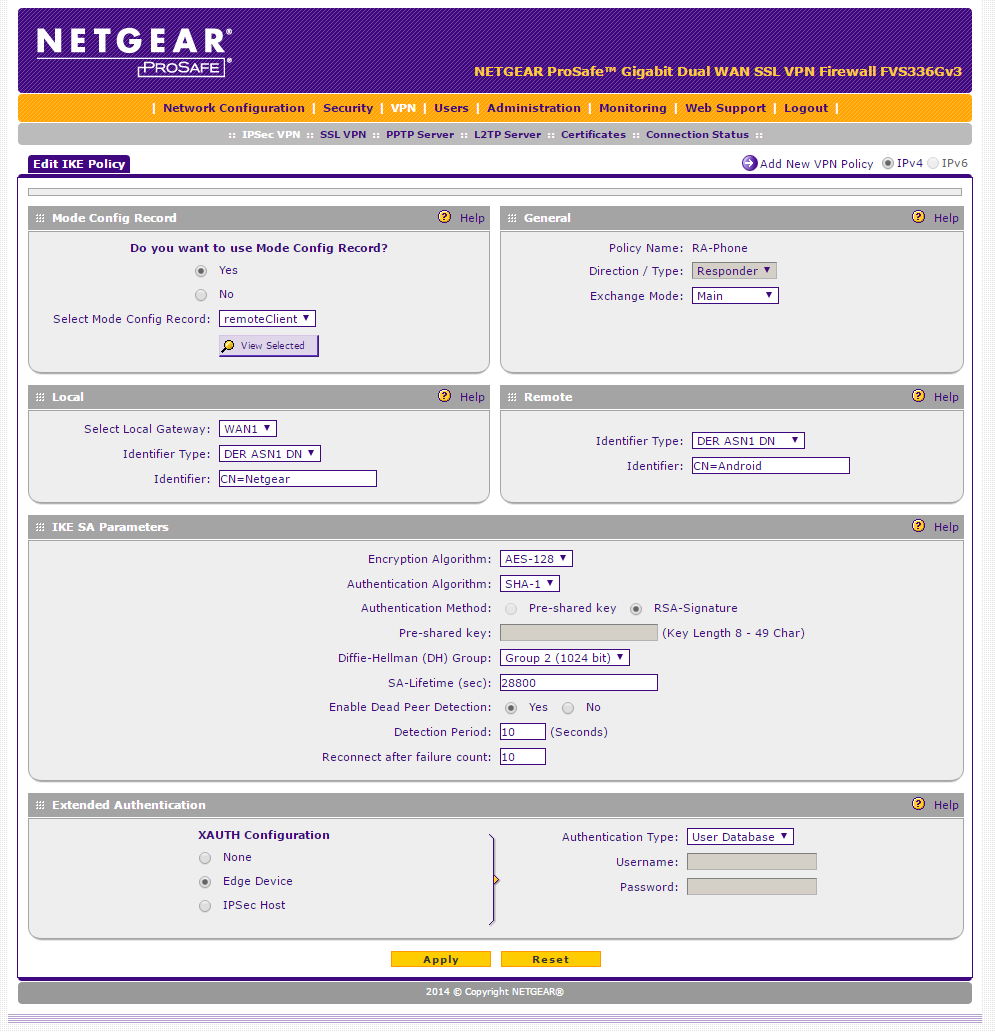
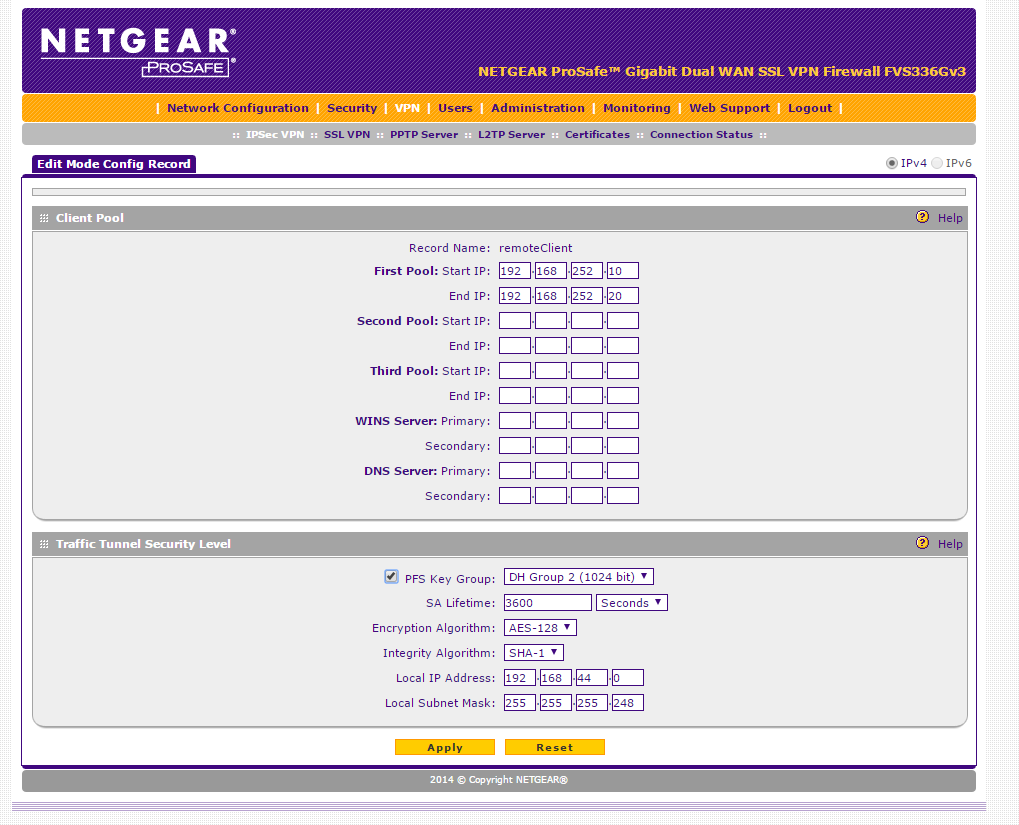
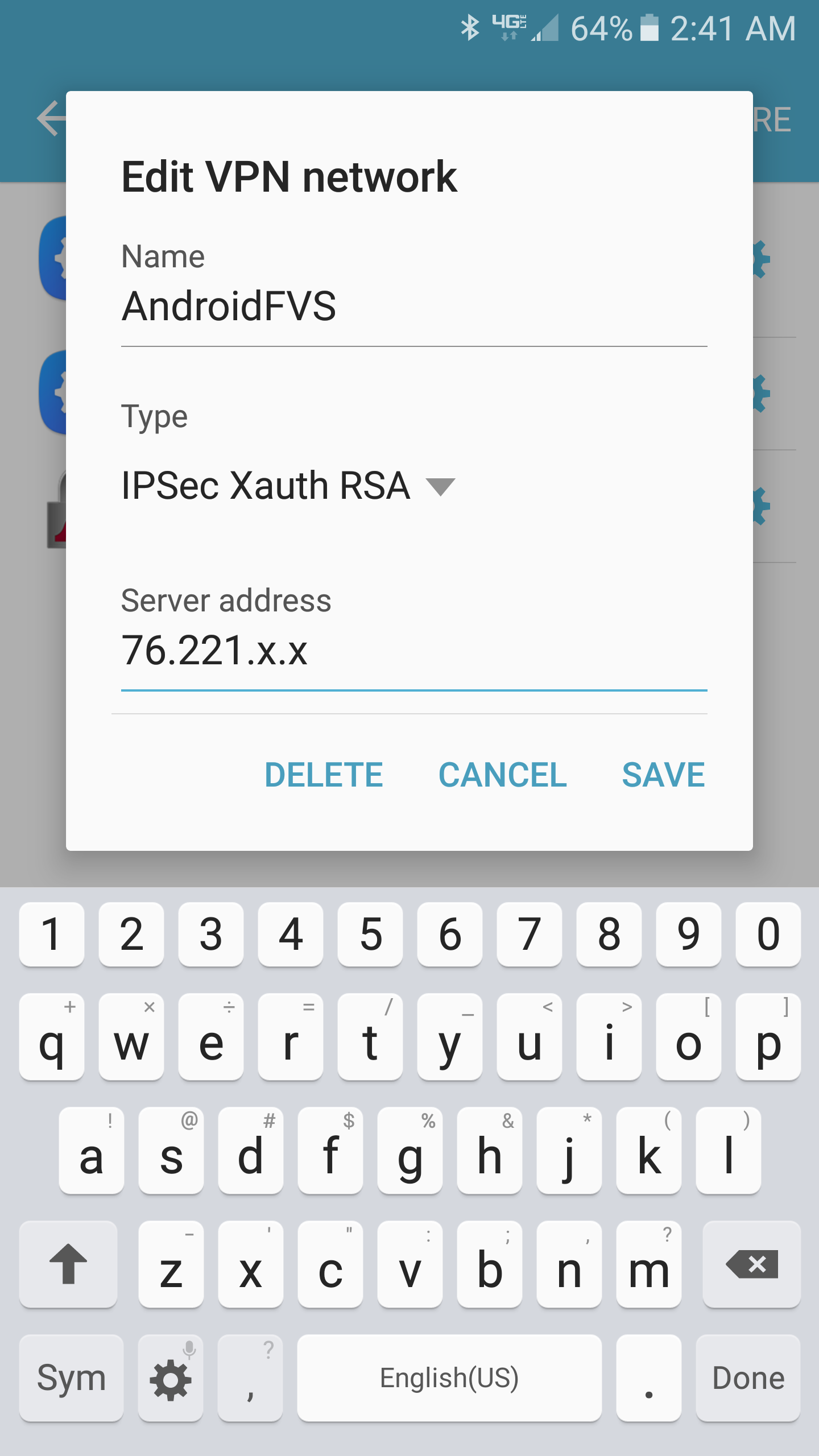
Here is VPN log during connection attempt:
Thu Dec 15 02:24:22 2016 (GMT -0600): [FVS336GV3] [IKE] ERROR:  Failed to get IPsec SA configuration for: 0.0.0.0/0<->192.168.252.10/32 from unknown address
Thu Dec 15 02:24:22 2016 (GMT -0600): [FVS336GV3] [IKE] INFO:  FOUND
Thu Dec 15 02:24:22 2016 (GMT -0600): [FVS336GV3] [IKE] INFO:  Responding to new phase 2 negotiation: 76.221.x.x[0]<=>174.195.y.y[0]
Thu Dec 15 02:24:18 2016 (GMT -0600): [FVS336GV3] [IKE] ERROR:  Failed to get IPsec SA configuration for: 0.0.0.0/0<->192.168.252.10/32 from unknown address
Thu Dec 15 02:24:18 2016 (GMT -0600): [FVS336GV3] [IKE] INFO:  FOUND
Thu Dec 15 02:24:18 2016 (GMT -0600): [FVS336GV3] [IKE] INFO:  Responding to new phase 2 negotiation: 76.221.x.x[0]<=>174.195.y.y[0]
Thu Dec 15 02:24:17 2016 (GMT -0600): [FVS336GV3] [IKE] ERROR:  Failed to get IPsec SA configuration for: 0.0.0.0/0<->192.168.252.10/32 from unknown address
Thu Dec 15 02:24:17 2016 (GMT -0600): [FVS336GV3] [IKE] INFO:  FOUND
Thu Dec 15 02:24:17 2016 (GMT -0600): [FVS336GV3] [IKE] INFO:  Responding to new phase 2 negotiation: 76.221.x.x[0]<=>174.195.y.y[0]
Thu Dec 15 02:24:16 2016 (GMT -0600): [FVS336GV3] [IKE] ERROR:  Failed to get IPsec SA configuration for: 0.0.0.0/0<->192.168.252.10/32 from unknown address
Thu Dec 15 02:24:16 2016 (GMT -0600): [FVS336GV3] [IKE] INFO:  FOUND
Thu Dec 15 02:24:16 2016 (GMT -0600): [FVS336GV3] [IKE] INFO:  Responding to new phase 2 negotiation: 76.221.x.x[0]<=>174.195.y.y[0]
Thu Dec 15 02:24:15 2016 (GMT -0600): [FVS336GV3] [IKE] INFO:  192.168.252.10 IP address is assigned to remote peer 174.195.y.y[6972]
Thu Dec 15 02:24:15 2016 (GMT -0600): [FVS336GV3] [IKE] INFO:  Received attribute type "ISAKMP_CFG_REQUEST" from 174.195.y.y[6972]
Thu Dec 15 02:24:15 2016 (GMT -0600): [FVS336GV3] [IKE] INFO:  XAuthUser wx Logged In from IP Address 174.195.y.y
Thu Dec 15 02:24:15 2016 (GMT -0600): [FVS336GV3] [IKE] INFO:  Login succeeded for user  "wx"
Thu Dec 15 02:24:15 2016 (GMT -0600): [FVS336GV3] [IKE] INFO:  Received attribute type "ISAKMP_CFG_REPLY" from 174.195.y.y[6972]
Thu Dec 15 02:24:15 2016 (GMT -0600): [FVS336GV3] [IKE] INFO:  ISAKMP-SA established for 76.221.x.x[4500]-174.195.y.y[6972] with spi:b89ed5eda657e06e:d432bc36aa6b0e1e
Thu Dec 15 02:24:15 2016 (GMT -0600): [FVS336GV3] [IKE] INFO:  Sending Xauth request to 174.195.y.y[6972]
Thu Dec 15 02:24:15 2016 (GMT -0600): [FVS336GV3] [IKE] WARNING:  unable to get certificate CRL(3) at depth:1 SubjectName:/C=US/ST=state/L=city/O=org/CN=myCA/emailAddress=email@domain.com
Thu Dec 15 02:24:15 2016 (GMT -0600): [FVS336GV3] [IKE] WARNING:  unable to get certificate CRL(3) at depth:0 SubjectName:/C=US/ST=state/L=city/O=org/CN=Android/emailAddress=email@domain.com
Thu Dec 15 02:24:15 2016 (GMT -0600): [FVS336GV3] [IKE] INFO:  KA list add: 76.221.x.x[4500]->174.195.y.y[6972]
Thu Dec 15 02:24:15 2016 (GMT -0600): [FVS336GV3] [IKE] INFO:  Floating ports for NAT-T with peer 174.195.y.y[6972]
Thu Dec 15 02:24:14 2016 (GMT -0600): [FVS336GV3] [IKE] INFO:  NAT detected: PEER
Thu Dec 15 02:24:14 2016 (GMT -0600): [FVS336GV3] [IKE] INFO:  NAT-D payload does not match for 174.195.y.y[6972]
Thu Dec 15 02:24:14 2016 (GMT -0600): [FVS336GV3] [IKE] INFO:  NAT-D payload matches for 76.221.x.x[500]
Thu Dec 15 02:24:14 2016 (GMT -0600): [FVS336GV3] [IKE] INFO:  For 174.195.y.y[6972], Selected NAT-T version: RFC 3947
Thu Dec 15 02:24:14 2016 (GMT -0600): [FVS336GV3] [IKE] INFO:  Received Vendor ID: draft-ietf-ipsec-nat-t-ike-02
Thu Dec 15 02:24:14 2016 (GMT -0600): [FVS336GV3] [IKE] INFO:  Received Vendor ID: RFC 3947
Thu Dec 15 02:24:14 2016 (GMT -0600): [FVS336GV3] [IKE] INFO:  Received unknown Vendor ID
Thu Dec 15 02:24:14 2016 (GMT -0600): [FVS336GV3] [IKE] INFO:  Received Vendor ID: DPD
Thu Dec 15 02:24:14 2016 (GMT -0600): [FVS336GV3] [IKE] INFO:  Received Vendor ID: draft-ietf-ipsra-isakmp-xauth-06.txt
Thu Dec 15 02:24:14 2016 (GMT -0600): [FVS336GV3] [IKE] INFO:  Beginning Identity Protection mode.
Thu Dec 15 02:24:14 2016 (GMT -0600): [FVS336GV3] [IKE] INFO:  Received request for new phase 1 negotiation: 76.221.x.x[500]<=>174.195.y.y[6972]
Thu Dec 15 02:24:14 2016 (GMT -0600): [FVS336GV3] [IKE] INFO:  Anonymous configuration selected for 174.195.y.y[6972].
The output doesn't make any sense..... the IKE daemon says it "FOUND" configuration, then immediately says it "Failed to get IPsec SA configuration"..... phase 1 is completing successfully as seen by the "ISAKMP-SA established" message, so it appears phase 2 is failing, though there is of course no helpful information as to why.
Anyone? I have setup numerous other VPN routers with this same type of configuration (RSA certs, XAuth) with no issues whatsoever........
5 Replies
 train_wreckLuminary
So, radio silence for over a week on this.
Is a RemoteAccess cert-based VPN just not possible on this unit? If so, I'd like at least an admission from Netgear on this, so that I can move on to a different product. The issue manifests itself on every VPN client I have tried (Android ith the builting VPN client AND the app "NCP VPN client", iOS on an iPad, Shrewsoft on Windows, )
- train_wreckLuminary
Bump.
I'm after an answer here, folks.......
Personal experience? When I receive those kinds of messages, it's because the client is too simplistic to handle to create a tunnel with NetGear's stuff.
Windows, Android...they try to automate / guess a lot of stuff, and they get it wrong; you try to specify the right values, but there aren't any tabs for them...
You might want to try the NCP VPN client for Android. I use that (for a pre-shared key configuration, not RSA); your configuration isn't too dissimilular to my own.
Of course, my pre-shared key config also works with ShrewSoft (Linux and Windows, tested it), so if you're not tied to the RSA way of doing things, maybe give it a shot. The tutorial I wrote is somewhere around here. Or you could try cannibalizing it to get your current config to work...

Related Content
NETGEAR Academy

Boost your skills with the Netgear Academy - Get trained, certified and stay ahead with the latest Netgear technology!
Join Us!
