NETGEAR is aware of a growing number of phone and online scams. To learn how to stay safe click here.
Forum Discussion

Schellsbeer
Jan 11, 2025Aspirant
Outdoor WiFi extender
Hi, I was just curious if anyone knows if netgear makes a long range wifi extender. Due to a lot of criminal activities in town and want to protect my operation from unwanted traffic, I would like to ...
- Jan 16, 2025Alright, well thank you all for your help and advice.

CrimpOn
Jan 12, 2025Guru - Experienced User
Schellsbeer wrote:
If you don’t mind me asking what is the best kind of outdoor camera.
This is like Alice going down the rabbit hole. Security cameras run the gamut from very inexpensive to really costly.
The cheapest (such as Wyze, and I have several) are almost all:
- 1024 resolution (bottom end)
- powered by a USB cable to an electrical outlet
- connected to the network with 2.4G WiFi (because [a] 2.4G components are cheap, [b] 1024 resolution does not require much bandwidth, and [c] 2.4G WiFi has greater range than 5G WiFi.)
Spending more gets things like
- much higher resolution. (I now have some 12MB cameras. the pictures are incredible)
- options to power using Power over Ethernet (PoE) cable. No electrical outlet needed.
I am not a fan of relying on claims that cameras are "weatherproof". Prefer to place them underneath something to protect from rain/snow etc. Also absolutely HATE battery powered cameras. Solar panels are a way to avoid battery problems, but I am not a fan of how they look and they (obviously) have to be exposed to get the sunlight and I like cameras that are sheltered.
Might want to start with internet searches.

JWS9518
Jan 12, 2025Luminary
I agree with CrimpOn as there are lots of cameras to choose from. I personally have Dahua and Hikvision cameras in my setup combined with the Ubiquiti antennas and Trendnet and Tp-link switches I think.
It all depends on what your expectations are in terms of quality, video ability, and reliability.
With NVR's, you don't need to run cabling like that as there are NVR's capable of connecting to those antennas so miles of ethernet cabling is not necessary. I personally use a Dahua NVR for that purpose which can stream up to 16 cameras, 4 up to 4k, and has a remote viewing app. There are NVR's which are cheaper, some more expensive depending on what features you want, video streaming quality, etc. It all depends on your budget and expectations. I personally don't like those cameras systems that rely on cloud streaming services, such as Ring and others, that you have to pay for as I think recording locally saves money in the long term.
I also don't personally trust those cheap, no name brand, cameras, not only due to security issues, but reliability, video quality, etc.
It all depends on what you are looking for and what you want out of the system.
- SchellsbeerJan 12, 2025AspirantThank you for answering all these questions. Sorry I have so many, I didn’t realize the variables and all the things to consider. So the cameras that you are talking about if I were to mount them to the bin or end of my barn and it says they run on PoE does that mean I need to run an Ethernet cable 700ft to the camera for it to get power?
- CrimpOnJan 13, 2025Guru - Experienced User
If a camera runs on PoE, then there has to be possible to run an Ethernet cable from the camera to a PoE device, such as:
- A switch that contains a number of PoE ports (8 is common). That switch could be in the barn, plugged into electricity, and connected to the "far end" of the wireless bridge.
- A PoE adapter. The PoE adapter could be in the barn, plugged into electricity, and then connected to an ordinary switch or the "far end" of the wireless bridge.
It might be useful to think of it this way:
- The point-to-point wireless bridge will product an Ethernet port in the barn that magically appears to be connected to the WiFi network in the house. That solves the 900 ft. problem.
- Where should cameras be located to observe these pens (and maybe the doors to the barn?)
- How will these camera get electrical power?
- Batteries (or solar panels)?
- Plugged into electrical outlets? Is there electricity near where the cameras need to be mounted?
- Power over Ethernet? Can you run Ethernet cables from each camera location to the point-to-point wireless bridge device in (or on) the barn?
- How will the signal get from each camera to the point-to-point wireless bridge device?
- Using Ethernet cables?
- Using WiFi, which implies that there has to be a WiFi access point that they can all reach, probably in the barn.
Surely other people in your situation face similar needs. How are they addressing this issue?
- JWS9518Jan 13, 2025Luminary
CrimpOn Does a great job of explaining. In my opinion, power is probably the biggest issue to overcome. Probably even more than the network connection because as long as you have power in the area that you are trying to put cameras, there are different ways you can connect the network as long as you have a way to power them reliably.
Whether that is by network antennas such as Ubiquiti's Nano stations that create that point-to-point connection, using a combination of cabling, POE adaptors, switches with POE capabilities, etc. as long as you get the right equipment that can cover the distance involved.
There are pros and cons to all of the different ways. Hardwiring for example creates less chances for wireless interference but isn't always practical to do. Wireless over distance can lose connection from time to time or have interference that causes interruption.
My setup uses a combination of things due to multiple locations involved, including 2 hardwired cameras directly where the NVR is located. The cameras that operate wirelessly are connected to power either to a POE switch or POE adaptor directly (depending on how many cameras in that area I have) which then connects to a Nanostation antenna, which sends a signal to another Nanostation receiving antenna on the same frequency, which is connected to the NVR on my network, where it can be viewed. This requires some port forwarding on the router. I also use the ability to remote view, which requires an app that works with the NVR and in my case a DNS service that you can either pay for or there are some good free ones as well.
You may also be able to get away with a simpler setup, depending on the distance involved and how you connect things, but that is really dependent on what you are dealing with there.
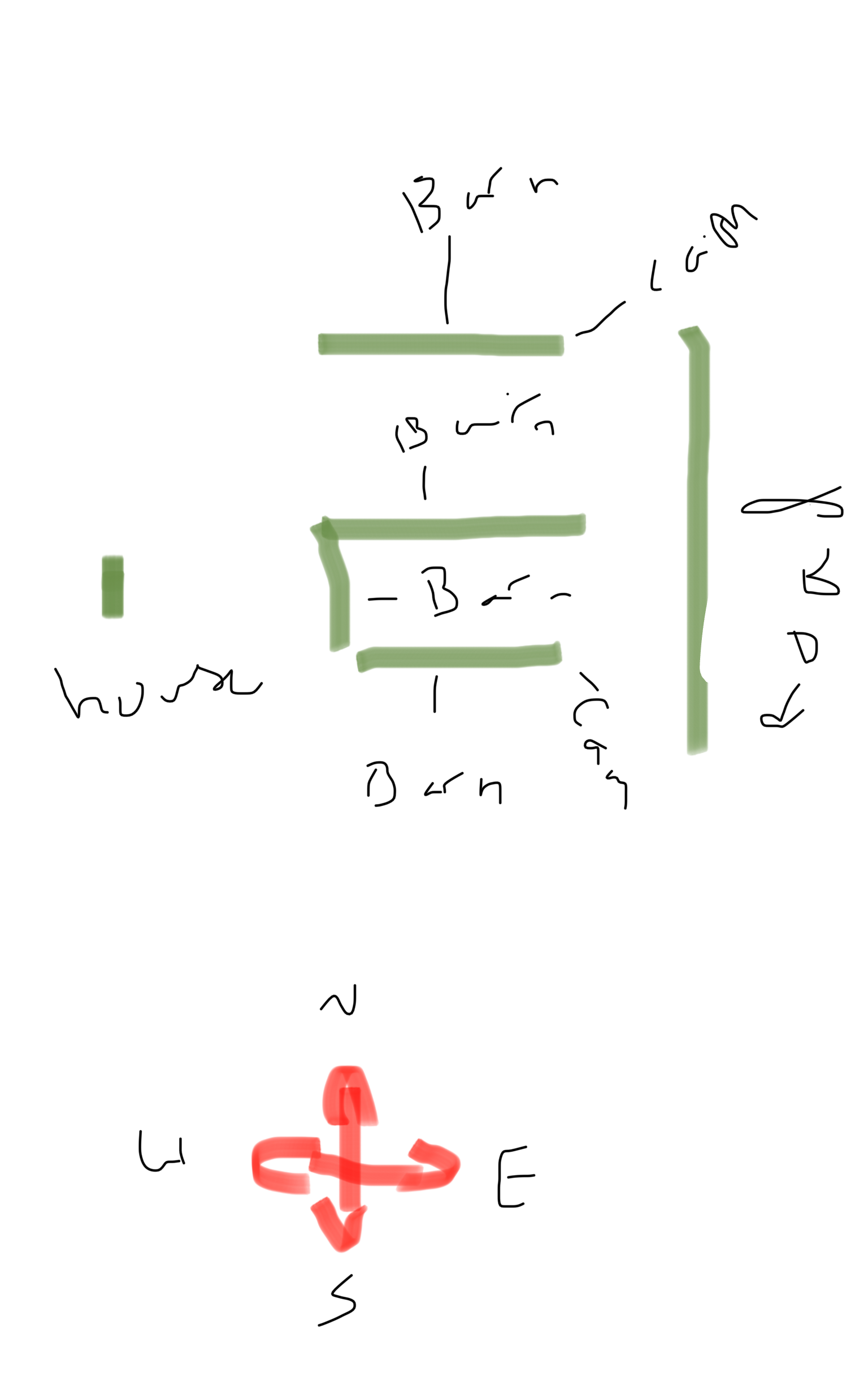
- SchellsbeerJan 14, 2025AspirantThanks for breaking that down and explaining it. If I’m comprehending this all correctly. For my set up to work I’m not entirely sure the one signal from the point to point would work as I have four barns three are placed in the shape of a u and the fourth is to the north of the three of them and my house is to the left of the of the barns. So my intention is to place one camera on the east bin of the north and south barn to point at the entry points of the driveway. I’m not sure a PoE would work with a master and slave bridge as I’m not sure if I would get interference so I was looking at a Wi-Fi camera specifically the dahua n41bl13-w plug in Wi-Fi camera because my thinking is if the bridges extend my wifi then this camera could pick up the wifi without having to buy two slave bridges. Or am missing something? My other thought was if I have to have two slaves to run PoE for camera is it possible that point to point would work two with two slaves or do I have to get two master and two slaves?
- JWS9518Jan 14, 2025Luminary
In my setup, I have one receiving antenna where the NVR is located and in the separate locations, I have another sending antenna, with a total of 6. These antennas ideally work with a line of sight and in the case where I have no direct line of sight to one of the locations, I have it setup with an antenna that sends a signal to another location that forwards that to the receiving end. Each location is going to need some type of way to send the camera signal.
Someone else may have other ideas to do that, but this is how the setup I have here, which was professionally installed, with the exception of the 2 hard wired cameras that I did myself. I did not want to climb a ladder. 😬
- CrimpOnJan 14, 2025Guru - Experienced User
It would be a lot easier to discuss pro's and con's if there was a rough drawing of these barns with dimensions and the locations where cameras might be placed.
- SchellsbeerJan 14, 2025AspirantAttached is a rough sketch of my operation. I hope that’s sufficient. The bins are at the east ends of the barns so I would place the cameras atop the bin. I don’t really want to put them on the roof of the barns as we can get lots of snow and I don’t want them to be ripped off when the snow slides off as it melts
- JWS9518Jan 14, 2025Luminary
At least the lines are straight, I can't draw a straight line with a ruler. 😁
One good thing is that it looks like based on your drawing that you have line of site from your house to the barns, which would help with the antenna situation. Those would need to be positioned so that you can get a good signal to and from those to your house. You would probably have to wire from the antenna to the camera based on the drawing where you have them positioned, with the antenna at one end of the barn and the cams on the other.
Do you have power in each of the locations you want to have cameras?
- SchellsbeerJan 14, 2025AspirantHaha thanks, I hoped everything was legible. It’s hard to write on a phone. But yes there is power on each end as we have yard lights attached to the bins and an outlet that is tapped into that power. So you think I would need two slave bridges one for each camera then? Or would two wifi cameras be able to pick up a signal from just one slave bridge for each camera?
- JWS9518Jan 14, 2025Luminary
Based on what I have here in my setup, you would need an antenna to send a signal for each camera, because they are in different locations. That could be done in two ways. An antenna to send a signal to the other antenna in the barn as a relay then it goes from that antenna to the house or both antennas just sending the signal to the house receiving antenna. That is assuming there are no obstructions in the way that could interfere with the signal, such as trees. If that is the case, it is possible you may need another relay in the middle, but I don't think so as there are really powerful antenna bridges out now that should handle the distance.
Protecting the wiring is important in these outdoor setups as well. So, I suggest getting those outlet boxes to mount the cameras on to protect the wiring that you are connecting the power and network through. Silicone around those as well to protect water from penetrating. I made that mistake one time and didn't properly silicone and it ended up frying the camera as moisture penetrated through to the connection.
Some others here may have a better way or idea to do this as there a lot of gurus here in the forum that know this stuff better than me, but hopefully this is helpful for you.
- CrimpOnJan 14, 2025Guru - Experienced User
There are basically two technical problems to solve:
- Extend the network from the house 900 ft. to the group of barns. Because 900 ft. is much too far for a typical omnidirectional WiFi system, a point to point wireless bridge is a typical solution. A pair of Ubiquiti LOCO5AC units is one solution (Amazon $209). A TP-Link Omada EAP211-Bridge KIT is another (Amazon $141)
Pair of units w/ power adapters: Amazon $209 or $141..
Pair of outdoor mounting brackets: Amazon $37.
Pair of ethernet cables (network to house adapter, barn adapter to electrical source) Amazon $50. - Connect cameras placed on the barns to that network extension.
This is where it gets tricky. (and where a diagram with dimensions would be essential. i.e. is the U-shape one structure or is it three? what are the dimensions of each structure? how many feet between them? Where is electricity available? Are the barns wood or metal?)
It might be that one WiFi access point placed in one of the barns would create a signal strong enough to connect WiFi cameras at those two locations. Perhaps a simple TP-Link AX3000 (Amazon $120) would do the job.
"The Devil is in the Details"
- Extend the network from the house 900 ft. to the group of barns. Because 900 ft. is much too far for a typical omnidirectional WiFi system, a point to point wireless bridge is a typical solution. A pair of Ubiquiti LOCO5AC units is one solution (Amazon $209). A TP-Link Omada EAP211-Bridge KIT is another (Amazon $141)
- CrimpOnJan 15, 2025Guru - Experienced User
One practice I have found useful is to:
- Use Google Maps (or Apple Maps) to display the property
- Take a screen shot of the property
- Past the screen shot into a Forum post
Describe the dimensions and material of each building and how far apart they are.
- SchellsbeerJan 16, 2025AspirantAlright, well thank you all for your help and advice.
Related Content
NETGEAR Academy

Boost your skills with the Netgear Academy - Get trained, certified and stay ahead with the latest Netgear technology!
Join Us!