NETGEAR is aware of a growing number of phone and online scams. To learn how to stay safe click here.
Forum Discussion

shejialun
May 01, 2024Aspirant
Abnormal delay in pinging the gateway ip through WAN 2.5G port.
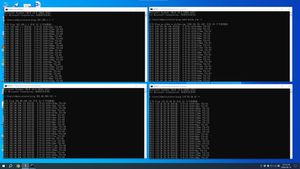
Hello When my SXR80 WAN 2.5G port is connected to the ISP's gateway, the computer is connected to the LAN through the cable, and then the latency is very unstable when pinging the ISP's gateway ip o...
shejialun
May 05, 2024Aspirant
I'm sorry maybe I misdescribed it, 192.168.1.1 is the ISP's gateway address and the SXR80 is working on the 10.0.0.0 network segment.
The problem I'm having is that the WAN port of the SXR80 is connected to the ISP's gateway, and the computer is connected to the SXR80 LAN port, and pinging the ISP's gateway on the computer has a delay of several hundred or several thousand milliseconds.
But when I set the WAN port of the SXR80 to port2(1G), this problem no longer occurs.
Also have submitted case to China Netgear tech support, 48171868, but they tested it and thought it was a WAN port hardware failure.
However, I found that none of the uplinked gateways have STP settings, so I can't rule out an STP issue, but I can't disable it to do the test, and I can't see the ping latency data in wireshark, and it doesn't seem to affect my internet access.
BasuKhodanapur
May 06, 2024Apprentice
Hi shejialun ,
Can you please help with below details to understand issue better, we can't reproduce issue in our setups.
1. What is your Orbi setup is it a 1:1 or 1:2 (1 Router and 2 Satellites)
2. What is the firmware version, if it's not latest version I will suggest you upgrade to V4.3.3.200
3. Network topology
4. Satellites are connected wired/wireless
5. Please provide debug logs: Enable debug logs and try to reproduce the issue and share the debug logs
6. I have attached screenshot for how to capture the logs
1. IP address of Router/debug.htm
2. Enable LAN/WAN Packet capture option
3. Click on Start capture
4. Reproduce the WAN Port issue wait for 5minutes
5. Click on Save debug logs
6. Share the debug logs
Thanks,
Basavaraj
- shejialunMay 09, 2024Aspirant
Hello BasuKhodanapur Nivedita
1. What is your Orbi setup is it a 1:1 or 1:2 (1 Router and 2 Satellites)
1 Router and 1 Satellites
2. What is the firmware version, if it's not latest version I will suggest you upgrade to V4.3.3.200
V4.3.3.200
3. Network topology
4. Satellites are connected wired/wireless
wireless
5. Please provide debug logs: Enable debug logs and try to reproduce the issue and share the debug logs
I have performed three scenarios of getting logs, using the R7000 as a gateway, and ISP gateway, and setting the WAN of the SXR80 to port2(1G), where when connecting to the R7000 and the ISP gateway, after each reset or reboot of the SXR80, sometimes the ping will be delayed and sometimes it won't.
https://drive.google.com/drive/folders/1qVPFgvcs80pmPBXVTkjcYg3TNBnpS1mG?usp=sharing
Related Content
NETGEAR Academy

Boost your skills with the Netgear Academy - Get trained, certified and stay ahead with the latest Netgear technology!
Join Us!
