NETGEAR is aware of a growing number of phone and online scams. To learn how to stay safe click here.
Forum Discussion

Sonya808
Apr 14, 2021Tutor
R7000 NightHawk How To Dismiss Circle Blurb?
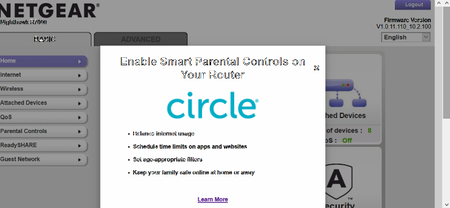
Hi - How can we remove the intrusive blurb every time we sign in to our router? CIRCLE - Enable Smart Parental Controls on Your Router We don't have need it or want it. It seems to have...
 Apr 25, 2021
FINALLY -- THE SOLUTION APPEARED
Just to upgrade the firmware to V1.0.11.116_10.2.100, and the blurb is gone.
I did so, and it works. Negear's information follows:
Bug Fixes:
- Fixes possible system kernel panic issues.
- Fixes the issue where the attached device list displays incorrectly.
- Fixes the issue where the Circle ad window displays every time when logging in to web interface.
Download Link: https://www.downloads.netgear.com/files/GDC/R7000/R7000-V1.0.11.116_10.2.100.zip

Christian_R
Apr 15, 2021NETGEAR Employee Retired
Hi Sonya808,
Hope you're doing well! May you confirm the firmware version your router is currently on for us to better assist.
Thanks,
Christian
Sonya808
Apr 22, 2021Tutor
Thank you, Christian, for replying - The firmware is V1.0.11.110_2.1.38.1 . The blurb appeared with the latest firmware update. I contacted Mozilla support for Circle about removal. They ignored my question. I scoured the web. Some people advised to roll back to original factory defaults. That seems self-defeating. The firmware updates are for a good purpose.