NETGEAR is aware of a growing number of phone and online scams. To learn how to stay safe click here.
Forum Discussion

Sonya808
Apr 14, 2021Tutor
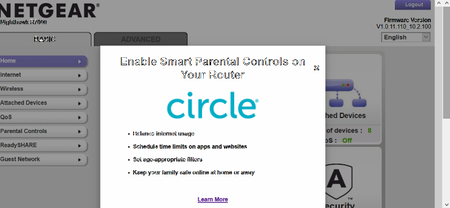
R7000 NightHawk How To Dismiss Circle Blurb?
Hi - How can we remove the intrusive blurb every time we sign in to our router? CIRCLE - Enable Smart Parental Controls on Your Router We don't have need it or want it. It seems to have...
 Apr 25, 2021
FINALLY -- THE SOLUTION APPEARED
Just to upgrade the firmware to V1.0.11.116_10.2.100, and the blurb is gone.
I did so, and it works. Negear's information follows:
Bug Fixes:
- Fixes possible system kernel panic issues.
- Fixes the issue where the attached device list displays incorrectly.
- Fixes the issue where the Circle ad window displays every time when logging in to web interface.
Download Link: https://www.downloads.netgear.com/files/GDC/R7000/R7000-V1.0.11.116_10.2.100.zip

svetaketu
Apr 23, 2021Luminary
Hi Sonya808 ,
Since seeing the Circle blurb again, how many times have you tried to dismiss it?
I think after dismissing it 3 times it should go away.
Since seeing the Circle blurb again, how many times have you tried to dismiss it?
I think after dismissing it 3 times it should go away.
Sonya808
Apr 23, 2021Tutor
Hi Svetaketu,
Thank you for your advice! Yes, I have dismissed the blurb multiple times, but it always returns the next time I sign onto the router. I'd like to get rid of it permanently.