NETGEAR is aware of a growing number of phone and online scams. To learn how to stay safe click here.
Forum Discussion

gworley
Sep 20, 2015Aspirant
Parental Controls not working properly
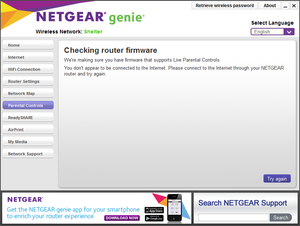
I manage 2 sites -- home and a homeless shelter. Both sites I have installed Netgear routers. At the homeless shelter I have a WNR2000v3 installed and it supports Parental Control. At home I have ...

Petercos
Feb 03, 2016Aspirant
I seem to be having a similar issue to others.
I have merger router net genie but parental controls works on three devices but not the other three.
They are all Apple devices.
Any advice given clearly the parental controls work on some devices but not others.
Any help please?

DexterJB
Feb 04, 2016NETGEAR Moderator
Hi @Petercos,
1. What is the model number and firmware version of your router?
2. What are the devices that are affected?
3. What version of iOS are they running on?
4. What version of NETGEAR Genie do you have installed on those devices?
5. Are you able to login to your OpenDNS account through those affected devices?
6. Does the filtering work?
Regards,
Dexter
Community Team
- PetercosFeb 04, 2016Aspirant
I bought a NETGEAR WNDR4500-200EUS N900 Wireless Dual Band Gigbit Router wo weeks ago.
I have two ipads in the house - neither works for parentla controls, I have two iphones - one iphone 5 where it works sometimes and one iphone 4 where it does not work.
I would always download the latest version of IOS so on my ipad
I am the only one with Netgear genie - I am using the app which I downloaded under two weeks ago so again presume it is the only one available to me
All devices are working theough the open DNS so all of them have wifi
I started by putitng time blocks in place but noticed even when we passed the timeblocks nothing changed
I then went into the filtering and chose high and that does not work either despite the fact that this should disable all youtube, facebook etc.
Thanks
Peter - DexterJBFeb 07, 2016NETGEAR Moderator
Hi @Petercos,
1. Please check if the DNS values on the router are set as 208.67.222.222 and 208.67.220.220.
2. Parental Controls only work with browsers (Safari, Chrome, Firefox) and not mobile apps.
Regards,
Dexter
Community Team
- PetercosFeb 08, 2016Aspirant
Thanks for your reply but I have a question.
Regarindg your first ppint with the DNS vlaues - what wll that accomplish?
Secondly, very few kids use the internet through a browser, every social media site has an app - snapchat, youtube, facebook etc so kids nevr use the internet browser.
The reason I bought the netgear product was to be able to stop access late in the evening or at times of my choosing so are you saying that bar pulling out the plug (which was what I was originally doing but i bought the netgear product to stop me having to do this) there is no other way to stop a child going onto social media sites through the app?
Thanks
Peter
- DexterJBFeb 08, 2016NETGEAR Moderator
Hi @Petercos,
The DNS values point to the OpenDNS servers which allows them to filter the Internet traffic that goes through your router. This is how they block the sites through your browser.
If you wish to cut off Internet access to specific devices on a certain schedule, you can perform address reservation for the devices that you want to block on a specific range then block all services using your preferred schedule. You may refer to the links below for the steps.
http://kb.netgear.com/app/answers/detail/a_id/24091
http://kb.netgear.com/app/answers/detail/a_id/24055
http://kb.netgear.com/app/answers/detail/a_id/24054
Regards,
Dexter
Community Team
- TheWombatFeb 21, 2016Aspirant
>> Parental Controls only work with browsers (Safari, Chrome, Firefox) and not mobile apps.
Hi Dexter, Since it's being done at a DNS level and apps do dns lookups, why wouldn't it work? My experience is that it does work with apps also. When the entire thing isn't broken that is.