NETGEAR is aware of a growing number of phone and online scams. To learn how to stay safe click here.
Forum Discussion

TealITGyrl
Nov 11, 2025Aspirant
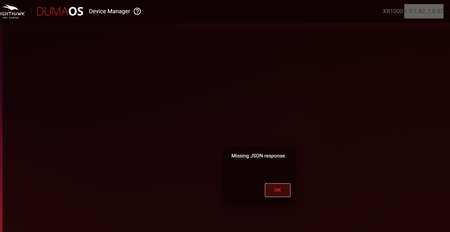
Has anyone figured out how to get Device Mgr to show in the Duma OS XR1000 Nighthawk?
Upgraded firmware from Version: 1.0.0.74 to Current Version of 1.0.1.82_1.0.67 I have rebooted, I've cleared cache, I've switched from Edge, to Firefox, to Chrome. I've tried all 3 in private...
TealITGyrl
Nov 14, 2025Aspirant
I've done a factory reset about 4 times this year. Each time the problem returns within a week. I shouldn't have to keep doing a factory reset for this to work. I think it may be time for a new device. I won't touch this DumaOS anymore. It's cool in theory, but there are too many issues. Thanks for the input though.

FURRYe38
Nov 14, 2025Guru - Experienced User
What browser are you using?
How was the FW updated?
What is the Mfr and model# of the Internet Service Providers modem/ONT the NG router is connected too?
- TealITGyrlNov 18, 2025Aspirant
I've tried Edge, Chrome and Firefox (All latest versions, I'm on a Windows 11 system)
From modem, FW was updated manually. Ensuring the proper 1.0.1.82_1.0.67 firmeware was installed.
ISP Modem: TECHNICOLOR CGA4332COM
- FURRYe38Nov 19, 2025Guru - Experienced User
What happens if you disconnect the router from the ISP gateway and factory reset the router and setup from scratch, with out it connected to the gateway and get to the home screen then check Device Manager in a web browser?
Your ISP modem already is a gateway and has a built in router.
This would be a double NAT (two router) condition which isn't recommended. This would be a double NAT condition which isn't recommended. https://kb.netgear.com/30186/What-is-Double-NAT
https://kb.netgear.com/30187/How-to-fix-issues-with-Double-NAT
Couple of options,
1. Configure the modem for transparent bridge or modem only mode. Then use the NG router in router mode. You'll need to contact the ISP for help and information in regards to the modem being bridged correctly.
2. If you can't bridge the modem, disable ALL wifi radios on the modem, configure the modems DMZ/ExposedHost or IP Pass-Through for the IP address the NG router gets from the modem. https://kb.netgear.com/25891/DMZ-on-NETGEAR-routershttps://kb.netgear.com/24086/How-do-I-set-up-a-default-DMZ-server-on-my-Nighthawk-router
3. Or disable all wifi radios on the modem and connect the NG router to the modem, LAN to LAN configure AP mode on the NG router.
https://kb.netgear.com/20927/How-do-I-change-my-NETGEAR-router-to-AP-modeAlso I see there is more recent FW version available for the XR router: https://www.netgear.com/support/product/xr1000
You might do a full manual FW update to this version, factory reset and setup from scratch and then check device manager.
Try option #2 first...
- Netduma-FraserNov 20, 2025NetDuma Partner
You mentioned the problem comes back within a week, do you notice it happening after anything specific like a setting change etc?
