NETGEAR is aware of a growing number of phone and online scams. To learn how to stay safe click here.
Forum Discussion
kell90
May 06, 2022Aspirant
Nighthawk XR500 traffic prioritization feature not loading after switching to Starlink
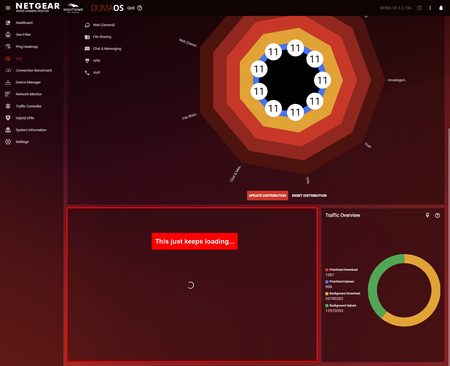
Model: XR500 Firmware: V2.3.2.134 OS: Windows 11 ----------------------------------- Hello, I recently just switched ISPs (Xplornet to Starlink) and I believe I have everything set up mostly cor...
Netduma-Fraser
May 06, 2022NetDuma Partner
Your ISP wouldn't dictate whether the feature loads or not, I suspect that is a coincidence. Reboot the router from the interface, wait 2 minutes then try accessing and see if it loads correctly please.
agent47isn1
May 07, 2022Guide
I recently got starlink the beginning of last month and finally got the Ethernet adapter about 2 weeks ago. Only problem I've had with my router (XR450) was when I updated it to the latest firmware my IP address changed from 192.168.x.x to 10.0.0.1 and I'd lose connection and regain connection within minutes of each other. Other than that every tothing else works like it should even opening ports needed for our consoles.
- kell90May 08, 2022Aspirant
Hmm strange. My internal IP did not change, it's still 192.168.x.x
- Netduma-FraserMay 08, 2022NetDuma PartnerThe LAN IP of the router will change if it notices a conflict, i.e. if the upstream modem/router LAN IP is also 192.168.1.1 then the XR will change to 10.0.0.1, other than that it won't affect the functioning of the router.
Go to the System Information page and then in the Rapp panel menu ≡ change the retries to 5, reboot from the interface, wait 2 minutes before accessing and see if it works.- kell90May 08, 2022Aspirant
It still does not work.
I should also mention that when I navigate to the QoS page, it says "device not found", see below. Not too sure what to make of an error message like that.
Also, we've noticed that our network quality has been significantly worse since connecting to the Netgear router. For example, our smart TV (on the 2.4 GHz band one floor away from the router) tends to drop out intermittently. Also, some smartphones in the house will get stuck sending text messages -- it's as if we lose connection to the internet for a brief moment, but it's far too frequent to be normal. I'm aware that Starlink isn't the most reliable service, but these issues are different.It's as if everything got worse when we bridged our Starlink to the Netgear router, to be honest. Kind of frustrating.
- kell90May 08, 2022Aspirant
agent47isn1 wrote:
... and I'd lose connection and regain connection within minutes of each other.Has this been solved for you? We are also experiencing something like this in our house. Our smart TV will kind of become sluggish and fail to load video despite me scoring a 150 Mbps speed test on my phone. Every now and again, our phones will get stuck sending messages, as if they lost connection to the internet for a second -- but it doesn't feel like a Starlink dropout. These problems did not happen on the Starlink router, they only cropped up after bridging to the XR500... Lately we've spent more time complaining about the internet than enjoying it.
- agent47isn1May 08, 2022GuideYea I ended up going back to an older firmware that's stable I haven't had issues since.
- kell90May 08, 2022Aspirant
Any idea what the version is? Or roughly the date the version was released? At this point, I'm considering just rolling back one update at a time.