NETGEAR is aware of a growing number of phone and online scams. To learn how to stay safe click here.
Forum Discussion

MR2MK1SC
Feb 15, 2023Initiate
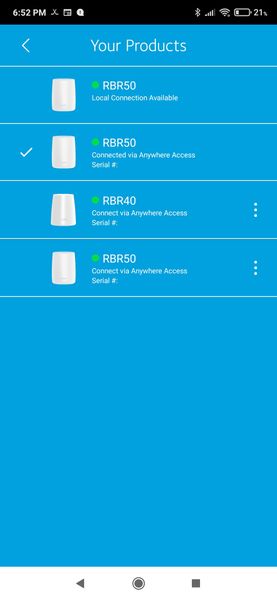
Is there a way to uniquely name your systems in the Orbi App?
Hi All; I have 3 individual Orbi networks that I manage. Problem is that in the Orbi App, when I go to select the system I want to look at, two of them are named "RBR50", as that is the primary ...
- Feb 16, 2023
No, NG keeps this static.

FURRYe38
Feb 16, 2023Guru - Experienced User
No, NG keeps this static.

schumaku
Feb 16, 2023Guru - Experienced User
FURRYe38 wrote:
No, NG keeps this static.
Any insight available? Based on experience or based on qualified answers from related complaints?
Reminds me to my repeated attempts to push Netgear into a more user friendly implementation of the Remote Access (renamed to Anywhere Access after nagging for a year or two). Ignorance comes into my mind in this aspect.
- FURRYe38Feb 16, 2023Guru - Experienced User
Coding, connection information between the app and NG cloud services need to be correct for this page and products that are associated with there services.
I presume if NG was interested the could add a line that was user editable on this page so users could input something to better ID multiple systems if users have this.
No idea if that would be something NG would do.
Could post about this here:
https://community.netgear.com/t5/Idea-Exchange-For-Home/idb-p/idea-exchange-for-home
For now, best suggestion would be to take the MAC addresses you see on this page and mark them down on a piece of paper or somewhere in your phone and then associate this address to what and where these separate systems are located for your identification.
Not here to make judgements either.
- CrimpOnFeb 16, 2023Guru - Experienced User
FURRYe38 wrote:
I presume if NG was interested they could add a line that was user editable on this page so users could input something to better ID multiple systems if users have this.
The Orbi app already picks up the customized name of each (and every) Orbi device:
- The network map displays them by each device.
(The app does not realize this phone screen is too narrow to show the drawing. Works OK on a tablet's wider screen.)
- The Router Settings also shows the actual name:
- Yet the screen where the users picks "which system" to administer shows this:
When the user is managing five systems, there is nothing on this screen to indicate which system is which? The app already has the information. The programmer simply chose to display something of no value rather than something that makes sense.
- schumakuFeb 16, 2023Guru - Experienced User
CrimpOn wrote:
FURRYe38 wrote:
I presume if NG was interested they could add a line that was user editable on this page so users could input something to better ID multiple systems if users have this.
The Orbi app already picks up the customized name of each (and every) Orbi device:
- The network map displays them by each device.
(The app does not realize this phone screen is too narrow to show the drawing. Works OK on a tablet's wider screen.)
- The Router Settings also shows the actual name:
- Yet the screen where the users picks "which system" to administer shows this:
When the user is managing five systems, there is nothing on this screen to indicate which system is which? The app already has the information. The programmer simply chose to display something of no value rather than something that makes sense.
Well, we don't have to dispute this here (gee, they show the serial number to distinguish), but completely fail to use the configured device name. Never got a reply on my earlier change requests....
