NETGEAR is aware of a growing number of phone and online scams. To learn how to stay safe click here.
Forum Discussion

Daniel-UK
May 16, 2019Apprentice
Network map keeps randomly changing on iPhone app
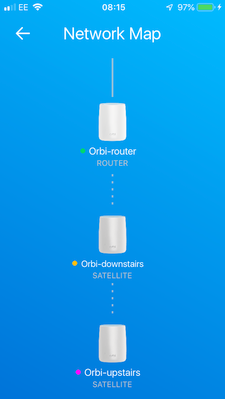
When I look at the Network Map in the iPhone app, I keep getting always different network topology and differen colours for the devices (green, magenta, orange) every time I look at it!
Strangely e...
Daniel-UK
May 16, 2019Apprentice
This could be a reasonable explanation looking at the pictures and I also splitted 2.4 and 5 Ghz ssid
However
1) from the Web interface 10.0.0.1 the back haul connection is good. Only rarely I saw config sync
2) the daisy chain setting is disabled. There should be no daisy chain topology
3) the Internet speed is very good. However there seem to be handover problems when moving around
I tried all the suggestions from agents and found on the Internet (reduce power, enable/disable fast roaming,mimo, etc) but no luck to have a stable network with a stable topology
However
1) from the Web interface 10.0.0.1 the back haul connection is good. Only rarely I saw config sync
2) the daisy chain setting is disabled. There should be no daisy chain topology
3) the Internet speed is very good. However there seem to be handover problems when moving around
I tried all the suggestions from agents and found on the Internet (reduce power, enable/disable fast roaming,mimo, etc) but no luck to have a stable network with a stable topology

SW_
May 17, 2019Prodigy
Daniel-UK wrote:
1) from the Web interface 10.0.0.1 ...
FYI, base on the Web IP address, 10.0.0.1, it seems that there's another router in front of Orbi and Orbi is also in Router Mode? If that's the case, you might be in a double-NAT setup, which you might also want to avoid.
- Daniel-UKMay 17, 2019ApprenticeYes, I have the ISP router connected to the orbi router and you are right I have double NAT as I left the default settings.
Why should I change this and how can I do it please?
Many thanks- SW_May 17, 2019Prodigy
It's quite simple. Just switch Orbi to AP mode. See my *sig* bellow on how to "Router to AP Mode". A warning, you will not be able to use Disney Circle or Armor features in AP mode. If you must have either of those two features, AP mode is not the right choice.
Double-NAT can cause problem for applications. Please refer to this double-NAT document.
- SW_May 17, 2019Prodigy
FYI, with two routers setup, their WiFi signals can interfere with one another, which in turn could affect WiFi performance. For example, if they happen to share the same channel for 2.4Ghz or their channels overlapping each other. NetSpot will help you identify this. Please disable WiFi on ISP modem/router if you can to keep it clean and simple.