NETGEAR is aware of a growing number of phone and online scams. To learn how to stay safe click here.
Forum Discussion

Timo40
Sep 22, 2026Aspirant
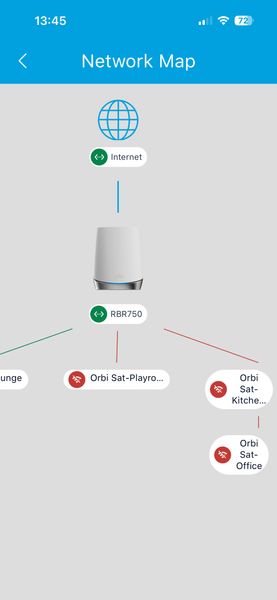
I am having so many issues with my orbi 6 router and satellites
I am having so many issues with my orbi 6 router and satellites. Constant drop outs lose connection with internet. One minute it’s fine then gone. I’ve tried reboots, reinstalls, turning off iv6, tur...
- Sep 22, 2026
IF your not getting internet at times from the ISP, then could be an ISP issue between them and there modem/router that the RBR is connected too. Red means the RBR isn't getting good signal from the ISP modem. Have them check everything up to there modem.
Cam use there router in router mode and connect the RBR then and see if the RBR still continues to see RED in the app. Use the ISP routers DMZ for the RBR in router mode.
Or try AP mode on the Orbi system with the modem in router mode.
What Firmware version is currently loaded on the RBR and RBS?
What is the Mfr and model# of the Internet Service Providers modem/ONT the NG router is connected too?
Be sure your using a good quality LAN cable between the modem and router. CAT6A STP is recommended.
What is the size of your home? Sq Ft?
What is the distance between the router 📡 and satellite(s)🛰️? 30 feet or more is recommended in between RBR 📡 and RBS 🛰️ to begin with depending upon building materials when wired or wirelessly connected.
https://kb.netgear.com/31029/Where-should-I-place-my-Orbi-satellite 🛰
Does this happen with the RBS turned OFF?
Does this happen with both wireless and wired devices?
What channels are you using? Auto? Try setting manual channel 1, 6 or 11 on 2.4Ghz and 40 to 48 channel on 5Ghz.
Try disabling the following and see:
Armor, Smart Parental Controls or Circle, IPv6, Traffic Meter.

FURRYe38
Sep 22, 2026Guru - Experienced User
IF your not getting internet at times from the ISP, then could be an ISP issue between them and there modem/router that the RBR is connected too. Red means the RBR isn't getting good signal from the ISP modem. Have them check everything up to there modem.
Cam use there router in router mode and connect the RBR then and see if the RBR still continues to see RED in the app. Use the ISP routers DMZ for the RBR in router mode.
Or try AP mode on the Orbi system with the modem in router mode.
What Firmware version is currently loaded on the RBR and RBS?
What is the Mfr and model# of the Internet Service Providers modem/ONT the NG router is connected too?
Be sure your using a good quality LAN cable between the modem and router. CAT6A STP is recommended.
What is the size of your home? Sq Ft?
What is the distance between the router 📡 and satellite(s)🛰️? 30 feet or more is recommended in between RBR 📡 and RBS 🛰️ to begin with depending upon building materials when wired or wirelessly connected.
https://kb.netgear.com/31029/Where-should-I-place-my-Orbi-satellite 🛰
Does this happen with the RBS turned OFF?
Does this happen with both wireless and wired devices?
What channels are you using? Auto? Try setting manual channel 1, 6 or 11 on 2.4Ghz and 40 to 48 channel on 5Ghz.
Try disabling the following and see:
Armor, Smart Parental Controls or Circle, IPv6, Traffic Meter.