NETGEAR is aware of a growing number of phone and online scams. To learn how to stay safe click here.
Forum Discussion

Sp33drasr
Oct 25, 2022Aspirant
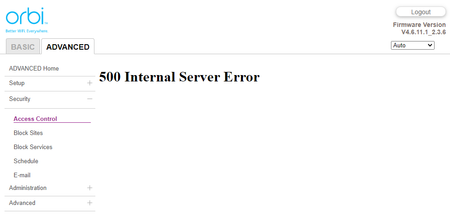
Orbi 750, 500 Internal Server Error, on all Security setting pages
I recently turned on the option to auto-block all new devices on my network so that I'd have to manually grant them access. Just a couple of days later, now I see "500 Internal Server Error" whenever...
Sp33drasr
Oct 26, 2022Aspirant
Good question - yes, I've tried Chrome, Edge and Opera. I've also rebooted (including full power off for a minute) and flashing to the latest firmware manually. No luck!
I found a reddit post where someone solved a similar issue by accessing the router via Telnet. I gather that they restored a missing entry in the device access list, or something like that. The RBR750 admin portal lacks the option to enable Telnet though.

Blanca_O
Oct 26, 2022NETGEAR Employee Retired
Hi Sp33drasr
Kindly clear out all browser cache then access again the Web UI (Security Settings).
How did you update the firmware? Auto update or Manual update?
Please reapply/reload the same firmware v4.6.11.1 and see how it goes.
Regards,
Blanca
Community Team
- Sp33drasrOct 26, 2022Aspirant
Hi Blanca_O I tried clearing the cache just now but it didn't fix the issue. The firmware update was done manually. Any other ideas?
- FURRYe38Oct 27, 2022Guru - Experienced User
Did you see this on prior FW version v4.6.9.11?
Sp33drasr wrote:
Hi Blanca_O I tried clearing the cache just now but it didn't fix the issue. The firmware update was done manually. Any other ideas?
- Sp33drasrOct 27, 2022Aspirant
Yes, the problem was happening on the previous version which is what prompted me to flash the latest.
