NETGEAR is aware of a growing number of phone and online scams. To learn how to stay safe click here.
Forum Discussion

rhettarded
Dec 06, 2022Aspirant
Orbi RBS850 (with satellite) keeps disconnecting Wi-Fi Computers
Hello folks, I'm having persisting problems of my orbi wifi disconnecting my laptops. I know it's only laptops since our phones are fine, and I say it's the orbi wifi because my wi-fi connection in s...
rhettarded
Dec 06, 2022Aspirant
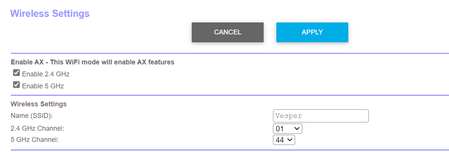
Hello! I believe my modem router is disabled. Kindly confirm with the screenshot.

CrimpOn
Dec 06, 2022Guru - Experienced User
rhettarded wrote:
Hello! I believe my modem router is disabled. Kindly confirm with the screenshot.
The screen shot appears to indicate that the AT&T WiFi is disabled, but the AT&T device itself is in router mode.
It has assigned the IP address 192.168.1.107 to a device called RBR850 and the status is "on".
If you bring up the Orbi web browser interface and click on the Advanced Tab, the box Internet Port should show the IP address as being 192.168.1.107.
This "Double NAT" configuration interferes with specific applications, such as sharing a server on the internet, enabling VPN access into the Orbi LAN, and certain internet gaming. (Internet search for "Double NAT" for more information.) While this is not a preferred configuration, thousands of customers appear to be blissfully unaware because (for them) "everything works".
Can you describe more about "what happens"?
- Does a message appear on the laptop?
- Does the laptop reconnect automatically?
- Does anything appear in the Orbi log at the time a laptop disconnects?
- What do you do to get the laptops connected again?
- rhettardedDec 06, 2022AspirantAs Kevin suggested, it is now on AP mode, and orbi router has a new IP address 192.168.1.163
Does a message appear on the laptop?
-no, it disconnects on its own
Does the laptop reconnect automatically?
-no, I have to manually reconnect to the network(please see link of video is my last reply)
Does anything appear in the Orbi log at the time a laptop disconnects?
-i will have to check it
What do you do to get the laptops connected again?
-i have to manually reconnect again, and to make it stable, my option is to only reconnect via ethernet which defeats the portability of a laptop.- CrimpOnDec 06, 2022Guru - Experienced User
rhettarded wrote:
-no, it disconnects on its own
Does the laptop reconnect automatically?
-no, I have to manually reconnect to the network(please see link of video is my last reply)Thanks (sometimes posts "cross in the mail" while we are typing).
Is there any significance to the name "VPN Unlimited"?
- rhettardedDec 06, 2022AspirantYes, I have VPN Unlimited installed in my PC and one thinkpad. I doubt that is the culprit as I need to sign in and connect to be able to access a VPN. My other thinkpad that doesn't have it, but has the disconnecting issue. Also, this disconnects only on my home network, never in school or public places.