NETGEAR is aware of a growing number of phone and online scams. To learn how to stay safe click here.
Forum Discussion

jwdavistx
Aug 17, 2024Aspirant
RBK852 - 5GHz disabled but Satellite shows 5GHz?
Can a mod move this to a more appropriate forum? The required "Labels" wasn't populating for me in the Orbi WIFI 6 (AX) AND Wi-Fi 6E (AXE) Mesh Systems so posting here in the hopes someone can redir...
- Aug 18, 2024
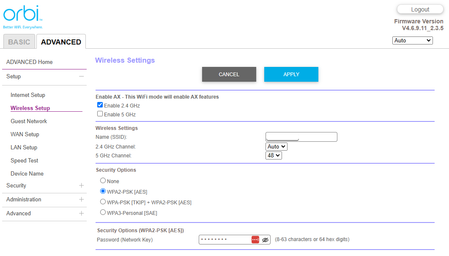
The Check box next to 2.4 and 5Ghz is for AX MODE, that disable or enabled the AX mode operation over 2.4 or 5Ghz or both. It does NOT disable the actual radios.
Your behind on FW.
If you need specific configurations for IoT devices and need only 2.4Ghz, then you'll need to update to v7.2.6.21:Then you'll have the ability to set up a separate IoT network for your devices.
https://kb.netgear.com/000064267/How-do-I-enable-or-disable-the-Internet-of-things-IoT-network-on-my-Orbi-WiFi-6E-System
https://kb.netgear.com/000064269/How-do-I-change-the-Internet-of-things-IoT-network-name-SSID-and-password-on-my-Orbi-WiFi-6E-System

jwdavistx
Aug 18, 2024Aspirant
Thanks so much for the quick and detailed response.
I've completed the Firmware update, and will be following-up on the configuration of devices.
jwdavistx
Aug 20, 2024Aspirant
Thanks again for the information. I wanted to follow-up with a new question.
After updating the firmware, that seemed to be enough to connect my 2.4-specific devices to the non-IoT network, which is awesome!
Is there any specific documentation/expectation you could point me to (I can't seem to find any) that would detail why I would want to utilize the secondary IoT network?
- FURRYe38Aug 20, 2024Guru - Experienced User
Historically, IoT have been problematic when connecting to MESHs systems. IoT Mfrs don't realize that 2.4 and 5Ghz are on same next work and setup devices like phones and pads prefer to connect to 5Ghz. The IoT Mfr limits there setup software to only work on 2.4Ghz. So users have to have a way to get there IoT devices setup so NG implemented this IoT network for this reason. Help users get IoT devices connected to MESH systems.
Glad you got it working. Be sure to save off a back up configuration to file for safe keeping. Saves time if a reset is needed.
https://kb.netgear.com/000062080/How-do-I-back-up-the-configuration-settings-on-my-Orbi-WiFi-System
Enjoy. 📡