NETGEAR is aware of a growing number of phone and online scams. To learn how to stay safe click here.
Forum Discussion

justin579
Jan 14, 2022Guide
Atrocious packetloss on CAX30
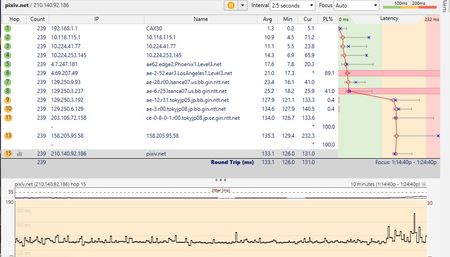
i'm having terrible packetloss on ALL devices. restarted modem, factory reset modem and still nothing. has been like that for a week. isp was useless saying it is my fault but the modem is ok. I ...
justin579
Jan 14, 2022Guide
the pictures don't seem to be showing up see here is this instead https://imgur.com/a/qLEwjEX
- plemansJan 14, 2022Guru - Experienced User
Your power levels are out of spec and you have a ton of errors.
Remove any splitters, amplifiers, or signal attenuators from your line.
Check your line for cheap cables, extended runs, bad/old/cheap/corroded ends and replace them.
Preferrably move the CAX to right where the coax comes into the home and direct connect there.
If that doesn't help, the ISp will need to check the line
- justin579Jan 14, 2022Guide
Ok but last thing i want to add if it means anything, that Acquire Downstream Channel number was different before the factory reset.
- plemansJan 15, 2022Guru - Experienced User
justin579 wrote:
Ok but last thing i want to add if it means anything, that Acquire Downstream Channel number was different before the factory reset.
the frequencies used can change. That's sometimes where we run into issues because there will be line issues but when a user opens the "cable connections page" it might be on a good chuck of bandwidth and not look bad. But you open the logs and you see issues. You've got them on the cable connections page already.
