NETGEAR is aware of a growing number of phone and online scams. To learn how to stay safe click here.
Forum Discussion

ChopShoey
Feb 09, 2020Tutor
C6250 Internet Dropping With Strong Signals
C6250-100NAS Firmware Version: V1.01.26 Provider: Cox Communications Our internet drops most days a few times while we are attempting to use it. When it occurs, several devices will lose connec...
- Feb 09, 2020
You have massive amount of errors in your line.
Here's where I'd start.
Move the C6250 to where to coax enters the home. Remove any splitters, amplifiers, attenuators from the line. Preferably just direct connect it. Then see how it works. Use it for a bit and re-do the modem connections page. If you're errors are gone, its something within the wiring if your house. If they aren't, your ISP needs to check your line running to the house as you have issue with the line.
Your strength is within limits but even that is variable. There should only be roughly 3.5dbmv between channels and you're running from 3.1-8.9dbmv.
so there's some issues with your line.

ChopShoey
Feb 09, 2020Tutor
plemans , I need to apologize. I missed the other message you sent and hadn't gone directly to the line yet.
Our setup was being split outside of our home, so I didn't go straight to where it comes into the home. I did remove the splitter and tap that were in the box so that the line would only go to the room where my modem is at.
I haven't been resetting my modem, so the "correctables" and "uncorrectables" were just accumulating. Here is the data right after I got everything back up after removing my splitters. We don't actually use TV so they won't be necessary anyway.
It looks like between the channels individually they are in the range you specified now, if I'm reading it right... but I can't be sure.
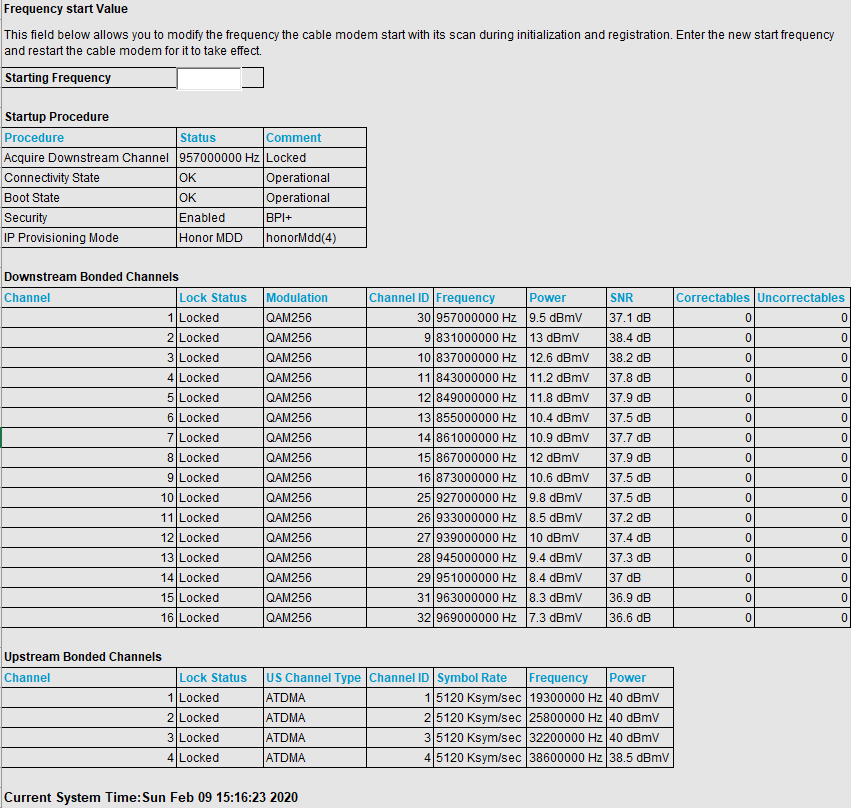
ChopShoey
Feb 09, 2020Tutor
plemans Here is information after 20 minutes. Started streaming to put some data on the network.
Are the correctables/uncorrectables still high? It seems like it might be high still but I don't know what to expect.
Thanks for the kudos :-)

- plemansFeb 09, 2020Guru - Experienced UserYes, you've still got quite a bit of errors. Probably worth it to have the isp check your line.
You're welcome for the kudos. Shows appreciation ;)- ChopShoeyFeb 16, 2020Tutorplemans after I forced the tech support to send someone out without charging me, they came out. Tech says "I don't even need to check anything, that little cable that you've probably been driving over is a bypass for the main that is out under your street." So it does seem that their service was the cause of the errors. I'll have to wait until they tear up the street and replace the main before I can do any more troubleshooting.
Thank you again for the help.- plemansFeb 16, 2020Guru - Experienced User
That'd definitely cause some issues!
Sorry that you'll have the issue until they come run a new line but at least you know your equipment isn't at fault or your home.
Sad that it took "forcing" them to come out. Kind of goes to show how helpful ISP's are at keeping their lines/equipment running in good condition.