NETGEAR is aware of a growing number of phone and online scams. To learn how to stay safe click here.
Forum Discussion

Wtin
Nov 30, 2016Aspirant
C6300 can't do LAN but wi-fi works (Time Warner Cable)
Please help. I have run out of options. Have had Time Warner (now Spectrum) Extreme 300 for over a year or so. It works great wtih Netgear C6300. Wireless (2.4 and 5 GHz) worked well, along with...
Wtin
Dec 01, 2016Aspirant
Didn't think it about hiding the IP address. I have edited out those numbers and reposted the question. Thank you for suggesting that.
By the way, I am thinking about returning to Best Buy and get a modem and a router (ARRIS SB6190 modem and Netgear R6220-100NAS wireless router) to replace this set up tonight. This may solve the problem?
-------------------------------------
Please help. I have run out of options.
Have had Time Warner (now Spectrum) Extreme 300 for over a year or so. It works great wtih Netgear C6300. Wireless (2.4 and 5 GHz) worked well, along with what it seemed like very very fast LAN connections. Four connectors from the C6300 are connected to a blu ray player (for Netflix), another to a desktop, another to another desktop and the 4th one connected to an unmanaged switch. From the Trendnet TEG-S81G unmanaged switch, they are connected to another blu ray player, and another desktop.
Everything worked fine, until three nights ago. Suddenly LAN went dead. I rebooted the C6300 (turned it off, wait a while, and turned it back on). The LAN light (2nd from bottom, above the USB light) blinked. The rest of them except the USB light were on green color).
The wireless devices (a laptop and an iPad) were working.
I was in such a rush - I went to BestBuy and bought another C6300 (exact model). Plugged it in and called Time Warner and gave them the new MAC number.
Wireless came on as soon as they activated it, but the LAN was not working. Lights were blinking on the back of the C6300 so they weren't exactly dead. I also looked at the Trendnet swich - lights were blinking, too.
Used Netgear Genie (and routerlogin.net but not at the same time).
Wireless worked. I changed the wireless names (SSID) and the passwords. 2.4 and 5 GHz continued to work, but no LAN.
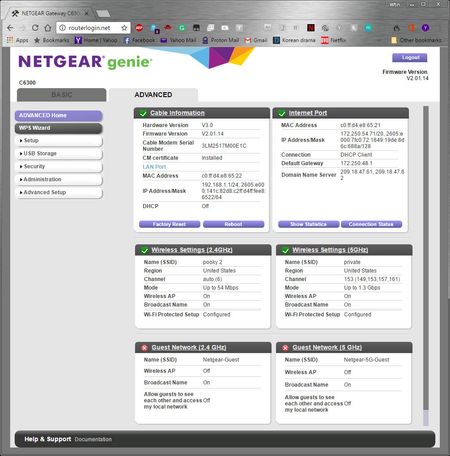
There are SO many settings that I feel so hopeless. Here are some screen captures


DarrenM
Dec 02, 2016Sr. NETGEAR Moderator
Hello Wtin
You have DHCP turned off under your Lan Setup check that box and try again.
DarrenM