NETGEAR is aware of a growing number of phone and online scams. To learn how to stay safe click here.
Forum Discussion

igHunterKiller
May 17, 2021Aspirant
C6300 Port Forwarding not working
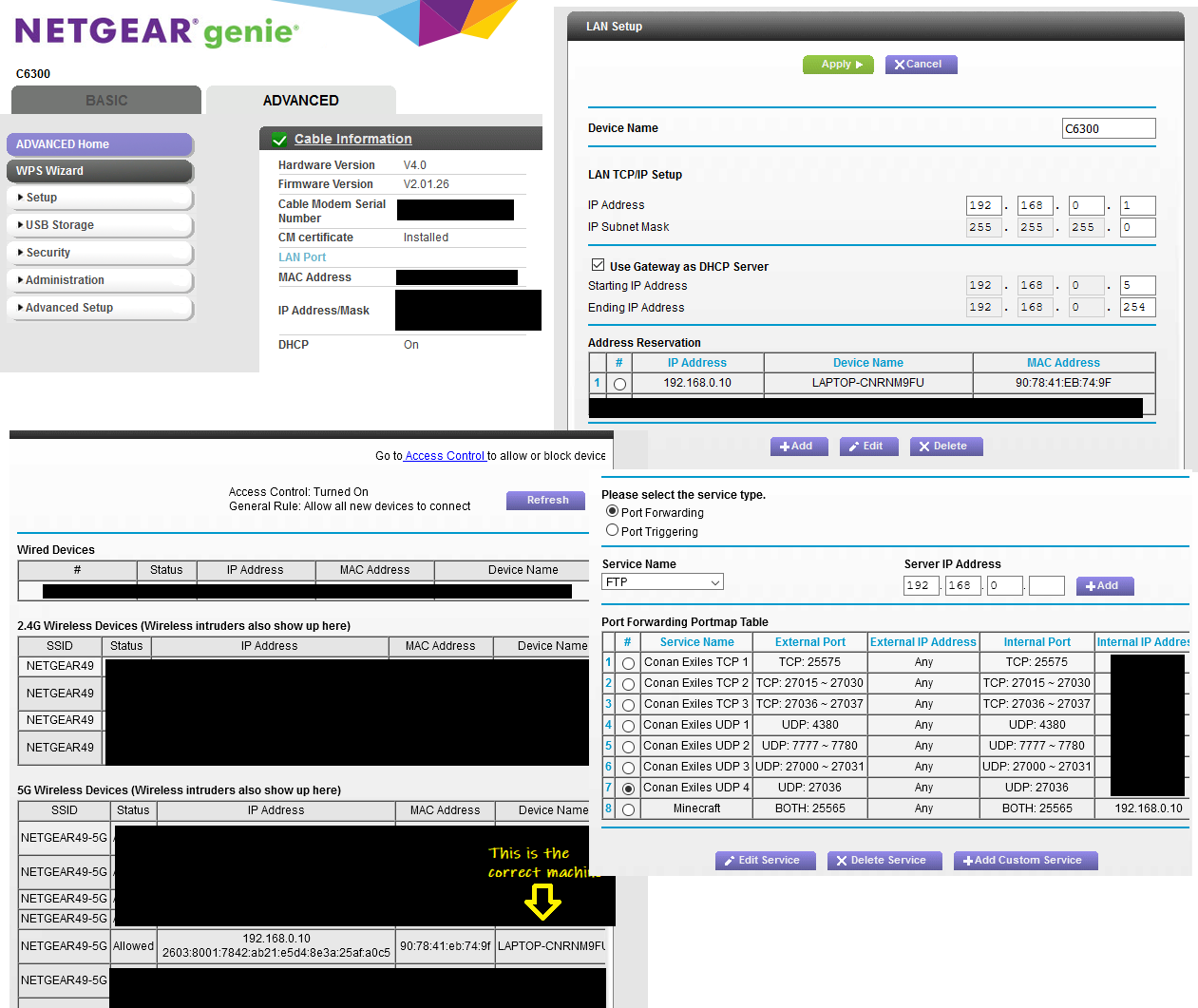
I am struggling to make port forwarding happen. Please find attached a png that is a set of screenshots of what I have set up. What did I get wrong? I have a static IP configured for the server (it...
- May 30, 2021
Ah thanks for the keyword 'loopback'. I did the test with the external IP and it wasn't working. So I tried a different game just to be extra-sure, and that worked. What's different? I guessed it was maybe 'Java' for Minecraft. 'java' and 'loopback' led me to some ineffective things to change, but then I came across this one:
https://www.youtube.com/watch?v=DAEkA2LEyb8
There's more than a few Java-related items that Windows firewall blocks, so enabling them all got things working again.
Thanks for walking me through the elimination testing - that keyword of 'loopback' sparked me down a path I had not gone down deep enough.
antinode
May 29, 2021Guru
> IPCheck.png
Your WAN/Internet IP address is a valid public address, which covers
usual problem 1.
> NetGearSettings.png
Your port-forwarding rule 8 and address reservation seem plausible,
which covers usual problem 2.
> log.png
That connection log seems to show the desired port forwarding.
> You seem to have 2 and half of 3 covered.
Still true.
> [...] the games I am attempting to enable see LAN clients connect
> successfully, and WAN clients cannot. [...]
Eh? You lost me. There are two tests for problem 3. The first is:
Can you access the server from a system on your LAN using the
server's LAN IP address? [...]
That is, from a system on your LAN, can you access the (game) server
at "192.168.0.10:25565"? Success there proves that the (game) server is
listening on that port at that address.
The second test for problem 3 is:
Can you access the server from a system on your LAN using the
router's WAN/Internet IP address ("172.117.a.b:25565")?
Success there proves that port forwarding and NAT loopback (on the
router) are working.
The final test is like the second one, but from a system in the
outside world. If both internal tests work, but the test from the
outside world fails, then I'd tend to blame the ISP.
igHunterKiller
May 30, 2021Aspirant
Ah thanks for the keyword 'loopback'. I did the test with the external IP and it wasn't working. So I tried a different game just to be extra-sure, and that worked. What's different? I guessed it was maybe 'Java' for Minecraft. 'java' and 'loopback' led me to some ineffective things to change, but then I came across this one:
https://www.youtube.com/watch?v=DAEkA2LEyb8
There's more than a few Java-related items that Windows firewall blocks, so enabling them all got things working again.
Thanks for walking me through the elimination testing - that keyword of 'loopback' sparked me down a path I had not gone down deep enough.