NETGEAR is aware of a growing number of phone and online scams. To learn how to stay safe click here.
Forum Discussion

dahar72
Sep 26, 2023Aspirant
C6300v2 turning off wifi every night
My router has been turning off the wifi every night, but all the lights still stay on as if the router itself is still working. I tried downloading the app to see what I could find, but it says I nee...
dahar72
Nov 23, 2023Aspirant
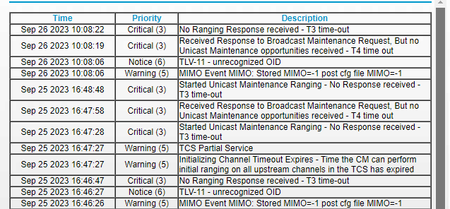
Let me know if this is what you were referring to. I am so tired of power cycling it two times a day because the wifi just stops working.


FURRYe38
Nov 25, 2023Guru - Experienced User
Yes. How about the Events log please.
Some of the channels are too high in power:
https://kb.netgear.com/24311/Power-level-guidelines-for-a-NETGEAR-cable-modem-router
Also you have a tone of correctables and un-correctables and should be zero.
Have the ISP check the signal and line quality UP to the modem. Be sure the ISP provisions the modem correctly.
Be sure there are no coax cable line splitters in the between the modem and ISP service box.
Be sure your using good quality RG6 coax cable up to the modem.
Start with removing any amplifiers, signal attenuators, or splitters from the coax.
From there check the line for kinks, damage, moisture in the line.
Check the connectors for improperly made ends, foil touching the copper coax line, loose connections, bad/old/cheap connectors, or corroded connections. Replace them if you do.
Be sure to power OFF the modem for 1 minute then back ON.
https://community.netgear.com/t5/Cable-Modems-Routers/General-info-and-Troubleshooting-for-Cable-Modems/m-p/1530376#M12853
https://www.duckware.com/tech/solving-intermittent-cable-modem-issues.html