NETGEAR is aware of a growing number of phone and online scams. To learn how to stay safe click here.
Forum Discussion

Camelhmpz
Oct 16, 2017Aspirant
C7000 and C3700 take 30 mins + to lock upstream and connect to internet
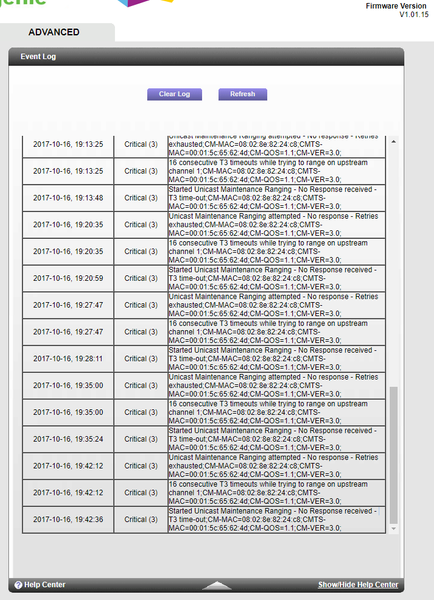
I upgraded speeds a year ago and needed to upgrade my modem. I had used a linsky router and Motorola surfboard for years, and I mean YEARS. I purchased a C3700 modem/router combo. Upon mode...
Camelhmpz
Oct 16, 2017Aspirant
- CamelhmpzOct 17, 2017AspirantUpdate :
I purchased a new splitter just to see, it lowered my downstream power to around 4-5dBmV which was nice but no change what so ever. Modem blinks on the upstream when connecting for right at about 30 mins and I keep getting the say upstream errors in the log. DarrenMOct 19, 2017Sr. NETGEAR Moderator
I would contact your ISP and have them check the lines in your home and out and your neighborhood. The T3 timeouts typically indicate a signal issue with the ISP.
DarrenM
- rarossinOct 22, 2017Aspirant
Had a similar problem, Comcast could initially see my C7100, then it went off line as they tried to provision it. The issue is not anticipated in their phone support scripts (assuming you can connect your modem to a coax cable...). Turned out there was a physical filter on the incoming line (at the pole) blocking some of the channels C7100 needed. Agree with DarrenM, have someone come out and look at your lines.