NETGEAR is aware of a growing number of phone and online scams. To learn how to stay safe click here.
Forum Discussion

Camelhmpz
Oct 16, 2017Aspirant
C7000 and C3700 take 30 mins + to lock upstream and connect to internet
I upgraded speeds a year ago and needed to upgrade my modem. I had used a linsky router and Motorola surfboard for years, and I mean YEARS. I purchased a C3700 modem/router combo. Upon mode...
Camelhmpz
Oct 17, 2017Aspirant
Update :
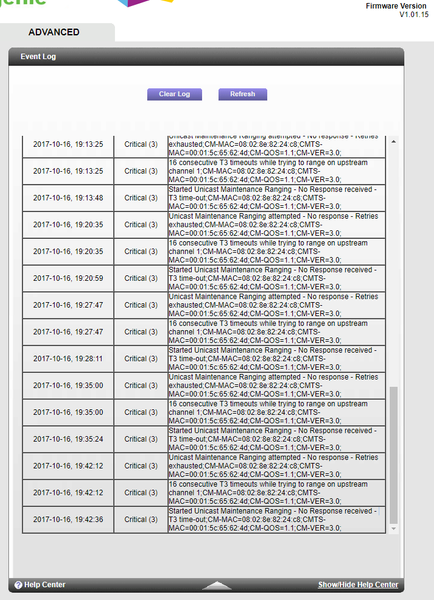
I purchased a new splitter just to see, it lowered my downstream power to around 4-5dBmV which was nice but no change what so ever. Modem blinks on the upstream when connecting for right at about 30 mins and I keep getting the say upstream errors in the log.
I purchased a new splitter just to see, it lowered my downstream power to around 4-5dBmV which was nice but no change what so ever. Modem blinks on the upstream when connecting for right at about 30 mins and I keep getting the say upstream errors in the log.

DarrenM
Oct 19, 2017Sr. NETGEAR Moderator
I would contact your ISP and have them check the lines in your home and out and your neighborhood. The T3 timeouts typically indicate a signal issue with the ISP.
DarrenM
- rarossinOct 22, 2017Aspirant
Had a similar problem, Comcast could initially see my C7100, then it went off line as they tried to provision it. The issue is not anticipated in their phone support scripts (assuming you can connect your modem to a coax cable...). Turned out there was a physical filter on the incoming line (at the pole) blocking some of the channels C7100 needed. Agree with DarrenM, have someone come out and look at your lines.
- CamelhmpzOct 22, 2017AspirantThanks for the tips folks. I do have an appt scheduled for Monday morning. I'm having anxiety about it because I'm afraid the tech will just say "get another modem" .
So for preemptive measures I have:
Ran a brand new Quad 6 line to the modem
Purchased a second C7000 (still wrapped) for standby
Purchased a C3700 (in case they say it's the model C7000) for standby
Replaced the splitter
Swapped the modems direct line from one pole drop to another and even excluded from splitter totally.
Thanks again and I'll keep the post updated.- CamelhmpzOct 24, 2017AspirantWell that was a pointless tech called I missed work for. Guy shows up fairly early, I greet and ask does he know the issue I'm having, claims he doesn't so I explain and tell him my steps I did and then all the sudden "Ya my boss told me to come out anyway but you gonna have that issue" "we only have one node for two cities"
So I don't know how to respond, he said he was going out to check the lines up and down the street and said most line filters have already been removed, I was under the impression he was coming back and after 3 and a half hours I decided I could go back to work. Last I saw he was slowly creeping towards town but I never saw him stop.
I'd call to complain but in this day and age why even bother.