NETGEAR is aware of a growing number of phone and online scams. To learn how to stay safe click here.
Forum Discussion

bschmiedeler
Oct 16, 2019Aspirant
C7000 Router Modem dropping WiFi periodically on Mac OS X Catalina
Hello, I have been battling this issue for about 2 months or so. I have a C7000 Nighthawk Cable Modem Router. Firmwire is V1.01.32. Compure is a 2017 MBP running Mac OS X 15.0 Catalina. ...

FURRYe38
Oct 17, 2019Guru - Experienced User
Do you know if you were having wifi problems before OSX 10.15?
What channels are you using? Auto? Try setting manual channel 1, 6 or 11 on 2.4Ghz and any unused channel on 5Ghz.
Any Wifi Neighbors near by? If so, how many?
bschmiedeler
Oct 17, 2019Aspirant
>>Do you know if you were having wifi problems before OSX 10.15?
Approximately, yes. I started running Catalina betas in late July. However, I don't think that is the issue, as I have a work MBP which I have NOT upgraded, and it still suffers from these problems. Also, our iDevices will sometimes have issues as they of course prefer WiFi over cellular. Sometimes if I am on my iPhone or iPad elsewhere in the house network speed will start to go south and I turn off WiFi and go to cellular and speeds are great.
However, I manage the router from the Mac that is running Catalina and was running the Bets. I have not tried connecting my home MBP directly to the router as I need a USB-C to ethernet converter.
>>What channels are you using? Auto?
>>Try setting manual channel 1, 6 or 11 on 2.4Ghz
>>and any unused channel on 5Ghz.
5Ghz is manually set to 153.
2.4Ghz was auto but manually changed it to 11.
>>Any Wifi Neighbors near by? If so, how many?
Too many. Not neighbors really, but devices. I am using Netspot to moniter WiFi (see attached picture). However, things were running very well for about 18 months, WiFi just worked. No idea what the heck happened.
Should I try a full factory reset?
Thank you for your suggestions. Looking at this as a learning experience.+

- FURRYe38Oct 17, 2019Guru - Experienced User
I would factory reset and setup from scratch.
ALso turn OFF all other wifi devices that put out a wifi signal temporarily to see if this helps resolve problems.
- bschmiedelerOct 23, 2019Aspirant
I completely reset the C7000. I have not been able to turn off all WiFi devices yet to try that.
At first I thought the issue was fixed as speed was very good! But over the last several days I have noticed that my speed varies greatly, from 180 Mbps down to less than 1. At least once a day the WiFi signal is totally gone and I have to turn the unit off and back on.
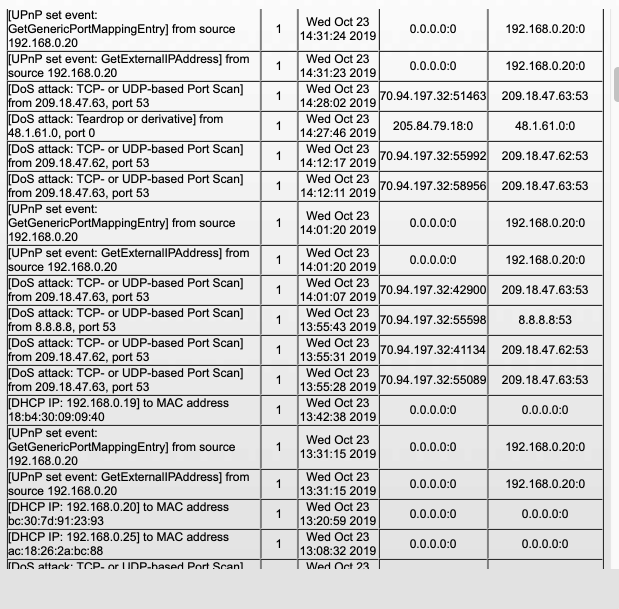
Further investigation revelaed many DoS attacks in the logs (see picture), but I have read that Netgear equipment can report false positives. If so, how the heck could I tell the difference between a real attack and a false positive?
Could the C7000 just be bad?
- FURRYe38Oct 23, 2019Guru - Experienced User
I would do a whois on those IP addresses comming from 209....Ask your ISP to change the IP address on the modem as well.
Also try to fully turn OFF ALL other wifi devices and signals to help narrow down and isolate there problems maybe coming from.