NETGEAR is aware of a growing number of phone and online scams. To learn how to stay safe click here.
Forum Discussion

oncourse
Feb 18, 2020Aspirant
C7000 stuck in IPv4 Only Mode on Charter
I recently moved with my C7000 modem/router combo that I've had for a couple years. Previously I was using it on Comcast/XFINITY with no problems at all - everything worked great. Now I live in ...

plemans
Feb 18, 2020Guru - Experienced User
How do you know it's not pulling an IPv6 setup?
You said you had it on auto config, if you check your under your advanced status page, what does it show?
oncourse
Feb 18, 2020Aspirant
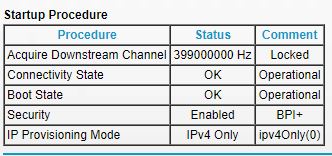
Attached screenshot of provisioning mode issue.
If I run a test at testmyipv6.com, it shows I do not have ipv6. If I attempt to load the ipv6 only test, the page will not load.
In the ipv6 settings it shows the system delegated prefix and that's it, no other info.
- plemansFeb 18, 2020Guru - Experienced User
My inlaws have the same C7000 on charter. I remoted in quick and their's shows the same IPv4 Only when you click on the modem. I've got it setup through their Advanced----advanced setup----IPv6 in auto config mode. And it pulls the proper setup but still shows "Ipv4 only" on modem page. Running it through the ipv6 test it gets 9/10 with only charter's dns server failing.
Have you tried changing your dns server?
- FURRYe38Feb 18, 2020Guru - Experienced User
I'd contact the ISP and have then check for IPv6 support on the modem and ensure it's getting IPv6 from the ISP services. Ask them if there is a specific IPv6 configuration needed on the modem. If it is and it's not working right, something in FW needs to be looked at.
oncourse wrote:Attached screenshot of provisioning mode issue.
If I run a test at testmyipv6.com, it shows I do not have ipv6. If I attempt to load the ipv6 only test, the page will not load.
In the ipv6 settings it shows the system delegated prefix and that's it, no other info.