NETGEAR is aware of a growing number of phone and online scams. To learn how to stay safe click here.
Forum Discussion

Sweedenburg
Nov 06, 2020Aspirant
C7000v2 Daily Slowdown
I've read so many posts about the c7000's that didn't work properly out of the box, or that ultimately had issues with ISP service (account-wise, or physical lines) but none that I can find have my s...
Sweedenburg
Nov 06, 2020Aspirant
The inability to attach multiple images to a post or reply is incredibly frustrating.
Sweedenburg
Nov 06, 2020Aspirant
- plemansNov 06, 2020Guru - Experienced User
Thats the router side logs. There should be modem logs showing the connection back to the isp
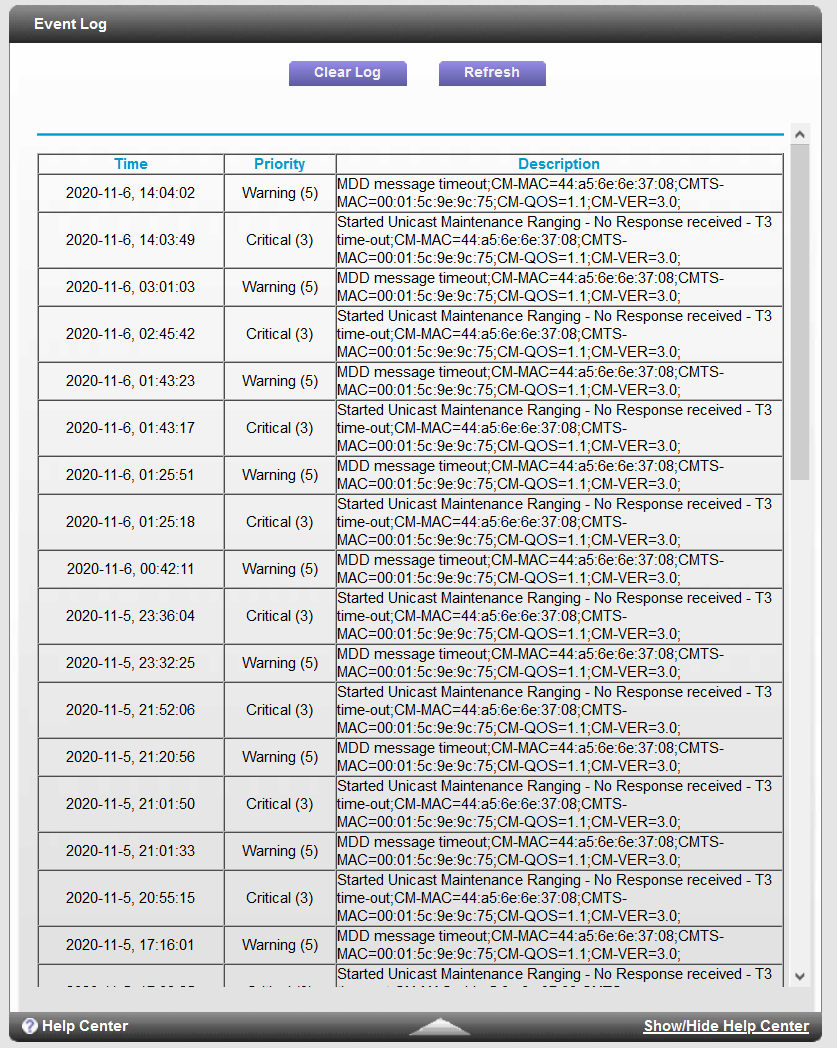
- SweedenburgNov 06, 2020AspirantThe only other thing I see is under Event Logs.
- plemansNov 07, 2020Guru - Experienced User
You do have a bit of errors and quite frequent t3 errors.
I'd check your line for splitters, amplifiers, or attenautors in line. If so, remove them.
Also check the cable for loose connectors, bad/cheap connectors, bad/cheap cable, kinks/damage to the cabled.
prefereably, move the modem to right where the coax enters the home to prevent damaged wiring within the walls being the issue.If none of that helps, have the isp check the line.