NETGEAR is aware of a growing number of phone and online scams. To learn how to stay safe click here.
Forum Discussion

jhook22
Feb 28, 2023Follower
c7000v2 dropping connection regularly Xfinity
Hello, I'm looking for some insight on the possible cause of my internet dropping multiple times per day. Sometimes it's for a couple seconds, others times it's for a minute or 2. I'm not sure if the...

FURRYe38
Feb 28, 2023Guru - Experienced User
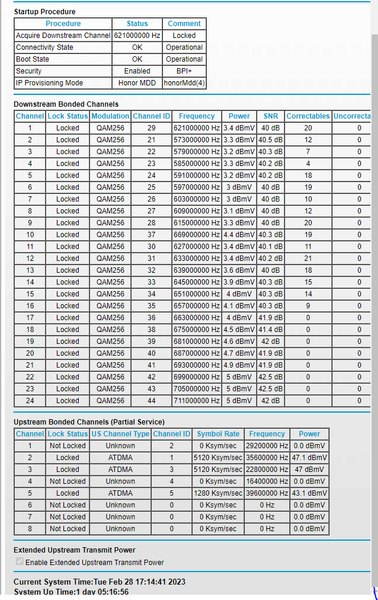
You have some Correctables that should be mostly zeros.
I see Criticals and Warnings that the ISP needs to review and resolve.
Have the ISP check the signal and line quality UP to the modem. Be sure the ISP provisions the modem correctly.
Be sure there are no coax cable line splitters in the between the modem and ISP service box.
Be sure your using good quality RG6 coax cable up to the modem.
Start with removing any amplifiers, signal attenuators, or splitters from the coax.
From there check the line for kinks, damage, moisture in the line.
Check the connectors for improperly made ends, foil touching the copper coax line, loose connections, bad/old/cheap connectors, or corroded connections. Replace them if you do.
Be sure to power OFF the modem for 1 minute then back ON.
https://community.netgear.com/t5/Cable-Modems-Routers/General-info-and-Troubleshooting-for-Cable-Modems/m-p/1530376#M12853
https://kb.netgear.com/24311/Power-level-guidelines-for-a-NETGEAR-cable-modem-router
https://www.duckware.com/tech/solving-intermittent-cable-modem-issues.html